• This forum is the machine-generated translation of www.cad3d.it/forum1 - the Italian design community. Several terms are not translated correctly.

toolbox

  • Thread starter Thread starter minutemide87
  • Start date Start date

minutemide87

Guest
hello to all boys,
it is now a few months that project with this fantastic software (sw 2009 sp 0), especially architectural-industrial projects.
I would now like to create a profiler of all the materials in possession of the company, so as to simply take them back with the welding command.
Now the question is this:
-I would like to add the profiles of my "profiles" within the toolbox (it is what is called whenever you use the welding command) but I don't know how to do it.

I tried to create a profile, such as hea240 (a h beam) and save it as a library file, and then with the dx button "Add to the library" by inserting the path of toolbox.... .
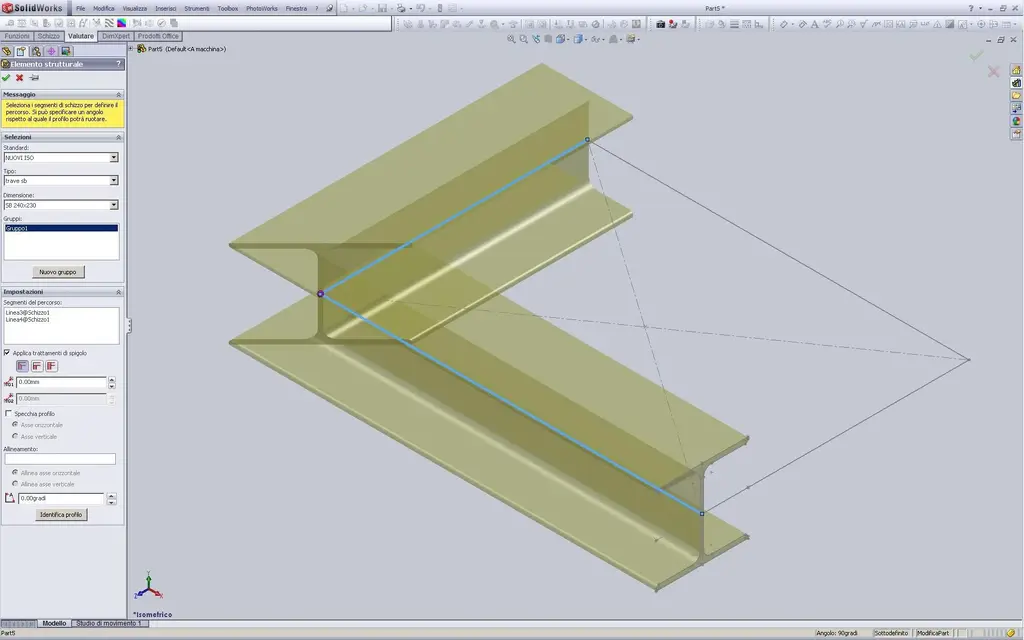
but when I go to turn a segment with the weld-> structural element, I do not find my hea240 among the possible configurations (there are the default ones always, my does not find it right).
How to do that? ? ?

Very kind.
greetings
 
I also tried to create a simple 80x80x3 box....Save it as part of the library and add it with the right button....nada
 
to tell the truth in this case you do not talk about real toolbox..
Anyway, I know what you mean.
I don't understand how you entered the " toolbox path":confused: (I repeat, it has nothing to do with this)

once you sketch your profile and assign the "significant points" exit the sketch and save as a library file (.sldlfp), ok. but for the path you have to make sure that it fits into the folder "weldment profiles" located in the program installation folder.. normally c:\programmi\solidworks\data\weldment profiles where you can also find those few "default" profiles.
better yet (for future installations/updates) you could make a new folder with all your profiles and assign the path by adding it to the list system options > file positions > welding profiles. the program is there that goes to point when you open the structural members of the welds.

often if it is only a different profile (or few) you copy/paste/rename one of the existing defaults, open it and edit it with the form you need, save normally and you are ready in the list the new profile.

greetings
Mar
 
I'm freaking out.

I would like to create my visible folder in toolbox, with all my profiles!! !
 
to tell the truth in this case you do not talk about real toolbox..
Anyway, I know what you mean.
I don't understand how you entered the " toolbox path":confused: (I repeat, it has nothing to do with this)

once you sketch your profile and assign the "significant points" exit the sketch and save as a library file (.sldlfp), ok. but for the path you have to make sure that it fits into the folder "weldment profiles" located in the program installation folder.. normally c:\programmi\solidworks\data\weldment profiles where you can also find those few "default" profiles.
better yet (for future installations/updates) you could make a new folder with all your profiles and assign the path by adding it to the list system options > file positions > welding profiles. the program is there that goes to point when you open the structural members of the welds.

often if it is only a different profile (or few) you copy/paste/rename one of the existing defaults, open it and edit it with the form you need, save normally and you are ready in the list the new profile.

greetings
Mar
Hello, Marco.
Thank you very much.
I made my box 80x80x3 saved as a library and inserted where you say.
but when I go to create the welded part, through the structural element, and selected my "80 x 80 x 3" tells me "the library function is empty"

:frown:
 
Hello, Marco.
Thank you very much.
I made my box 80x80x3 saved as a library and inserted where you say.
but when I go to create the welded part, through the structural element, and selected my "80 x 80 x 3" tells me "the library function is empty"

:frown:
..uhmm.
Wait, it happened to me, too. but I no longer remember the reason, where I was wrong and how I solved:redface:. Now everything works and you know, age. the memory..:biggrin:

if you are sure you have done and saved the sketch correctly, have assigned the right path in the system options (if you have made a new folder from another side that path put it at the top of the list). . close and restart the program, you never know..
Maybe post that file and the path you assigned, let's take a look at it and try it out.

if you just do not find it copy and edit one of the existing files (which you are sure to work), so it should go for sure.

greetings
Mar
 
and marc,
You made me laugh ah ah ah.
"I have solved" by editing the existing ones....but unfortunately I will not be able to do it for all :(
 
and marc,
You made me laugh ah ah ah.
"I have solved" by editing the existing ones....but unfortunately I will not be able to do it for all :(
And, well, you've arranged yourself.:biggrin:, that's okay.
post that file and the path we take a look.

greetings
Marco:smile:
 
And, well, you've arranged yourself.:biggrin:, that's okay.
post that file and the path we take a look.

greetings
Marco:smile:
with the boxes I am not having problems (80x80x3, 60x40x2 etc.), published and replaced.
Now that I have edited a sb profile to realize a hea240, it gives me the same problem as before.... maybe because I eliminate quotas, does it give me the problem??? (with the box, I simply edited the quotas, and they were always in that position)
 
with the boxes I am not having problems (80x80x3, 60x40x2 etc.), published and replaced.
Now that I have edited a sb profile to realize a hea240, it gives me the same problem as before.... maybe because I eliminate quotas, does it give me the problem??? (with the box, I simply edited the quotas, and they were always in that position)
Strange, tried now and I work very well also removing all odds.
but when you copy and edit the file you leave it where it is (the same folder of origin)? If you make yourself a standard you have to add a folder with your name where there are already iso and eager. inside this you make a subfolder for each category (e.g. hea) where your new files reside.
or you can put the files where you want, as long as they are in at least 2 folders (so you can fill out the feature manager of the structural members) and then add the path to the system's options/properties.

greetings
Mar
 
Last edited:
with the boxes I am not having problems (80x80x3, 60x40x2 etc.), published and replaced.
Now that I have edited a sb profile to realize a hea240, it gives me the same problem as before.... maybe because I eliminate quotas, does it give me the problem??? (with the box, I simply edited the quotas, and they were always in that position)
I ask you:
post the file and path you have assigned in your system options/properties.

greetings
Mar
 
Hi.
then I did these operations:

- I extracted in a new folder on the desktop, the standard iso from "contained solidworks" of the right panel.
- on the desktop, inside the new folder just created, I have the rar that I extracted....so I get new folder->iso (file extract)->iso->tubo recttagolare, square, sb, c, etc. etc...

I went to recall the folder "iso(file extract)" from the system options, so that I have the full feature manager, and in fact they all appear to me.

After that, I went to edit for example 80x80x3.2, because I wanted 80x80x2, and I did this:
- I copied the 80x80x3.2 file on the desktop
-I opened it with sw2009, and edited only the odds
-Saved with name (80x80x2), with the same extension, and path any
-I took the new 80x80x2 file from any location, and copied within the new folder->iso->iso->iso->square


to create, for example, the hea 240 (the offended one that doesn't work with me) I acted like this:
- new part
-create the sketch with 4-5 particular points, without leaving visible quotas
-Save with name as library file (as name I enter for example sb 240 x 230 and as description "sb 240 x 230") and place it inside new folder->iso(file extract)->iso->sb

but when I go to create any sketch, and with the soldering option I go to recall the sb 240 (which would be my initial hea240), I get out the known message I wrote before.

:
:
:
:
 
20090826213733_sw.jpg
 
Ooops.:redface: forgive me!
I forgot to tell you that when you did the sketch and saved as .sldlfp you then click it with the right from the tree and select add to the library. see that the sketch icon adds a green light. otherwise the system finds the library function empty while being there the file name in the list.
try again and excuse again:biggrin:

greetings
Mar
 
In this way I followed your procedure literally (by adding the file to the library:redface:) and the result is this:PROFILO HEA.webpSo everything goes smoothly.

greetings
Marco:smile:
 
to create, for example, the hea 240 (the offended one that doesn't work with me) I acted like this:
- new part
-create the sketch with 4-5 particular points, without leaving visible quotas
-Save with name as library file (as name I enter for example sb 240 x 230 and as description "sb 240 x 230") and the position within the new folder->iso(file extracted)->iso->sbbut when I go to create any sketch, and with the soldering option I go to recall the sb 240 (which would be my initial hea240), I get out the known message I wrote before. :
But wait,
I don't think the system points to that folder.
the route you wrote it so (small/small, same names..)?
in the image the standard is tiny and the type is hea, while above you wrote iso maiuscolo and the type is sb. .
Something doesn't fit, check all the steps. .

greetings
Mar
 
Good morning,
I don't add it to the library (but which library I choose from the tree: design library, and in which folder or toolbox? )
 
managed....where I also had to add in the folder options, the path of the library folder....for now it seems to be okay!!

:
 
Good morning,
I don't add it to the library (but which library I choose from the tree: design library, and in which folder or toolbox? )
shakes if I interfere, but "structural elements" and "toolbox" are two different things, so the post would be more correct to name "structural elements"

the procedure to save profiles with 2009 is explained by looking for "structural elements" under "saving-creating a custom profile"
 

Forum statistics

Threads
44,997
Messages
339,767
Members
4
Latest member
ibt

Members online

No members online now.
Back
Top