epasinet
Guest
Ragaz, I'm freaking out!
I want to try to make a project of a two-storey house with falde roof and windows with balconies in venetian in the simplest of cases.
after reading all the possible guides imaginable on the net I stuffed my sleeves and put myself to work.
I'm leaving!
file settings document>set document and set everything there is to set with unit of measurement cm and sheet size a1.
file settings document>set model choose 2planes without basement and set in the most trivial of the ways the share of the shiny foundation to -50cm; the ff share of the polished ground floor at 0cm the floor height at 270cm and thickness 50cm; the ff share of the polished first floor to 320cm the floor height to 270cm and thickness 50cm; the r share of the polished roof to 590cm.
active start the polished ground floor and for convenience design a rectangle of the internal dimensions of the perimeter walls of the building and then with the command "create walls" we pee around the walls without style of thickness cm40 with height of the gloss and that is 270cm.
then active the shiny first floor, design a rectangle on the outer perimeter of the walls of the ground floor and with the command creates loft create the foundation plate with altitude z -50cm and thickness 50cm.
I then activate the shiny second floor and with the same method I create the loft resting on the walls of the ground floor.
then activate the shiny first floor and take off the copied walls of the gloss that contains the walls of the ground floor.
taken from curiosity I want to see in 3d what I created and so active the unified view and imposed the view iso right front to see my first creation. (I note that if I make hidden lines it doesn't make me the whole model but only the solids present in the active polish!?!? Is that normal? ? )
then mistakenly disables the unified view and when I pass to the view in the plant it changes point of view only to the active gloss and so proceed to the change of view for each gloss, command+0 and ..sorpresa! Some of the walls were disaligned:
vabbè select the unsaligned elements and thanks to the smartcurson they put them in their place.
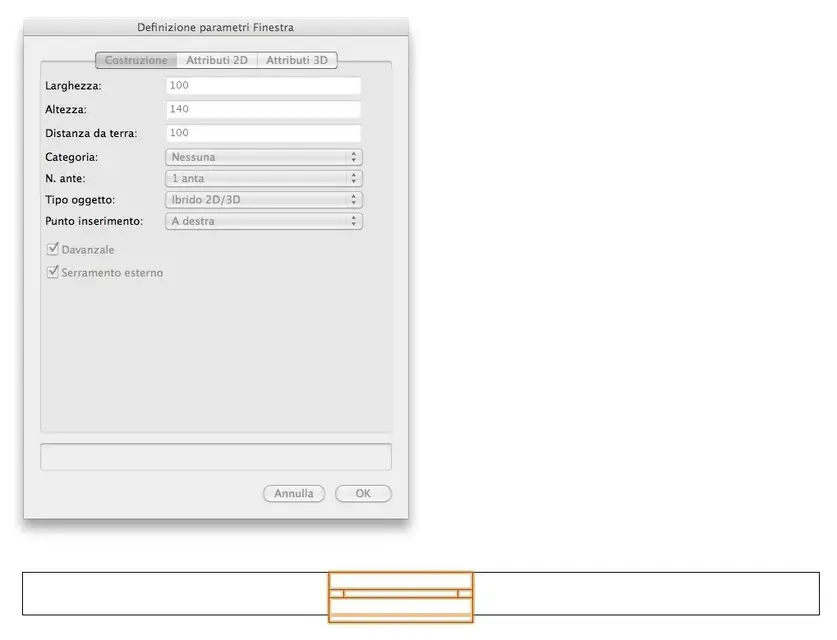
ok, then I decide to insert a window on the walls on the ground floor; I leave in fourth, open the curtain walls and clikko the architect window. clikko the fourth icon on the way bar to see the configuration panel and looks like a window with very few settings, I mention some, width, height, distance from the ground, category, no doors, type object, insertion point. .
but I want a classical window mounted inside the wall and with the shields mounted in axis to the thickness of the wall with opening to the Venetian?!? How do I do that?
For now I stop here because I think I already put enough meat on fire to discuss.
cmq the work in progress continues. .
I want to try to make a project of a two-storey house with falde roof and windows with balconies in venetian in the simplest of cases.
after reading all the possible guides imaginable on the net I stuffed my sleeves and put myself to work.
I'm leaving!
file settings document>set document and set everything there is to set with unit of measurement cm and sheet size a1.
file settings document>set model choose 2planes without basement and set in the most trivial of the ways the share of the shiny foundation to -50cm; the ff share of the polished ground floor at 0cm the floor height at 270cm and thickness 50cm; the ff share of the polished first floor to 320cm the floor height to 270cm and thickness 50cm; the r share of the polished roof to 590cm.
active start the polished ground floor and for convenience design a rectangle of the internal dimensions of the perimeter walls of the building and then with the command "create walls" we pee around the walls without style of thickness cm40 with height of the gloss and that is 270cm.
then active the shiny first floor, design a rectangle on the outer perimeter of the walls of the ground floor and with the command creates loft create the foundation plate with altitude z -50cm and thickness 50cm.
I then activate the shiny second floor and with the same method I create the loft resting on the walls of the ground floor.
then activate the shiny first floor and take off the copied walls of the gloss that contains the walls of the ground floor.
taken from curiosity I want to see in 3d what I created and so active the unified view and imposed the view iso right front to see my first creation. (I note that if I make hidden lines it doesn't make me the whole model but only the solids present in the active polish!?!? Is that normal? ? )
then mistakenly disables the unified view and when I pass to the view in the plant it changes point of view only to the active gloss and so proceed to the change of view for each gloss, command+0 and ..sorpresa! Some of the walls were disaligned:
vabbè select the unsaligned elements and thanks to the smartcurson they put them in their place.
ok, then I decide to insert a window on the walls on the ground floor; I leave in fourth, open the curtain walls and clikko the architect window. clikko the fourth icon on the way bar to see the configuration panel and looks like a window with very few settings, I mention some, width, height, distance from the ground, category, no doors, type object, insertion point. .
but I want a classical window mounted inside the wall and with the shields mounted in axis to the thickness of the wall with opening to the Venetian?!? How do I do that?
For now I stop here because I think I already put enough meat on fire to discuss.
cmq the work in progress continues. .