
• This forum is the machine-generated translation of www.cad3d.it/forum1 - the Italian design community. Several terms are not translated correctly.

directx, schede grafiche, windows 7/vista

  • Thread starter Thread starter weldox
  • Start date Start date

weldox

Guest
Hello, everyone!

I currently have sw2010 on platform windowsxp 32bit, a graphics card nvidia picture fx3450, directx 9.0c

I wanted to know if with other more recent cards and with the most advanced directx there were visual/prestational improvements regarding solidworks.

I better explain, I had a ram upgrade planned (I have 4gb)...and I was thinking if I had to pass to 64bit (windows 7? ).
in view of this possible upgrade, I was also thinking about the issue of directx and graphics card.

Excuse me, I'm pretty ignorant in these things. Can any of you help me make some clarity? ?
Thank you so much!

Bye!
maurials
 
hi, I have the model just higher (3500) and the previous (3400): I am well with both, then it depends very much on the complexity of geometry... Don't you have an example image?
 
Hello, everyone!

I currently have sw2010 on platform windowsxp 32bit, a graphics card nvidia picture fx3450, directx 9.0c

I wanted to know if with other more recent cards and with the most advanced directx there were visual/prestational improvements regarding solidworks.

I better explain, I had a ram upgrade planned (I have 4gb)...and I was thinking if I had to pass to 64bit (windows 7? ).
in view of this possible upgrade, I was also thinking about the issue of directx and graphics card.

Excuse me, I'm pretty ignorant in these things. Can any of you help me make some clarity? ?
Thank you so much!

Bye!
maurials
in solidworks directx are not relevant (they are not used) as it uses opengl libraries. In fact, the picture cards are certified because these libraries are "processed" via hardware and not in software emulation as it could happen with a normal gaming card (which now arrives at the dx11 I think, but I repeat that you do not need here).

Obviously with more recent and more powerful picture cards (especially) improvements there are.. but it depends on what you do; if you don't "manipoli" assiemi huge (and boards accordingly) and don't use countless "particular" features you may not notice the difference.
for a "normal use" your card goes even more than well.

eye that very important always remains the processor (the faster and modern architecture, the better it is).. What mountains?
to say that before thinking about "elective" upgrades you should see the whole system as a whole and evaluate if it is worth it, not to risk being disappointed.

greetings
Mar
 
hi, I have the model just higher (3500) and the previous (3400): I am well with both, then it depends very much on the complexity of geometry... Don't you have an example image?
Bye!
Let's say I'm pretty good too:smile:, my reasoning is more than anything related to the fact that with 32bit I can't take advantage of all 4gb rams, so next I think I'll pass to 64bit.
Given this "movementation" I was evaluating a bit if I had to take advantage of it for a small upgrade not too expensive.

I found my card used it and I didn't spend much. I was evaluating even if I had to buy another identical one and put it in sli (these cards are around 100 euros). ..always that such technology brings actual advantages in solidworks.

the complexity of geometry and the number of parts of the axieme, in my case, vary greatly.
birth from relatively simple pieces (both with two flanges)....to much more complex assemblies: complex tubular structures...etc.

in "big axioms" mode and light weight, the pc is riding discreetly.

is an intel core 2 quad q6600 "tired" from 2400 to 3200 mhz.
Current ram:

a0 (ras 0, ras 1) : 2048 (double bank)
a1 : vacuum
a2 (ras 4, ras 5) : 2048 (double bank)
a3 : vacuum

ddr2-sdram pc2-6400 (399 mhz) - [DDR2-800] I didn't overcloak it, it was overcloaked and configured by the store from where I bought it.
I chose a slightly drawn pc (talk when I bought it) because it seemed to me that sw almost worked with a single "core".
the quadcore then it turns out quite well when I happen occasionally to render with maxwell render (it happened to me for 2 or 3 details in which the customer wanted to have an aesthetic idea and also "luminosa" of the structures).

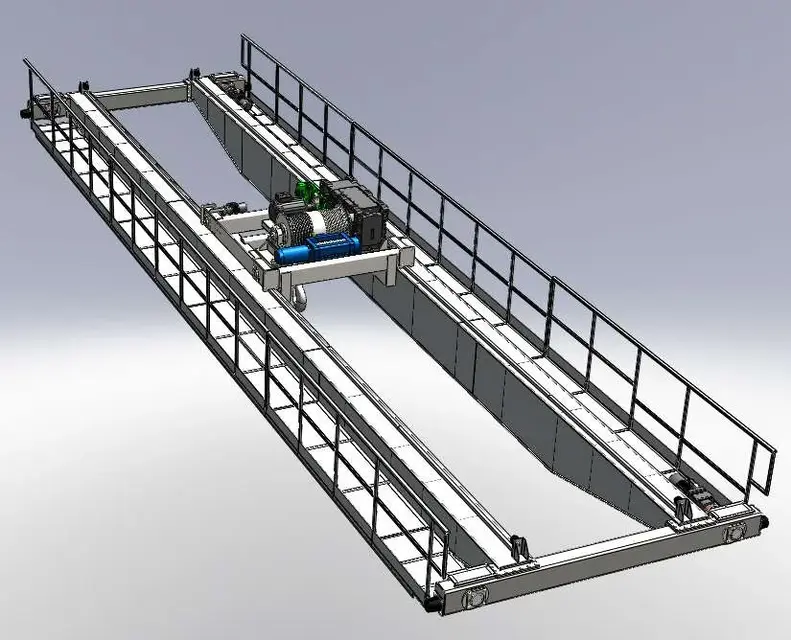
I attach example wagon 20-3t to understand the extreme superior of the complexity I happen to manage.

x sampom,
I understand! Thanks for the information!
you say if I put 2 fx3450 cards in sli I could implement the performance on big assemblies or is it a matter of ram and cpu?

more than anything is the structure of the processor that gives me thought.
Will it be a little old?
the ram, if I pass to 64 bit I implement it anyway...that is not a great expense.

Thank you so much!
Maurizio.
 

Attachments

  • 207.10.000.webp
    207.10.000.webp
    72.5 KB · Views: 20
You should understand what kind of trouble you are experiencing to say to what element you blame.

That witness doesn't seem "excessive" to me; with that already you pass the threshold of 500 parts and you go in great modes assemblies?

the q6600, although no more than first hair, is still a good processor from which you would be able to squeeze at least another 400ghz (at 3.66 it arrives quietly with a good cooling), and already you would notice an improvement.
until recently here at home I had a dual coevo core of yours, 2.66 @ 3.66, with 3500 and xp 32bit 4gb ram, and I manage much larger assemblies than yours without problems.
I always keep it set on rule so you get the best performance, therefore no visual effect, frames, colors, shadows, fade etc... the major problems of both visual and processing slowness I have in the large/complete boards of assemblies, but this is a bit the weak point of systems also fall on more modern/performing machines.

64 bits will certainly solve ram management problems, but even here you will notice only when and if you really need it; I still have 32 and the disk never swaps me, nor at least I crashed unexpectedly for overcoming the memory limit.
many say that the program generally turns better/faster to 64bit. at work I have seven 64 and this great difference I do not know.. But for new systems now it is definitely better to orientate on 64 bits.

about the sli,
I don't remember if your card supports this mode, you should make sure before you shop. and above all check that the motherboard contains this configuration.. has 2 ex x16 pci slots?
because if you have to change the mobo so much it is worth updating the whole system passing to current architectures.
also for the ram; buy "old" and slow memories that cost as new (even more in certain places), of which in the future you will not do anything, it does not make much sense.

I don't know, we'd have to consider everything a bit. In the meantime, I would try to overcycle the cpu further, to maximise what you currently have without unnecessary investments. Try and then tell us.

greetings
Marco:smile:
 
I tried to play a little bit with the bios... at times I burn everything! Luckily, in the bios the old overclock parameters were saved!
Don't put your hands on it. :

I think I should be satisfied for now.

He will talk about it when I have serious need!
anyway thanks for the information! You've made it clear to me.

Bye!
maurials
 

Forum statistics

Threads
44,997
Messages
339,767
Members
4
Latest member
ibt

Members online

No members online now.
Back
Top