• This forum is the machine-generated translation of www.cad3d.it/forum1 - the Italian design community. Several terms are not translated correctly.

archicad vs revit vs vectorworks

  • Thread starter Thread starter spazio2d.it
  • Start date Start date

spazio2d.it

Guest
ciao ragazzi,
I am new, and I do not know if this discussion has already been opened.ma ho una domanda da chiedervi; use archicad 13 for 2d/3d design, but often some friends or on the web I find dwg files of autocad, and I find myself in difficulty.

I wanted to know if it was better to use revit or vectorworks for architectural design (for dwg files).

I know that revit or autocad architecture, are programs similar to autocad but more versatile with dwg/3d since you design directly the object and not the lines that depict the object.

a greeting to all:)
 
probably depends on the forum you ask, personally I would tell you that in the field of building archicad is better than vectorworks and 2-3 times better than revit. personal opinions of course
 
Thank you for the answer.
not knowing revit and/or vectorworks I might know why archicad is better than these two software.
I also feel good with archicad, the projects run them in really short times, facilitating me a lot of work.

but when they "pass" a staircase in dwg because it was designed by a colleague or they demand that scale ( downloaded from online brochure): I'm in trouble with archicad.
 
I think personal opinions should be accepted and respected.
btw each software is valid if used to the maximum of its possibilities, no one fully knows all the products to tell how much advantage it has to work with one or other sw.
the important thing is to use at best what you have.
 
Hello, and good New Year's Eve.

I appreciate the advice received by users.
but I have asked why the answer is: because I would also like to have a qualitative assessment:
example rendering engines.. and above all the possibility to dialogue with dwg files:).
I also think that skill depends on "designer" and not on software.

soon and good year.
 
the fact is that it is difficult to be objective.
I know well vectorworks and almost for nothing others, so it is spontaneous to advise you this; darthvader instead archicad. others know you well.
the thing I recommend is to evaluate yourself through the demos of these software. It's the only way you can understand what really meets your needs.
I can tell you that all three of the software we mention are bim-oriented cads, so they work with objects (walls, doors, windows, etc...)
vectorworks also allows to work totally in two-dimensional; integrates as a rendering engine cinema4d; import and export very well the format dwg... but it is always good to keep in mind that it is a different proprietary language and therefore small shortcomings are always necessary to manage it to the best.
Happy New Year
I do.
 
hi I know quite well both archicad and revit and I can quietly tell you that archicad is much easier to learn and with a bit of cunning you can shape almost everything in the architectural field, but revit is much more powerful especially regarding modeling, allows you to create everything using the commands that it has inside so without tricks or external plugins, but it is much more complex in using it, to learn to do a lot
 
Thank you 1000 guys, I had an answer I was looking for. Although archicad is simpler and intuitive. revit is still an interesting software.
then I am slightly "mascochist" I like when a software is hard to learn and know: It never makes me want to use it.
 
probably depends on the forum you ask, personally I would tell you that in the field of building archicad is better than vectorworks and 2-3 times better than revit. personal opinions of course
We are still waiting for an answer from darthvader.. .especially the "2-3 times better than revit" intrigues me a lot! to affirm this must be one who knows all three software. . .
 
We are still waiting for an answer from darthvader.. .especially the "2-3 times better than revit" intrigues me a lot! to affirm this must be one who knows all three software. . .
Sorry the delay for the answer, I read basically only the forum archicad, I read this by chance after the move.
I think my comment was misunderstood, my position is basically similar to glyommarro and loryb. in fact I said that the answer depends on the forum where you ask depending on whether it is an archicad forum, vectorwors, revit.
the question had been posted in an archicad forum, and the answer was an archicad user (I) so the preference for this software was discounted.
about my personal opinion instead, comes from a direct knowledge of archicad (I claim to know no more than 40% of the potential of the program, but I can do everything, without any significant problems). of vectorwors and revit I have indirect experiences, especially of women regarding the second, of friends and colleagues who use these software. comparing our experiences, I see them move difficultly in operations that I would not create problems in archicad. someone also told me that revit does not dialogue so well with autocad as membership would suppose, to me it seems strange, anyway. Of course, the "human" factor is relevant, but I have no other comparison terms: Trying another software for me would still not provide worthy data, because I know too well archicad in comparison to a new program, and it would be difficult for the second to hit me so much to win years of experience. I therefore prefer to weigh the illusions and enthusiasms of those who use a program for years.
If I had to opt for another software, given this non-objective data, I would probably pass to vectorworks, which has several interesting things including the facilitated dialogue with 4d cinema.
I repeat, personal opinions
 
a good year greeting to all of you of the community:)

I used for a very short time allplan, then to go to archicad 13, of which at first I was really fascinated.
However, my expectations were quite disappointed as a result of some rigidities in the modeling and management of the program, of all those additional elements that were created in the design.

I often used complex profiles, which for example a triangular wall with grooves, created a section not consistent with that of the cutting plane (it seemed that archicad cut where he wanted).
same problem with the stairs, all created impeccablely and quickly but they were cut all at the same height, after the 3rd steps and not updated in the plant, if I modified the cutting plan. . .

or again, in the view of the sections, have the beams placed behind the profile of the loft and to view them correctly, intervene with the command to give priority to the element and put it (always in the section view) in the foreground regarding what was behind.

or again, the impossibility to manage the railing of a balcony without resorting to the external plugin of cadimage, or perform a laundry of a wall, other than the libraries present in the program's access.

these, things more rigidities (for example, to create a fence wall, where in some traits is higher than the others, had: if the profile part "trapezoidale" is performed with complex profiles, this will not tie then with the rest of the masonry in when its axis line, as it is normal, will not match the profile of the wall, for which the only solution is to resort to the mesh36 command )
they gave me up archicad and go back to using sketchup (with all its array of architectural addons to create stairs, lines walls, complex profiles, windows and curtains, which over time I created or downloaded).

I have never been a great autocad user, since every single project was performed on the forgery of a bim with sketchup and then export the plants and sections in dwg to clean out the excess lines, the sampling of the retini, the quotations etc... all things that, they lost all the time earned in the very fast modeling of the google home software.

had it... from a month and the more I discovered revit 2011, program that I knew only by name, of which I had downloaded a demo of 2008 and then promptly uninstalled for little interest.
he had, now I don't know the previous versions as they were, but 2011 has a whole series of things that have made me appreciate so much this program, starting from the ribbons most intuitive (but here I am guessing benefited because I never used the old interface...) to modeling, views etc...

I am still at archicad 13, and my comparison is only with this version, and I must say that revit 2011 beats it on several points.
these things that I appreciate and that in archicad I did not find or if you find, managed in an unperformance way:

- curtain wall drilling walls
- direct modification to the profile of the walls, so as to give them the desired shape without resorting to complex things (the profile is managed by simple lines or curves)
- create a wall from a present line, which can be for example the edge of a loft below, and therefore, avoid time losses or any imperfections in the redesign.
- laundry of walls without having to load a library element, but intervening directly in the modification of the profile
- shady views, realistic etc...
- Views in selectable detail mode
- the possibility to display in a view, all the elements we wanted to hide
- change to the surface of a wall or a ceiling to apply over the desired material or texture
- insert an intermediate plane to the existing ones, without the project undergoing aberrant distortions (the pillars or walls ranging from floor 0 to floor 4, even if I add a new intermediate plan or if I change the height of an existing plan, remain always anchored from floor 0 to floor 4 whatever their heights are:36_3_8:

I do not say that revit is the perfect program, because it will certainly have its limitations like any other software, however since in this discussion it was asked a comparison between various similar software, from my experience I can say that revit 2011 in comparison to archicad 13 has several things that to his rival of house graphisoft are missing :36_1_1:
 
- curtain wall drilling walls
- direct modification to the profile of the walls, so as to give them the desired shape without resorting to complex things (the profile is managed by simple lines or curves)
- create a wall from a present line, which can be for example the edge of a loft below, and therefore, avoid time losses or any imperfections in the redesign.
- laundry of walls without having to load a library element, but intervening directly in the modification of the profile
- shady views, realistic etc...
- Views in selectable detail mode
- the possibility to display in a view, all the elements we wanted to hide
- change to the surface of a wall or a ceiling to apply over the desired material or texture
- insert an intermediate plane to the existing ones, without the project undergoing aberrant distortions (the pillars or walls ranging from floor 0 to floor 4, even if I add a new intermediate plan or if I change the height of an existing plan, remain always anchored from floor 0 to floor 4 whatever their heights are:36_3_8:
all these things on archicad can be done... except the last of the floors, because the walls, pillars etc. are assigned heights, not floors and obviously each element can be adequate and belong to the single floor. and the modification of the wall profile, which I don't think I understand what you mean. for the rest unless you misunderstand, you can do everything
 
all these things on archicad can be done... except the last of the floors, because the walls, pillars etc. are assigned heights, not floors and obviously each element can be adequate and belong to the single floor. and the modification of the wall profile, which I don't think I understand what you mean. for the rest unless you misunderstand, you can do everything
bye darthvader :36_1_13:
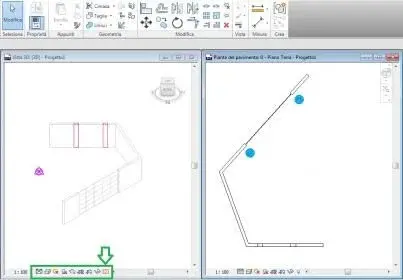
on the curtain wall I had found the option that associated the orthogonal wall, to a window glazed, but did not perform the washing, well it was limited only to performing a continuity of geometry, great if for example I had a curtain tilted (in this case my wall became trapezoidal, then normal return once the glazed wall was eliminated)

I mean this: (Annex picture.jpg )
I designed a wall and above it I redesigned the path of a curtain wallthe result is as you see, of a glazed wall that cuts me the wall (see that it works as a dynamic boleana, I can move it or resize it even in height as I prefer).
with archicad this versatility I did not find it.

As for the management of hidden views and elements, (always in image.jpg ) it is possible to manage everything from the lower controls, which are independent for each window, so if in a design at 100 I put the structural pillars, but then I do not want them to see, I simply disable them to the view, without even losing time to change the contour material, as instead in archicadlegatti I had to do to make to do to do to do to do to make it to do to make it to make it to make it to do. . .

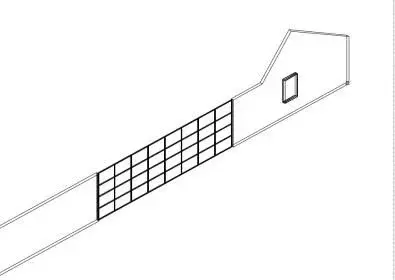
regarding the modification to the profile of the walls, look image2.jpg and image3.jpg for the final result. I have performed a hole and a modification to the wall profile without the help of cuttings with flap or similar :36_3_8:
 

Attachments

  • Immagine.webp
    Immagine.webp
    9.6 KB · Views: 50
  • Immagine2.webp
    Immagine2.webp
    11.5 KB · Views: 45
  • Immagine3.webp
    Immagine3.webp
    9.2 KB · Views: 38
Forgive me, I still don't understand the curtenwall that hole the wall: you can cut the wall if you want a "definitive" change, or use the boolean operations or the wallhole to make a hole with the cw. especially, the walhole serves to make holes in the walls and possibly to change the profiles of the walls (for a single wall, which makes little sense if the wall is part of a larger building body: It is true that I can't seem to change the profile of the wall as in the second image moving points unless I do the wall with the mesh tool, or use booleane or wallhole, it is also true that if on that wall there is a roof, or any other house, I get it very easily). However, things like that are all easy to achieve.
based on my experience, if I had to think of something complicated to do with archicad I would say tensostructures, but I don't know if I'm the one who never had need, I don't know.
 
I mean this: (Annex picture.jpg )
I designed a wall and above it I redesigned the path of a curtain wallthe result is as you see, of a glazed wall that cuts me the wall (see that it works as a dynamic boleana, I can move it or resize it even in height as I prefer).
then it is similar to vectorworks where objects enter the wall and this adapts to their typology, still remaining a single entity.
I do.
 

Attachments

  • Immagine 3.webp
    Immagine 3.webp
    6.2 KB · Views: 21
Forgive me, I still don't understand the curtenwall that hole the wall: you can cut the wall if you want a "definitive" change, or use Boolean operations or wallhole to make a hole with the cw.
in revit the continuous facades can be self-incorporated, so that the simple modification of the facade is reflected on hole and wall. from what I understand in archicad it is necessary to change both the cw and the hole and the wall...poco bim as a solution!
It is true that I can't seem to change the profile of the wall as in the second image moving points unless I do the wall with the mesh tool, or use booleane or wallhole, it is also true that if on that wall there is a roof, or any other house, I get it very easily). However, things like that are all easy to achieve.
mesh and boolean? or virgin maria, autocad racing return if I have to work with mesh and boolean. . .however it is not so rare to have walls not overstated by any cover. . .
based on my experience, if I had to think of something complicated to do with archicad I would say tensostructures, but I don't know if I'm the one who never had need, I don't know.
that is a nice casino even in revit (perhaps with the conceptual masses but you should see the form well...), but bad that I go I create a beautiful sup nurbs in rhino or in autocad and annego in a family. but it works!
 
Hello, guys, I'm sorry I'm late. I'm grafted into the discussion. .

I read all the answers you gave me, and they're all very valid.
I use archicad, I wanted to give better limits and qualities of the other two programs. but if I don't stand above (personally) I don't know who to give reason.

Since I opened the discussion, I would also like to tell you that my question, perhaps deserves a little more attention since I asked: how programs interfaced with external files of type dwg (and maybe it was better revit since autocad interfaces well)! then mesh.. boleane etc etc, bim file railings were not so required.

However these seben programs similar to each other.. and with a plaque of the same hookers! the answer is that it depends a lot on what you want to do and who the user is using the program! that is to make it simple. . .

It's like asking: If to go fast it takes a ferrari, a porsche, a lamborghini... there is no winner, much depends on the conditions of the road, from who brings the car, from the tires.. and where you want to get :p
 
Since I opened the discussion, I would also like to tell you that my question, perhaps deserves a little more attention since I asked: how programs interfaced with external dwg files
I felt like I answered you about it.
I can give you more info. amount and carry every day dwg, since strutturists and planters use it. with a minimum of attention there are no problems. and for a minimum of attention I mean that, of course, some features of vectorworks are not present in autocad and must be taken into account.
I do.
 
I felt like I answered you about it.
I can give you more info. amount and carry every day dwg, since strutturists and planters use it. with a minimum of attention there are no problems. and for a minimum of attention I mean that, of course, some features of vectorworks are not present in autocad and must be taken into account.
I do.
How does vw behave with dwg 3d? How does it handle them?

@spazio2d.it
revit is developed by autodesk, the software house that develops autocad and that has "invented" the dwg. Do you think there is no communication?
I wrote several posts on my blog related to the interoperability between autocad and revit:
http://ctrl-alt-cad.blogspot.com/2010/10/nuovamente-sullinteroperabilita.htmlhttp://ctrl-alt-cad.blogspot.com/2010/02/lotti-edificabili-e-formato-adsk.htmlhttp://ctrl-alt-cad.blogspot.com/2010/06/particolari-cad-in-revit-architecture.htmlhttp://ctrl-alt-cad.blogspot.com/2010/06/autocad-e-il-formato-fbx.html...if you want to read...:wink:
 

Forum statistics

Threads
44,997
Messages
339,767
Members
4
Latest member
ibt

Members online

No members online now.
Back
Top