• This forum is the machine-generated translation of www.cad3d.it/forum1 - the Italian design community. Several terms are not translated correctly.

large drawings

  • Thread starter Thread starter tanticapelli
  • Start date Start date
"The designer must put what he needs" is Holy!

but that sentence is not foolish at all.
many times the problem is not the drawing parts, but the commercials.
I have seen things that you humans (etc. etc.) as bearings with all spheres and screws with helical threads. In addition with "image quality" (tipping, this unknown) shot at ball. or motor groups imported with fifteen thousand surfaces without even an attempt to clean the input.

about image quality, I remember that a cruder quality of higher groups non ha influsso on the accuracy of the designs and/or the files exported, nor on that of subgroups and parts.

this not always to blame the user (even because the user usually - if he did the course - applies what the dealer teaches him!) but I assure you that often the triplets are those, and once you have settled the asses things go much better.

all this is true more less for all cad 3d, with different forms but recurrent substance.

as regards solidworks, it is advisable to deepen the commands "display of asses" e "assessment", with an eye to the "graphic-triangoli" and "total triangles".

Once the critical areas are identified, one can understand where it makes sense to intervene.
because even on the parts and drawing groups, it is often enough to simplify (even hinds) only a few particular groups.
I can now say I've done it and among other things have made me do some "optimization" exercises of distracted assemblies made by other customers.
I have applied the same approach to my work but you have to recognize that during the design phases (the subject that is not held in the middle of the courses usually) it often happens that you have to turn on and off subaxis both graphically and through suspensions. These operations however require their time and serve nothing but to have a "functioning" design without too many pretensions.
then you also put the magagne of windows where every now and then asks to save everything when you launched only the drawing together and you have added some quota...
if you manage axioms of certain dimensions you can certainly adopt useful measures to "limit damage" but the tribulations do not macano, guaranteed.
and I do however for granted the use of a last generation workstation (mannaggia a questi cpu...).

so many hairs
 
Bye to all,

day by day I understand something more about the operation of solidworks.
I would just like to point out that when you ask solidworks to generate a drawing of a large set, the slowness is due more to the number of bodies and lines to be computed than by the complexity of the mathematics.
In fact, while having a large set (well done with all the necessary measures to ensure that the model functions smoothly and yet without configurations for lightening purposes) consisting of unsimplified parts and also configured quite heavily with so much active external references, if they generate one or more (even sections) drawing originating from a display state in which very few objects are visible the design is very fast.

so it follows that the calculation effort is based not so much on the complexity of the mathematicians present in the features tree but on the graphic elements to project that, curiously, do not put so much pressure on the graphics card but the cpu.

I think that this is not very worth turning the sheet into a cube (to make an example) because for the purposes of the design speed it would be much more to hide it simply.

Too bad that 90% this is not possible for demanding design character.

Hi.

so many hairs
 
if it is possible, in case you work on a view at a time, the others can be put in shady mode without borders and without hidden lines and tangenze you gain something in performance.
a possibility is also to hide the views that at the moment are not necessary.
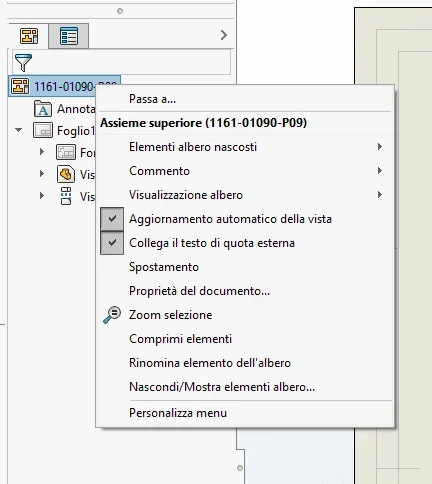
also remove the check for automatic view update (external button on the top design name in the feature manager)
 
if it is possible, in case you work on a view at a time, the others can be put in shady mode without borders and without hidden lines and tangenze you gain something in performance.
a possibility is also to hide the views that at the moment are not necessary.
also remove the check for automatic view update (external button on the top design name in the feature manager)
these tips you had already given them in other posts and I tried to apply them from the first day and something they benefited.
think that in the official courses of solidworks I felt that disable "move the components by dragging" does not serve to speed up the drawing. Obviously they never really had to deal with a drawing of a great set.

The only stratagem I still have to try is a drawing without drawing.

In the sense that there's the teaming, you print it and then inside you draw what you want.

many hairs (at least for now)
 
Bye to all,

day by day I understand something more about the operation of solidworks.
I would just like to point out that when you ask solidworks to generate a drawing of a large set, the slowness is due more to the number of bodies and lines to be computed than by the complexity of the mathematics.
In fact, while having a large set (well done with all the necessary measures to ensure that the model functions smoothly and yet without configurations for lightening purposes) consisting of unsimplified parts and also configured quite heavily with so much active external references, if they generate one or more (even sections) drawing originating from a display state in which very few objects are visible the design is very fast.

so it follows that the calculation effort is based not so much on the complexity of the mathematicians present in the features tree but on the graphic elements to project that, curiously, do not put so much pressure on the graphics card but the cpu.

I think that this is not very worth turning the sheet into a cube (to make an example) because for the purposes of the design speed it would be much more to hide it simply.

Too bad that 90% this is not possible for demanding design character.

Hi.

so many hairs
hello to all thanks to the details and info; I wanted to add something, perhaps for many granted perhaps for many controversy but many is.....
They don't tell us everything.

it is not possible that when solid "blocks to think" you go to see the performance of the cpu and you find it to 9% or maximum to 20%; there is someone who finds the cpu used 100%, not to mention the various cores.....

I am convinced that for some strange reason the cpu is exploited by the programs we use yes and no to 30%, not only by solid.
when we see the cpu used 100% maybe slow problems will disappear not to mention the gpu.....
Hi.
 
hello to all thanks to the details and info; I wanted to add something, perhaps for many granted perhaps for many controversy but many is.....
They don't tell us everything.

it is not possible that when solid "blocks to think" you go to see the performance of the cpu and you find it to 9% or maximum to 20%; there is someone who finds the cpu used 100%, not to mention the various cores.....

I am convinced that for some strange reason the cpu is exploited by the programs we use yes and no to 30%, not only by solid.
when we see the cpu used 100% maybe slow problems will disappear not to mention the gpu.....
Hi.
I absolutely agree with you! I never found the performance on the limit when I monitored them. only the hd disk was seen to suffer a little, then taken ssd, and I no longer checked this data. my computer assistant told me that it is not always linked to what you read directly in the usage data. ..mystery, but not so much at the bottom, but it's enough to compare with what we did with old stains and previous versions and with the last... from my point of view nothing has changed, indeed! I always said these things here on the forum...
 
I absolutely agree with you! I never found the performance on the limit when I monitored them. only the hd disk was seen to suffer a little, then taken ssd, and I no longer checked this data. my computer assistant told me that it is not always linked to what you read directly in the usage data. ..mystery, but not so much at the bottom, but it's enough to compare with what we did with old stains and previous versions and with the last... from my point of view nothing has changed, indeed! I always said these things here on the forum...
Unfortunately, solidworks has a sequential calculation method which in fact uses only and always a core at a time (the multicore is in fact not exploitable as the operations performed in parallel are really few and are not the most frequent use).

this statement is unquestionable since they are the first teachers of the courses (advanced) of solidworks that hold us to punctuality.
so it is very important to set the functions in such a way as to avoid unnecessary loops.
the speech is also valid for autocad if you use it thoroughly, but you will notice less since in the most common use the cpu is not very stressed so if you do not notice the " bottleneck".
the calculation of the views of a drawing together is as long as the edges to be represented/section and is almost completely dependent on the cpu.
therefore in this sense also the "simplification of the bodies" does not have much use.
if the 3d model of the large assembly works smoothly (if the machine is in use is proportional to the needs) and if there are no relevant warnings in the performance analysis of the axieme means that we are working in the right direction.
to speed up the performance, take note of the selection tips written countless times from mammals.regarding the fact that from "activity management" of windows you see an exploitation of the cpu very far from 100% is due to the multicore, but also this aspect has been widely treated in old posts of this forum.

Bye!

so many hairs
 
Unfortunately, solidworks has a sequential calculation method which in fact uses only and always a core at a time (the multicore is in fact not exploitable as the operations performed in parallel are really few and are not the most frequent use).

this statement is unquestionable since they are the first teachers of the courses (advanced) of solidworks that hold us to punctuality.
so it is very important to set the functions in such a way as to avoid unnecessary loops.
the speech is also valid for autocad if you use it thoroughly, but you will notice less since in the most common use the cpu is not very stressed so if you do not notice the " bottleneck".
the calculation of the views of a drawing together is as long as the edges to be represented/section and is almost completely dependent on the cpu.
therefore in this sense also the "simplification of the bodies" does not have much use.
if the 3d model of the large assembly works smoothly (if the machine is in use is proportional to the needs) and if there are no relevant warnings in the performance analysis of the axieme means that we are working in the right direction.
to speed up the performance, take note of the selection tips written countless times from mammals.regarding the fact that from "activity management" of windows you see an exploitation of the cpu very far from 100% is due to the multicore, but also this aspect has been widely treated in old posts of this forum.

Bye!

so many hairs
Hi.

I can agree with you but it is in fact that we have machines exploited yes and no to 30%; Now I wonder why they don't wake up and instead of sending us every year a lot of fuffe that doesn't work between.. a year or two or how many hell they need it and they don't solve it I'm problem that I think it's the problem.... .

Hi.
 
house software live on versions that release every year, all indistindamente. It's clear that x us is just a cash out, but anyway they do it because there are users who always want the last product and enjoy when they have "prestational" hardware. as x phones especially, but also x many other products. staying in the house sw, every year versions always come out in the same way, not as it happened several years ago when it was updated just x having a real new version. start advising you to upgrade hardware every 3 years, and every new update of win you always notice a greater general slowdown of the pc.... The thing is wanted.
 
Well I think you've got the goal...I'm sure this may sound like a futile discussion because nothing will change or better it will change in favor of them....I'm sure it's sad instead of going on these force us to go back think only for a moment to have a 100% exploited pc; how they would simplify our work... how we could work better and maybe even a little less.... but this is another speech.........
Hi.
 
Hello everyone
I am delivering projects with the board made only in part, just add some section, it is impossible even to move inside the table, I did various tests, does not count the network, does not count the gpu that (except for rendering works) is exploited to the minimum (quadro or gaming give very little difference).
the problem is sw, in the office we also use inventor, creo and solidedge and they also have the same problems even if very reduced.
in my opinion sw has the problem that every movement regenerates the views, and I do not think they will be able to solve.
you can not use views drafts or speed packs, not select the hidden etc.... in this way you cannot work; Besides if I can't use the features of cad 3d, then I don't know what to do with it.
must stop telling "balls " sellers and companions.
 
Did you disable automatic view update?

Can you see the incriminating table?
 

Attachments

  • Immagine.webp
    Immagine.webp
    19 KB · Views: 14
Hello Massivonweizen
I have disabled everything that can create problems, moreover they have passed into the company one of the members of ready2works with a technician of his and one of sw but have not come to head of anything.... the tables are very slow and not usable, moreover I have read various posts and I have seen that in the years (from 2015) in many have been problem....vedo that from year to year they leave more and more aside the tables.
but I have to deliver "ready-to-use" projects with boards with all the details and so I can not do it.
Mr. Callegaro will have to reimburse me two years of contract
Thank you.
Hi.
 
regardless that without actually seeing the type of model, its complexity and how it is handled more than what is said there is little to add, I would do this attempt:
I imagine you have so many sections and details, if so for the definition of these I would spread them on multiple sheets so that in every single there are less entities to manage.
I did a test, but being a good model does not allow to accurately assess the performance, however it gave me the feeling of being more fluid. make an attempt I don't think it costs great sacrifices.
Moreover one of the members of ready2works with a technician of his and one of sw have passed into the company but they have not come to the head of anything.
just out of curiosity, what are the checks they made?
 
Hi.
han controlled the basic things (options etc.) then they put on the server with their program both to control the performance (recording messages every time the performance fell under a threshold), they also rated the construction of the assemblies (if there are references, especially nested, type of constraints or ties on instances of repeated parties; they worked a bit on vba (at least it seemed) I think to check some points that "were" the pc.
but they did not have great news or solutions... .in the end han said not to use gtx cards but picture, that was that the problem.... then we made him remake some tests on the pc in part (last purchase, with a p2000)....poi han finidicendo that in 2019/2020 will be all right...but I already see complaints.
Hello, good day
 
It's useless to turn around in solid circles, it's heavy to turn around, and every year the situation gets worse......it's necessary to have super performing pcs, if you want to turn the complex axioms and a p2000 I see it scars at least for solid..... according to me it's so otherwise they wouldn't explain all the complaints. . . .
Hi.
 
the great and very great assemblies, they must be approached in very well spotted ways, both for the management that follows (bom and derivatives), and also according to the program that you have (hotly asks who asserts that it is the cad that must always adapt to the production typology) and already on this one could discuss a lot.

in the company where I am, we abundantly exceed 4500 parts, but with the approach we are giving, we will arrive at 7-8000 within a few years with many parts imported from suppliers etc..
I was given the role of finding solutions even with solidworks consultants, to speed up as much as possible the working environment and I must say that after 2 years of work, we are working faster with about 25-30% more components (including habits), than when I started.

at the general level I can say that:
- there are different settings in solidworks that if you mix well with each other, speed up not little
-solidworks is influenced a lot by the clock speed of the workstation processor, not by the number of cores, internal cache or high amount of ram, so better a high clock processor even quad core, than an octacore with high cache (like a xeon or similar).
- the structure of the together is fundamental, the more a project is great, the more it is divided into subaxis wisely
- external references between file geometries, slow regeneration in a devastating way, especially if the files in question are editable, solidworks has a habit of regenerating them or wanting to regenerate them often
- very heavy for the system are the parts composed by only surfaces, having everything in solid is lighter for the whole system
- Imported parts with functions necessary to the only visualizations (i.e. that the component does not undergo internal processing, but it just comes so), it is advisable to export them as parasolid and reimport them so as to have only fine bodies to themselves (even the size of the file is positive)
- unnecessary writings (both imported and modelled), should be limited, if not even avoided
- excellent performance evaluation function, but it should be remembered that it reduces the number of triangles, not the number of surfaces, therefore very defined parts, remain heavy however
-subassiemi very complex internally, it would be worth transforming them into single parts consisting of body, it is an extra file in storage, but it leans a lot in assemblies
-flexibly help, many do not recommend using them, personally use them, but not beyond the second level, if it is necessary to go beyond the second, better configurations
-poco used are the visualization states, but they are extremely useful for "shaking" the axieme and working on smaller branches
-viteries/minutes for those who can do without them, better (I don't agree with this mentality), those who have to use them, must be as simple as possible, obviously no solid threads, no "fighetti ring"
-texture: avoid
-surface conditions of the materials, beautiful to see, but avoided, the basic colors weigh nothing and leave a good presentation on complexes so large
- not fully defined asses, not totally defined sketches, is the basic rule that slow down, but it is never wrong to remember it.
 
hi 320i s
very well, the same I had deducted..... workstations with i7 fast go much better than xeon (as well as for a performance xeon prices rise too much), anyway I see that if you do not render the most "stressed" part is the processor that must continue to write (if there is the server worse yet)
the problem is that, who does mounts, details etc. can solve in various ways (no reference, reimport parts etc.); My problem is that developing projects from zero of industrial lines occupying a shed, a small set has about 5000 pcs, if I have to work without references or other tools of the 3d, then it is better if I return to autocad mechanical, I need to draw so that I can overturn the project in a short time and with few steps, and with the tools that give me until now I have failed.
 

Forum statistics

Threads
44,997
Messages
339,767
Members
4
Latest member
ibt

Members online

No members online now.
Back
Top