• This forum is the machine-generated translation of www.cad3d.it/forum1 - the Italian design community. Several terms are not translated correctly.

macro separate extraction base

  • Thread starter Thread starter FIGOR71
  • Start date Start date
Hi. I tried the macro and now it works.
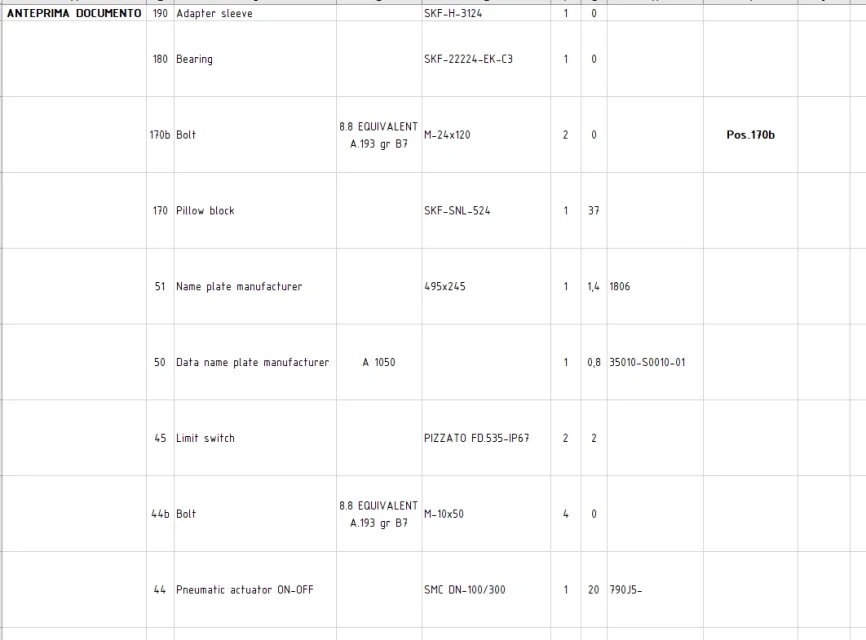
the difference between table save and macro are the previews of the files that are created.. I just noticed that the preview does not match the description line... is there solution?
also useful the choice of the directory where to save the table
you can disable the saving of the previews and hidden rows by changing the parameters of the function

boolstatus = thetableannotation.saveasexcel(filexls, false, false)1587041976448.webp
 
I attach the updated version where I eliminated the routine that could create ambiguity in startup
hi, sorry to bother, but I tried the macro in other axioms and sometimes does not work or do not appear the previews of the parts in the excel file.. and as mentioned in the other message are not in correspondence with the descriptions.. .
Do you have a solution?

Thank you
1587042396953.webp
1587042454632.webp
 
hi, sorry to bother, but I tried the macro in other axioms and sometimes does not work or do not appear the previews of the parts in the excel file.. and as mentioned in the other message are not in correspondence with the descriptions.. .
Do you have a solution?

Thank you
View attachment 57269
View attachment 57270
Sorry if I interfere, but the column with the figure related to the piece "Preview document" how does it fit?
 
Sorry if I interfere, but the column with the figure related to the piece "Preview document" how does it fit?
I don't know, at the first attempt in a group, he put the previews (although staggered) , in the second attempt in another group he didn't put them on me, and in another group he didn't even create the excel file.
you have to thank pose63 for what he answers and sends

Hi.
 
I don't know, at the first attempt in a group, he put the previews (although staggered) , in the second attempt in another group he didn't put them on me, and in another group he didn't even create the excel file.
you have to thank pose63 for what he answers and sends

Hi.
using current version 2018 I can't do any tests. the 2019 version in the office we installed it for testing only in a laptop and these days staying at home I can not do much. .
 
Well, now I think everything works. select the distinct, launch the macro, make me choose where to save, I cannot choose the name of the excel file.

the preview comes out and of this I will be eternally grateful.

Now I tell you that in the excel file it repeated in the last row a detail without apparent reason.

I did a test and did not export the parts that I exclude from the separate by selecting the special option "excluding from separate base" in the properties.

Would it be possible not to export everything I decide to put as hidden in the distinct that I have in solid?

I explain with two pictures:

solid distinct:Distinta solid.webpdifferent excel:Distinta excle.webpin that solid I have hidden points 7.1-7.2, 8.1-8.2 etc. that are part of axiemi and I do not care to see them in dismissal.

Thank you very much for your contribution.
 
Last edited by a moderator:
using current version 2018 I can't do any tests. the 2019 version in the office we installed it for testing only in a laptop and these days staying at home I can not do much. .
Thank you very much for what you did.. I have the 2020 sp.01
I just asked why I thought it was a mistake due to me..
Thank you.
 
Does it work!!!? ? ?

I did the test by exporting the distinct before without hiding and then hiding and it's okay.

you can choose the file name and it is perfect.

My ingordigy leads me to tell you that if you could open a window for saving excel files identical to that of windows where you can see the files already present in the folder, the name choice would be easier.

Thank you, thank you.
 
test with this, where hidden rows are excluded and activate images
Hi. Sorry to take advantage of it.. but is it not that you could help me with a macro for saving the solidworks table in dwg and pdf with the possibility to choose the rescue directory?
Thank you. .
 
Hi. Sorry to take advantage of it.. but is it not that you could help me with a macro for saving the solidworks table in dwg and pdf with the possibility to choose the rescue directory?
Thank you. .
This macro is already in the forum, do a little research.
 
This macro is already in the forum, do a little research.
I know.. you had already asked in another discussion about me the thing.. but the answers received were not satisfactory and I kindly asked for help to pose63.
 
Hello, everyone.
I kindly wanted to ask if someone knows where it is possible to find a macro to make the extraction of the distinct base, or of a single column, of a set (from the table of solidworks) or a certain property (in a set or in a part) .
the purpose would be to extract this property or column (which would then be a description for a purchase request) in a word or excel file to get a list of things to order (a sort of distinct strangers, but without a pdm)
then we accept advice on other methods to get the same result. .
Thank you in advance and wish everyone a good Easter
I have seen that, big way, they have already responded with an excellent solution (save directly in excel, with lots of previews, etc...).

I propose a little different (that I attach with bas source): practically, starting from the top-assembly, they generate the distinct in csv format and proceed recurringly for all possible sub-assembly presets, for which, in turn, the corresponding csv is generated.

csv contains in the order the 3 fundamental data that each separate must have:
  1. code
  2. quantity
  3. Description
csv file can then be automatically imported into excel; if I deceive the csv, it also updates the excel. This allows me to have excel files with some formatting and I use csv as they were "database" (in fact, I am).

I then made a dos program with which I also go to create the "total distinction".
in fact, the above csvs are "hierarchics": in that of the top-assembly, for example, there are only sub-assieme codes and so on, until you find a csv of a sub-sub-assieme that has actually pieces and commercial.
to assemble everything and have the distinct "of the stuff to send in production/purchase" I have to do what I call - precisely - "total distinction" and I do it with the dos program mentioned before.

the proposed macro, unlike other solutions, has these peculiarities:
  1. do not need to create the drw or however the table of the distinct; If we talk about distinct from some dozen pieces, okay, but if we talk about making a separate machine with thousands of codes... becomes difficult to open every drw and launch a macro. In my case everything is done from top-assembly.
  2. you can update only a branch and not all from top-assembly; For example, if only a sub-group changes, it opens, it launches the macro (clearly I made a button, I read over the ways to create one, take the cue from there) and only the dependent csvs are updated.
  3. allows you to locate if and which components have not been coded. by "codified" I mean that every document - not excluded from the separate or envelope - present in the hierarchy of the assembly must possess a parameter that identifies the code. could happen that you forget to associate this code (depending on how one works ...) but, using the macro, this signals any anomalies.
  4. always about the code, the macro attempts to identify itself the name of the parameter that contains it; it assumes that in the top-assembly there is a parameter whose value matches the name of the asm itself. if it is not detected, the macro at that point explicitly asks for one-time.
  5. there would also be the possibility of automatically calculate the cost of groups and sub-groups, through a "costi.txt" file that contains, for each line, a "code / cost in €" matching; but it is an optional, relative messages about it - issued by the macro - can be quietly ignored.
Unfortunately it is a macro that I did well 7 years ago, I am not a professional programmer (all other) and I hope that the stick provided (I had to change it to remove unnecessary things without possibility of testing it, I am quarantined myself and I write from a mac ...) functions well, at the limit, ask yourself.
 

Attachments

I have seen that, big way, they have already responded with an excellent solution (save directly in excel, with lots of previews, etc...).

I propose a little different (that I attach with bas source): practically, starting from the top-assembly, they generate the distinct in csv format and proceed recurringly for all possible sub-assembly presets, for which, in turn, the corresponding csv is generated.

csv contains in the order the 3 fundamental data that each separate must have:
  1. code
  2. quantity
  3. Description
csv file can then be automatically imported into excel; if I deceive the csv, it also updates the excel. This allows me to have excel files with some formatting and I use csv as they were "database" (in fact, I am).

I then made a dos program with which I also go to create the "total distinction".
in fact, the above csvs are "hierarchics": in that of the top-assembly, for example, there are only sub-assieme codes and so on, until you find a csv of a sub-sub-assieme that has actually pieces and commercial.
to assemble everything and have the distinct "of the stuff to send in production/purchase" I have to do what I call - precisely - "total distinction" and I do it with the dos program mentioned before.

the proposed macro, unlike other solutions, has these peculiarities:
  1. do not need to create the drw or however the table of the distinct; If we talk about distinct from some dozen pieces, okay, but if we talk about making a separate machine with thousands of codes... becomes difficult to open every drw and launch a macro. In my case everything is done from top-assembly.
  2. you can update only a branch and not all from top-assembly; For example, if only a sub-group changes, it opens, it launches the macro (clearly I made a button, I read over the ways to create one, take the cue from there) and only the dependent csvs are updated.
  3. allows you to locate if and which components have not been coded. by "codified" I mean that every document - not excluded from the separate or envelope - present in the hierarchy of the assembly must possess a parameter that identifies the code. could happen that you forget to associate this code (depending on how one works ...) but, using the macro, this signals any anomalies.
  4. always about the code, the macro attempts to identify itself the name of the parameter that contains it; it assumes that in the top-assembly there is a parameter whose value matches the name of the asm itself. if it is not detected, the macro at that point explicitly asks for one-time.
  5. there would also be the possibility of automatically calculate the cost of groups and sub-groups, through a "costi.txt" file that contains, for each line, a "code / cost in €" matching; but it is an optional, relative messages about it - issued by the macro - can be quietly ignored.
Unfortunately it is a macro that I did well 7 years ago, I am not a professional programmer (all other) and I hope that the stick provided (I had to change it to remove unnecessary things without possibility of testing it, I am quarantined myself and I write from a mac ...) functions well, at the limit, ask yourself.
Thank you. .
As soon as I try it and let you know. .

Hi. .
 
I have seen that, big way, they have already responded with an excellent solution (save directly in excel, with lots of previews, etc...).

I propose a little different (that I attach with bas source): practically, starting from the top-assembly, they generate the distinct in csv format and proceed recurringly for all possible sub-assembly presets, for which, in turn, the corresponding csv is generated.

csv contains in the order the 3 fundamental data that each separate must have:
  1. code
  2. quantity
  3. Description
csv file can then be automatically imported into excel; if I deceive the csv, it also updates the excel. This allows me to have excel files with some formatting and I use csv as they were "database" (in fact, I am).

I then made a dos program with which I also go to create the "total distinction".
in fact, the above csvs are "hierarchics": in that of the top-assembly, for example, there are only sub-assieme codes and so on, until you find a csv of a sub-sub-assieme that has actually pieces and commercial.
to assemble everything and have the distinct "of the stuff to send in production/purchase" I have to do what I call - precisely - "total distinction" and I do it with the dos program mentioned before.

the proposed macro, unlike other solutions, has these peculiarities:
  1. do not need to create the drw or however the table of the distinct; If we talk about distinct from some dozen pieces, okay, but if we talk about making a separate machine with thousands of codes... becomes difficult to open every drw and launch a macro. In my case everything is done from top-assembly.
  2. you can update only a branch and not all from top-assembly; For example, if only a sub-group changes, it opens, it launches the macro (clearly I made a button, I read over the ways to create one, take the cue from there) and only the dependent csvs are updated.
  3. allows you to locate if and which components have not been coded. by "codified" I mean that every document - not excluded from the separate or envelope - present in the hierarchy of the assembly must possess a parameter that identifies the code. could happen that you forget to associate this code (depending on how one works ...) but, using the macro, this signals any anomalies.
  4. always about the code, the macro attempts to identify itself the name of the parameter that contains it; it assumes that in the top-assembly there is a parameter whose value matches the name of the asm itself. if it is not detected, the macro at that point explicitly asks for one-time.
  5. there would also be the possibility of automatically calculate the cost of groups and sub-groups, through a "costi.txt" file that contains, for each line, a "code / cost in €" matching; but it is an optional, relative messages about it - issued by the macro - can be quietly ignored.
Unfortunately it is a macro that I did well 7 years ago, I am not a professional programmer (all other) and I hope that the stick provided (I had to change it to remove unnecessary things without possibility of testing it, I am quarantined myself and I write from a mac ...) functions well, at the limit, ask yourself.
Hi, I would like to test it, but I don't know how to use .bas file
 
I have seen that, big way, they have already responded with an excellent solution (save directly in excel, with lots of previews, etc...).

I propose a little different (that I attach with bas source): practically, starting from the top-assembly, they generate the distinct in csv format and proceed recurringly for all possible sub-assembly presets, for which, in turn, the corresponding csv is generated.

csv contains in the order the 3 fundamental data that each separate must have:
  1. code
  2. quantity
  3. Description
csv file can then be automatically imported into excel; if I deceive the csv, it also updates the excel. This allows me to have excel files with some formatting and I use csv as they were "database" (in fact, I am).

I then made a dos program with which I also go to create the "total distinction".
in fact, the above csvs are "hierarchics": in that of the top-assembly, for example, there are only sub-assieme codes and so on, until you find a csv of a sub-sub-assieme that has actually pieces and commercial.
to assemble everything and have the distinct "of the stuff to send in production/purchase" I have to do what I call - precisely - "total distinction" and I do it with the dos program mentioned before.

the proposed macro, unlike other solutions, has these peculiarities:
  1. do not need to create the drw or however the table of the distinct; If we talk about distinct from some dozen pieces, okay, but if we talk about making a separate machine with thousands of codes... becomes difficult to open every drw and launch a macro. In my case everything is done from top-assembly.
  2. you can update only a branch and not all from top-assembly; For example, if only a sub-group changes, it opens, it launches the macro (clearly I made a button, I read over the ways to create one, take the cue from there) and only the dependent csvs are updated.
  3. allows you to locate if and which components have not been coded. by "codified" I mean that every document - not excluded from the separate or envelope - present in the hierarchy of the assembly must possess a parameter that identifies the code. could happen that you forget to associate this code (depending on how one works ...) but, using the macro, this signals any anomalies.
  4. always about the code, the macro attempts to identify itself the name of the parameter that contains it; it assumes that in the top-assembly there is a parameter whose value matches the name of the asm itself. if it is not detected, the macro at that point explicitly asks for one-time.
  5. there would also be the possibility of automatically calculate the cost of groups and sub-groups, through a "costi.txt" file that contains, for each line, a "code / cost in €" matching; but it is an optional, relative messages about it - issued by the macro - can be quietly ignored.
Unfortunately it is a macro that I did well 7 years ago, I am not a professional programmer (all other) and I hope that the stick provided (I had to change it to remove unnecessary things without possibility of testing it, I am quarantined myself and I write from a mac ...) functions well, at the limit, ask yourself.
Hi, I was able to try it, but I find it a little too sleek, maybe because I'm not very practical.
However I thank you for the help and I will continue to test it in free time.. .
Hi.
 

Forum statistics

Threads
44,997
Messages
339,767
Members
4
Latest member
ibt

Members online

No members online now.
ciao
Back
Top