
• This forum is the machine-generated translation of www.cad3d.it/forum1 - the Italian design community. Several terms are not translated correctly.

[2021] step import

  • Thread starter Thread starter cacciatorino
  • Start date Start date

cacciatorino

Guest
when one step in se2021 the cylinders are always divided into two semi-surfaces:
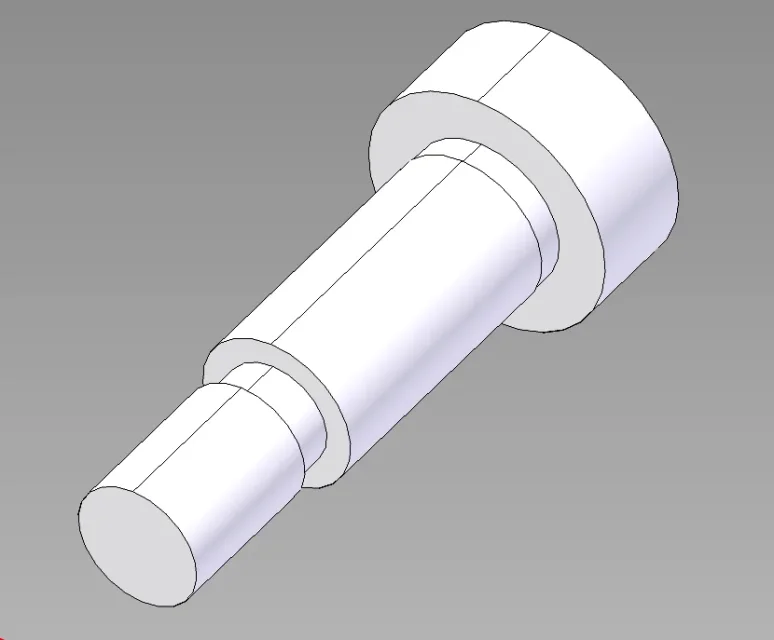
1710348029659.webpThis is a certain rupture of boxes: There's a way to avoid it, how was it in the previous versions of itself?
 
to me does not happen (if 2022).
depends on whether or step settings?
try the step I attach (the same as the image) and let us know.
1710399839848.png
 

Attachments

to me does not happen (if 2022).
depends on whether or step settings?
try the step I attach (the same as the image) and let us know.
with this went well. the file of the first image instead behaves well if opened with st10 and badly if opened with v2021. I will try to understand if there is any changeable setting.

Thanks anyway, now I know it's not systematic.
 
depends on the step file.

in any way to join the cyclics it is sufficient to use the command "optimize". probably on the st10 is done automatically, depends on the import settings.
 
depends on the step file.

in any way to join the cyclics it is sufficient to use the command "optimize". probably on the st10 is done automatically, depends on the import settings.
ah thank you, so far I had converted into synchronous and then deleted faces. I try!
 

Forum statistics

Threads
44,997
Messages
339,767
Members
4
Latest member
ibt

Members online

No members online now.
Back
Top