
• This forum is the machine-generated translation of www.cad3d.it/forum1 - the Italian design community. Several terms are not translated correctly.

3d solid overlap

  • Thread starter Thread starter Simone1666
  • Start date Start date

Simone1666

Guest
Good morning, everyone!

I wanted to know if in solidworks there is some function that allows me to overlap two step files in identical theory to see if there are differences.

I better explain: I have a step rev.0 and a step rev.2, is there a way to see if there are differences between the two?

Thank you very much
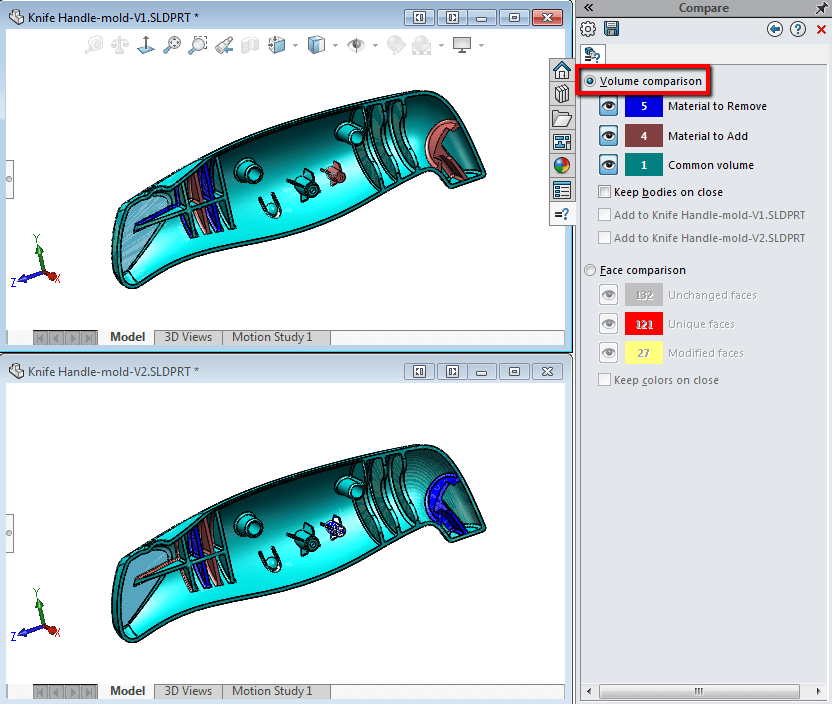
 
exists the comparison tool (in the guide indicated as "utility comparison")
 
but with this tool can I compare only the right functions? Can't I go and evaluate any differences in quotas?

For example I have a hole with depth of 3.1 in one case and 3,35 in the other, is there any way to assess these differences?
 
no, you can also compare the volume and then geometry
At this point I can see the differences between the two versions, but I do not have a tool that automatically indicates the different value? as I said before the 4 blue seats are indicating that they are different, but I do not know if for example for the diameter or for the depth
 

Attachments

  • Confronto.webp
    Confronto.webp
    43.5 KB · Views: 9
automatisms must be taken for what they are. you could do it in solid solutions and see if in the next versions they implement, you've ever seen.
 
At this point I can see the differences between the two versions, but I do not have a tool that automatically indicates the different value? as I said before the 4 blue seats are indicating that they are different, but I do not know if for example for the diameter or for the depth
use drawcompare that compares the two drawings with quotas etc......ennamo su
 
use drawcompare that compares the two drawings with quotas etc......ennamo su
Yeah, okay.
but to use drawcompare I have to make the table of the two pieces.

I thought there was a more immediate command to automatically find different odds in two different 3ds. at this point, if the piece is not as complex as in my case, I can safely use the tool measures directly in the 3d and see the differences between the two versions having to make an initial evaluation of the piece.
 

Forum statistics

Threads
44,997
Messages
339,767
Members
4
Latest member
ibt

Members online

No members online now.
ciao
Back
Top