• This forum is the machine-generated translation of www.cad3d.it/forum1 - the Italian design community. Several terms are not translated correctly.

a surface

  • Thread starter Thread starter gatton
  • Start date Start date

gatton

Guest
Bye to all,
I press that I am a neophyte of the surfaces of catia.
I would need help and I would be extremely grateful.
having a surface already built, it is possible to extend it literally, and not a edge at a time?
like when we have a flat profile, we do an external offset. Obviously not an operation that develops in 2d.

Thank you very much
 
edge command --> extract surface edge

extrapolar command ---> select the edge and then the surface

eye that if the surface is complex it is wrapped
 
Thank you so much... Unfortunately I was looking for a command that would do it on all edges at the same time but it does not seem there is, at least in wire and surface design.

However I am faced with a great difficulty for me that I am a neophyte.
I created a curved solid along an axis, and I need to create a sort of " Rectangular frame" that follows as guides the boundary of the surface of the solid itself.
putroppo I can't do it, because it incarnates sayndmomi (operator costs) that I have to use a less curved director.
the problem is that it wraps itself on the inside side when I expect it to make a sort of connection following the director (it does it correctly on the outside)!esempio.webpI also tried as a surface sweep.
 
for the first question:

?? but the edge command extracts all edges at once. . .
sends a surface image or the file so I understand better than what you're talking about.

for the second question:
even here better than sending the file or profile picture you want to use on the director, otherwise we don't get to head... often the problem is not in the knowledge of the command, but it is because you want to achieve geometrically impossible solutions... with those small rays on the ends, what profile can you turn inside?

Hi.
 
Thank you for your help.
As for the first question I answered myself, thank you very much the same.

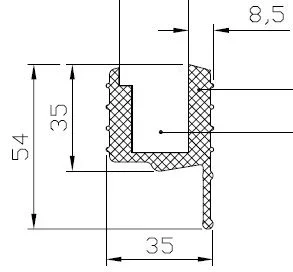
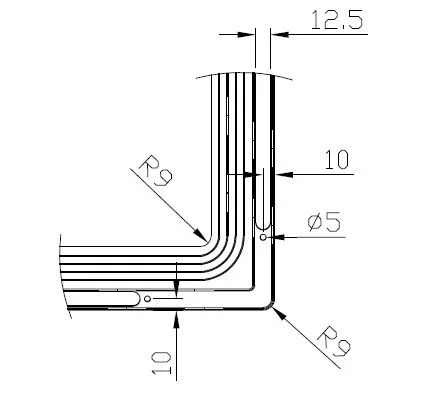
As for the second, they are in great difficulty; I attach pictures of the frame:Immagine2.webpImmagine.webpAs you can see, the problem arises in the corner, where the section deforms, because the inner part of the frame remains practically the same, while externally the section extends. How could I work to achieve a solution not too laborious? Thank you so much, I'm really desperate, I'm waving. (the frame must follow the inner object which is in practice cylindrical shape - extruded arc along a direction and thickened)
 
you could make the first part (r9 with the 4 rays increasing) with a director, let's say the internal one
while the second part r9 with 1 radius that decreases, with an external director

or use the solid multisection with an internal guide, an external and sections (the section is always the same, only that helps you control the pass points).
to place the sections, you have to put plans:
a plan at the end of the straight part (and start of the radius)
a plan at the end of the radius (and arc start)
a plan at the end of the arch

If you want, to avoid doing so many operations, it only realizes 1/4 of the solid, then mirrors it 2 times and get the full part.

Let me know.
 

Forum statistics

Threads
44,997
Messages
339,767
Members
4
Latest member
ibt

Members online

No members online now.
Back
Top