Mano63
Guest
Good morning to all,
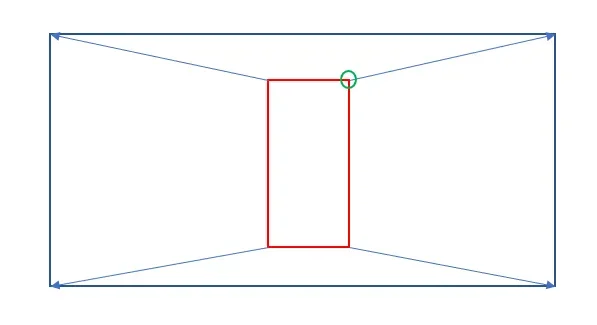
I created a block (named post2021, v. attached) with constraints that works this way (see pictures below):
operation "a" - selecting the block is highlighted the top right, drags to the corresponding vertex of the largest polyline (always on the top right) and the block adapts to the size of the larger polylinea (saving the texts consist of data fields that report size and surface).in practice, having planes with hundreds of polylines:
1 - with a lisp I introduce the post2021 block in the geometric center of every polyline that populates my planimetry (command that introduces the block in all polylines with a single selection)
2 - I repeat the operation "a" for each polyline contained in the design
I ask your help to succeed (with a lisp of your creation) to perform adaptations with a single operation.
I think useful, once the blocks are inserted (point 1) explode them all with special lisp (of which I have) in groups. groups are bound so that all elements "follow the movement of the polylinea contained in them.
the command that I ask you should make so that the four vertices of the inner polylinea to the group go superimposed to the four vertices of the largest polylinea (vertice of the polylinea of the group with summit of the larger polylinea closer). the other elements of the group will follow the polyline of the group itself.
simple concept, perhaps more complex explanation... If someone understood and wants to try to help me I thank him in advance.

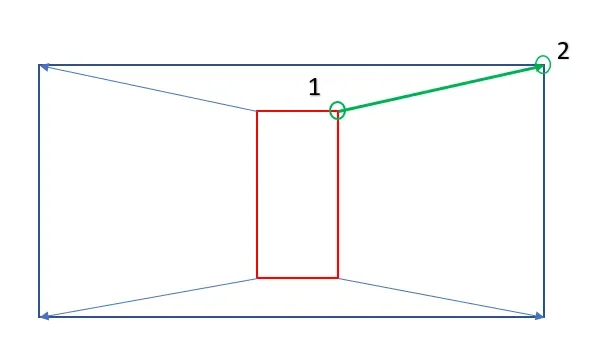
I created a block (named post2021, v. attached) with constraints that works this way (see pictures below):
operation "a" - selecting the block is highlighted the top right, drags to the corresponding vertex of the largest polyline (always on the top right) and the block adapts to the size of the larger polylinea (saving the texts consist of data fields that report size and surface).in practice, having planes with hundreds of polylines:
1 - with a lisp I introduce the post2021 block in the geometric center of every polyline that populates my planimetry (command that introduces the block in all polylines with a single selection)
2 - I repeat the operation "a" for each polyline contained in the design
I ask your help to succeed (with a lisp of your creation) to perform adaptations with a single operation.
I think useful, once the blocks are inserted (point 1) explode them all with special lisp (of which I have) in groups. groups are bound so that all elements "follow the movement of the polylinea contained in them.
the command that I ask you should make so that the four vertices of the inner polylinea to the group go superimposed to the four vertices of the largest polylinea (vertice of the polylinea of the group with summit of the larger polylinea closer). the other elements of the group will follow the polyline of the group itself.
simple concept, perhaps more complex explanation... If someone understood and wants to try to help me I thank him in advance.