
• This forum is the machine-generated translation of www.cad3d.it/forum1 - the Italian design community. Several terms are not translated correctly.

add custom properties to the cutting list

STC

Guest
Good morning.
in the design of metal carpentry with sw 2015 a customer, in the cutting list, requires weight, surface and other data.
I carry this table in spreadsheet and he inserts it into his file where he performs all his calculations.
in the part file I have to insert manually, in the properties of the cut distinction, the required entries. the problem is that if the profiles are so many the work is long and boring.
can these voices appear automatically without waste of time?
in the manual, the welding-dividing item for welding is explained how to add properties one by one manually, in the forum I found nothing.
often there are carpenters with hundreds of different profiles and plates and pass all the pieces to add 4 or 5 voices takes me too long.

Thank you all for your help
 
Good morning.

in the design of metal carpentry with sw 2015 a customer, in the cutting list, requires weight, surface and other data.

I carry this table in spreadsheet and he inserts it into his file where he performs all his calculations.

in the part file I have to insert manually, in the properties of the cut distinction, the required entries. the problem is that if the profiles are so many the work is long and boring.

can these voices appear automatically without waste of time?

in the manual, the welding-dividing item for welding is explained how to add properties one by one manually, in the forum I found nothing.

often there are carpenters with hundreds of different profiles and plates and pass all the pieces to add 4 or 5 voices takes me too long.


Thank you all for your help
all structural members can be managed automatically as long as they take sensible properties. you have to create tubular templars with the properties you want. even the dishes drawn. If you make ribs, you have to edit them by hand.
everything automatically can not be.
 
Hi.
the problem of stc is that he had the project that, apparently, did not start from any default with parts and assemblings having properties....., I am new on solid but I think you should do everything by hand or make you a macro... .

Alternatively I think that if you have the pdm it might be faster to make the property settings by selecting more simultaneous components. ...

However it is better to wait for the most experts on this matter.

bb
 
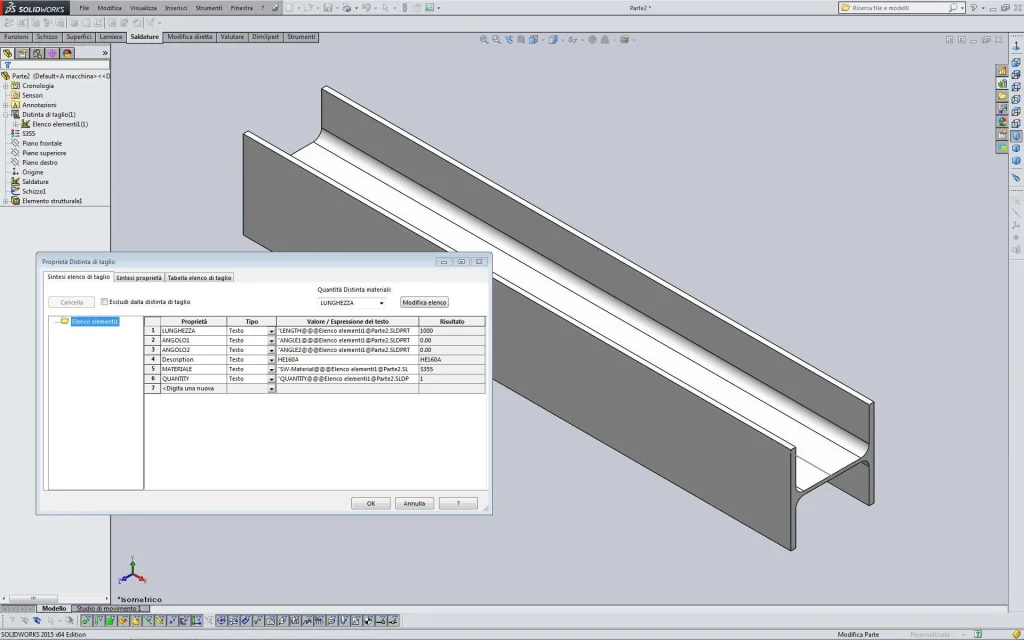
I should create a file for each profile but not enough. I attach a part screen with hea 160 and default properties appear.
if I add other properties like mass and surface, when I create another welded profile on the first I have to repeat the process because the properties are always length, angle1, angle2, description, material and quantity.Schermata.webpI am convinced that somewhere in the system there is a text file to edit. . .
the properties of the files imposed for each customer and appear in the list pieces and on the cartilage, but the problem always remains for the cutting lists and for the sheets.

thanks for the speed!
 
you need to change the profile file (sldlfp) where you add the items you want.
the voices lunghezza,olo1,olo2, calculates the program at the time of creation, the others are already present in the profile, open it and see if I am not right.
in sequence:
profile with weight properties
profile without weight ownership
distinct with weight properties
distinct without the ownership of weightView attachment 40440
View attachment 40439
View attachment 40438
View attachment 40437There are no other manners. the work already done you have to do it by hand; to make a system first can be, I do not guarantee anything if they happen I have never existed, that to sequentially compile the properties on the first list then with the ctrl key pressed to select them and copy them on the other lists. or go to proprietary synthesis (second tab), select the affected item and where missing add the affected value/expression.

as filling out the profiles can be annoying I make present this thing, always with the fact that I do not exist, that if the profile is compiled well and exploits the measures of the sketch (for example the "angolare@schizzo@020x030x04.sldprt"x"l1@schizzo@020x030x04.sldprt"ché profiling@020x030x04 instead if I use 1' measures of dishes I can always use that from 20x4 and change the sketch in 50x6, 300x15 and so on.
 
you need to change the profile file (sldlfp) where you add the items you want.
Eureka! I gave a peek because it's enough to work at this hour. . .
problem solved and actually with hindsight I could have thought about it myself but I lost half a day. . .
I find it a pity that it is not written anywhere in the manual.

Many thanks to all for the commitment.
 
in the manual, which is an online guide not a vademecum, can not be written all else would be so great to disperse even the fundamental notions.
These knowledge is the result of experience, necessity, curiosity and even a little ass that never spoils. and the forum is all this
sometimes you smadonna, mea culpa, without thinking that those who already know the information also know where to look for it in the guide and what words to use for research while those who do not know it could crave in the most total darkness; but it is also true that there are demands where it is enough to have the opposable thumb to get there alone.
the right aristotelian means does not exist therefore who knows continues to unmadonnare giving information and some dick and who does not know how much given all inclusive.
and this is all gone to peace...
 
in case someone else was interested in the solution to the problem:
in the change of the entries of the "lib feat part" in the properties of the files (information summary) there is a "change list" button where you can add all the new entries and then make the choice in the drop down menu of the properties.
 
I do not know if I am in the right section, but I try:cool: I have a problem with solidworks, in practice I create new welding profiles and so far all right, my problem is later in the cutting list i.e. in the description of the part comes out only what I wrote, and if I change the measure of the part always remains the usual written thing. I would like to be able to create profiles like the standard ones present in solidworks, that is, changing the measure, is updated also in the separate cut without that I have to correct it manually. I would use solidworks standards but the description is in English. for this I would like to create personal profiles with descriptions in Italian. Thank you in advance if you can answer me.
 
in the explanation you made some confusion and you understood very little.
in the cutting list ie in the description of the part
distinct cutting and ownership part are two very different things
only comes out what I wrote, and if I change the measure of the part always remains the usual written thing
How is it right that it is, what else should it go out? what measure you speak and where should be written
I would like to be able to create profiles like the standard ones present in solidworks, that is, changing the measure, is updated also in the separate cut without that I have to correct it manually.
What do you need to correct? What measure do you refer to? the only variable size is the length because the others are inherent in the specifications for each profile type
I would use solidworks standards but the description is in English. for this I would like to create personal profiles with descriptions in Italian
Simply open the solidworks profile and change the description by putting it in Italian.

in the useful resources of this section there are a lot of profiles besides being treated in this debate post #19
 
I add an image that I hope will clarify the concept of the cut distinction.
first we clarify two concepts:
the profile file with sldlfp extension is a file with only a closed sketch inside which represents the desired shape
the structural elements can be inserted only in a part file and need a guide sketch (open or closed) and the profile file that once inserted loses the connection with the sldlfp file (in essence if created the structural element you go to change the sldlfp file the changes will not be made to the part file and you will have to repeat the strutural function)

1.2.3 positions are created by solidworks for each structural element
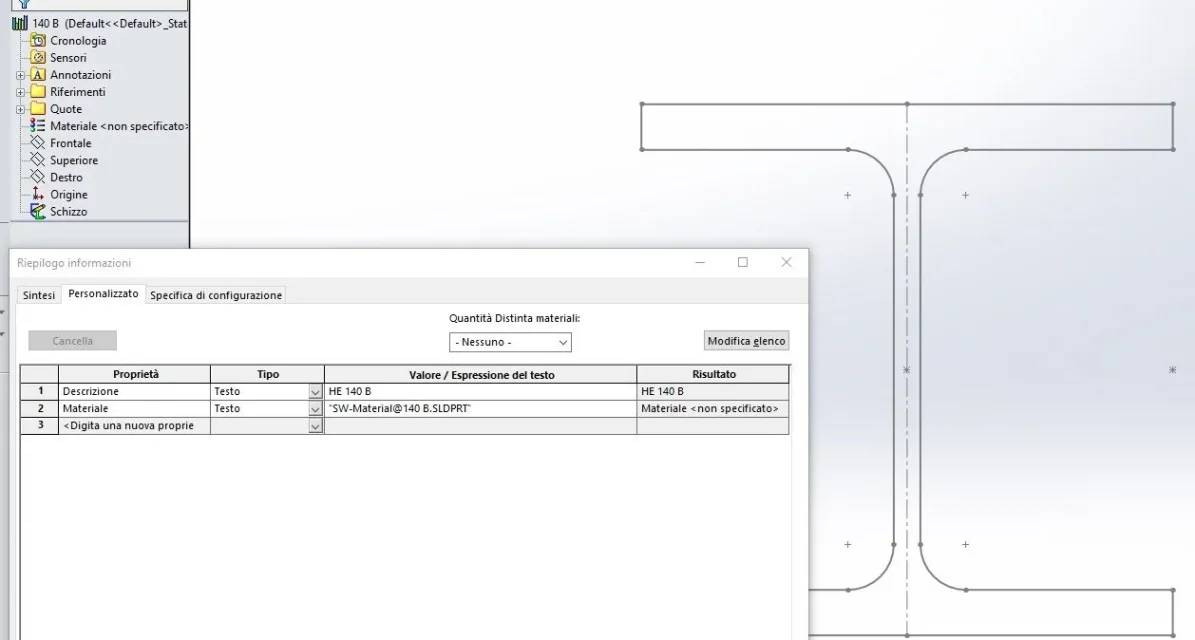
4,5 positions are inserted in the properties of the sldlfp file; in that file you can enter all the necessary properties (e.g. warehouse code, weight) that can be either related to file variables (in the first case they will be subject to the modifications of the part file as the location 5 of the image in which they are inserted while in the second as the position 4 will be fixed) and will be reported in the separate cut.
I believe it is obvious but I write it equally; if by chance other properties are inserted in the cut-off of the part they will remain only in that part and in the case of using the same profile on another side file will not be repeated.
Immagine.webpI also insert the profile file imageImmagine.webp
 
Last edited:
I would like to refer to this discussion as the previous person, to set the customised properties of the cutting distinction of the components I have put into the discussion I have previously created.
but I have to go on every single component to create the delimitation and edit by hand the weight property and then insert it into the table, this last step is automatic.
Unfortunately the images that were in this discussion have disappeared, I think the procedure was in those pictures, it is possible to trace in some way.

Thank you.
 
If you use the structural members you need to change the sldlfp profile, for all others you need to change the properties of the welds by right on the weld symbol at the beginning of the feature manager. you can create a template already set, so distinct cut is always present and compiled as you want
 
Thanks again.

regarding the part, ok, I insert in the model welds and the mass property and therefore for the new details is set automatically, while for the old ones I have to do it manually.
instead regarding the profiles, using the uniworks, how should I do, look for the folder where they are inserted and change them one by one?
 
I never used the uniworks.
I speak of profiles of the structural members that are used in part environment.
profile files are sldlfp, as already written several times in this thread, and to find them, if you use them, you have to read what it has inserted in options> file paths> weld profiles
 

Forum statistics

Threads
44,997
Messages
339,767
Members
4
Latest member
ibt

Members online

No members online now.
Back
Top