
• This forum is the machine-generated translation of www.cad3d.it/forum1 - the Italian design community. Several terms are not translated correctly.

added branch quotation

  • Thread starter Thread starter MaxBigno80
  • Start date Start date

MaxBigno80

Guest
Good morning to all,
I wanted to ask but in the 2020 version of solidworks have deleted the add branch command?
until a short time ago if I had a quotation of a bevel and I wanted to add a branch, because I wanted to quote two, with the right mouse button you could do, now I can't find it I lost something?

Thank you.
max max
 
Good morning to all,
I wanted to ask but in the 2020 version of solidworks have deleted the add branch command?
until a short time ago if I had a quotation of a bevel and I wanted to add a branch, because I wanted to quote two, with the right mouse button you could do, now I can't find it I lost something?

Thank you.
max max
I have not yet passed to 2020, but you can try to see if the keyboard shortcut works

> select the quota
>> brings the mouse to the top until the icon " → D" appears (see also image below)
> > > > > > > > > > > > > > > > > > > > > > > > > > > > > > > > > > > > > > > > > > > > > > > > > > > > > > > > > > > > > > > > > > > > > > > > > > > > > > > > > > > > > > > > > > > > > > > > > > > > > > > > > > > > > > > > > > > > > > > > > > > > > > > >
>>>> drag the share on the feature you want to "add to the branch"
1593677544455.webpUnfortunately this mode is sometimes Dancer and does not always recognize the features to quote (at least in my experience).

However strange that they removed the option "add branch" ?
 
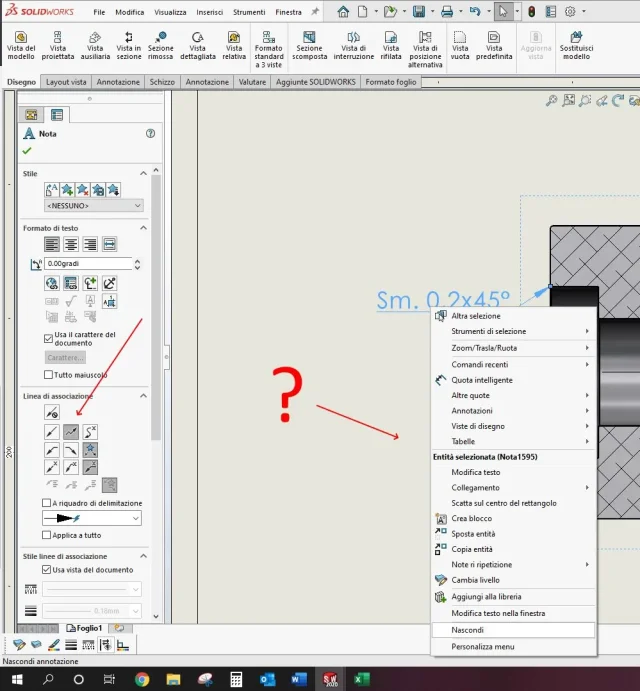
the item add branch is present if the quota is set as multi-slot in the board association lines of the property manager
 
Hi.
as you can see the quota is set as a multi-click, but if I click dx button does not appear "addi branch"
 

Attachments

  • quota.webp
    quota.webp
    92.9 KB · Views: 7
that is not a quota but a note, also you did right button on the text and not on the arrow ...
 
to be precise the note does not require that it is preset on multi-click. going to add a new branch this option is automatically assigned.
to have the lines that start from the same point changes the association line from multi-slot to standard association line.

maxbigno80, please when you risk solutions correctly describe the problem using the correct terms and attach images otherwise you risk giving useless and incorrect solutions
 

Forum statistics

Threads
44,997
Messages
339,767
Members
4
Latest member
ibt

Members online

No members online now.
Back
Top