
• This forum is the machine-generated translation of www.cad3d.it/forum1 - the Italian design community. Several terms are not translated correctly.

agreement

  • Thread starter Thread starter CielitoLindo
  • Start date Start date

CielitoLindo

Guest
hello, everyone.
as i have written in the presentation one the cad for more than 20 years. learned from self-taught i slowly increased my knowledge by exploring it more and more. i am now having to teach cad 2d but sometimes things happen to me that i do not know how to solve because i have never happened.
it's, for example, the case of the "gather" command. i always used it by selecting the first line and then the second and the chord was created. while now in autocad 2021 (in italian) to make the connection, i must select the second line holding down the shift key. is it possible to change this configuration? i also use autocad 2021 (english) but use it as always or simply by selecting the first line and following the second, without pressing shift.
i hope i've been clear in the explanation.
good cad to all.
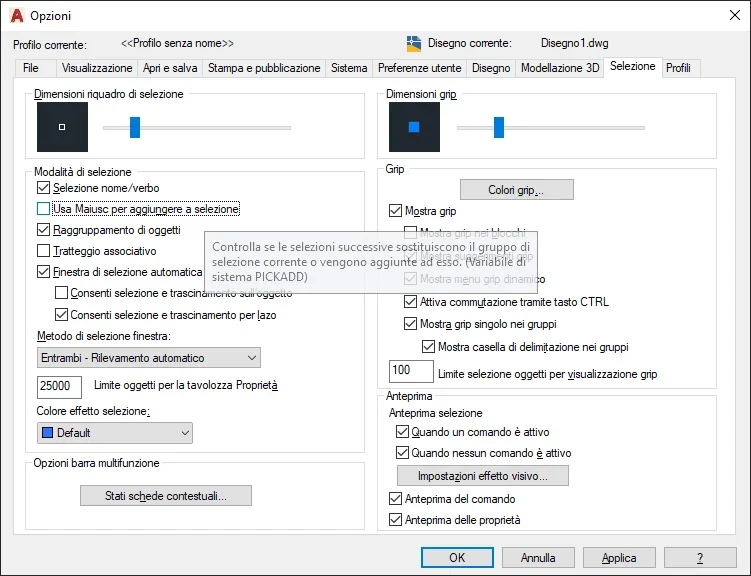
 
as soon as i have the cad in front i try. i tested it now on my english and it actually is at 2. is the same in the italian version?
 
Good morning. Friday I had to check pick add and it was already set to 2. So I'm still at the starting point.
 
select the second line holding down the capital key actually cancels the radius value and executes a live edge connection (as if the radius is = 0)
Are you sure that the radius is not set too large and therefore without the capital key does not make you do it because geometrically impossible?
 
Sure. the connection radius is imposed on 0 for both distances. the connection that I intend to make is perlappoint to radius 0 or connection to angle.
 
the shift button in the connecting command (especially in the second element selection) has a precise task, which is written as a reminder also in the prompt:
'select the second object or select the object by holding down the maiusc key to apply the angle or [RAggio]:'
Pickadd to 2, and all right, but I think it is also necessary to check that in the submenu 'selection' of the window "options" the box that regulates the use of the shift for the addition of new selections does not contain the check.
this is managed by pickadd, which in the connection command does not enter the merit.
Immagine 2021-05-24 164628.webp
 
this is managed by pickadd, which in the connection command does not enter the merit.
But it's strange because the connection command always expects him to be selected another entity after the first. always maintains the first selection. That's why I thought it might depend on that check I was talking about before, which could affect, although it seems strange.
Unless there's any other variable, but I don't think so.
 
explained the ark
problema:Suddenly, the use of autocad connection requires to hold the maiusc key during the selection of the second object, while previously the operation had never been necessary.cause:is in use the option "No cut" of the raccordo command.
solution:
  1. run the connection command in autocad.
  2. when the request message is displayed select first object or [Annulla/Polilinea/Raggio/Taglia/Multiplo], select size size.
  3. when the message is displayed type cutting mode option [Taglia/No taglio] :, select size size.
 
Good. In fact I tried to check and de-check the use of shift in the selection tab on my cad and the Nn connection command changed. Tonight I try this last option and see.
 
from me he kept letting me select the second line without shift...
in my 2016 autocad instead it works. cut/cut determine whether or not to use the shift button.

However this size in the fitting is a complication that autocad could well avoid in my opinion. what sense does it make to leave the original lines after making a connection? It's clear that if one gives the ring command he wants the lines to reconnect and cut what is to be cut. It doesn't make sense to leave the "ladies". What are they for?
Then these things happen for which one does not know what are determined, because there are an ocean of variables, options and various options.
 
in my 2016 autocad instead it works. cut/cut determine whether or not to use the shift button.
I understand why... try to set the connection radius different from 0 and you will see that even with non-cutting does not require the pressure of the maiusc.
It is as I said; in this specific case autocad is tricked because there is nothing to 'do not cut' and therefore without the pressed maiusc it is not able to execute the command correctly, but not for a matter of selection or pickadd, but because with the mausc pressed the connection radius and size or nontaglia does the chord to live edge anyway.
 
the tristus method has been resolving
I didn't even know that this option existed in the connection command. autocad is always prodigal of new things. However it is good that you can use the link command by saving unnecessary keyboard steps.
You don't plan roads, do you?
I'm telling the truth, I would have preferred autocad to have some other usefulness to track the road. Maybe one on the spike of the curves. we did the work of piquetting curves directly in the countryside through tables. and with the same we calculated the distance between the summit of the 2 lines that identified the traces to be connected and the 2 points of tangency where the curve began and ended. based also on the maximum project speed for the curve. all with the boards.
We didn't use autocad at the time. and anyway it would be served a little in the countryside.
extend 2 lines and break them (with the old method) at tangenza points is a game by boys with autocad.
 
I'm telling the truth, I would have preferred autocad to have some other usefulness to track the road.
but autocad does not treat road tracks, it is only a drawing tool.
extending 2 lines and breaking them at tangency points is a game for boys with autocad.
Of course, but why would he cut two lines if I have to re-extend them?
...
All right, we're digging. we have all learned something new;)
 

Forum statistics

Threads
44,997
Messages
339,767
Members
4
Latest member
ibt

Members online

No members online now.
Back
Top