• This forum is the machine-generated translation of www.cad3d.it/forum1 - the Italian design community. Several terms are not translated correctly.

aid for quota

  • Thread starter Thread starter valeria_emme
  • Start date Start date
the blue point, as you call it, is present on the function odds
as you obviously have the instant3d option activated (see help).
you have only one share with two points,the 84 share of sketch1 That's it.
because the sketch is symmetrical.
I attach a fast file in pait:cool:... don't preach to me for using a little orthodox system:biggrin:
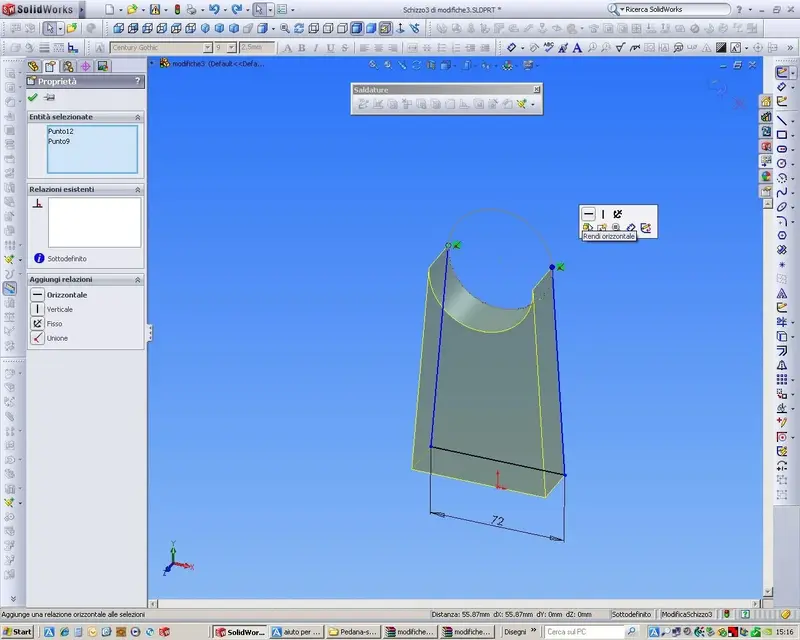
sketch3 underdefinite, select the two vertices and give the report
horizontality you will see that the sketch becomes black
I put it, but it doesn't turn black... If I try to define the sketch in an automatic way I see the quota between the point of tangence and the origin, but I do not care... I care that the base is 72, in symmetrical position compared to 84 (i.e. 6 on one side and 6 on the other), that the axis of the cylinder is 130 on the ground, and that the two oblique sides are tangent with the cylinder.. .
I strongly recommend you to perform the tutorials.
I know I should do the tutorials, but I'm not well... I do everything with the online guide, don't I? ? ?
 

Attachments

  • modifiche3.rar
    modifiche3.rar
    85.5 KB · Views: 2
  • Immagine.webp
    Immagine.webp
    45.1 KB · Views: 11
I would have done first the hole, quoted 50 mm from the base and in axis with the half-works (design us a construction line from the center to the half-way of the base line) and after the asola aligning the half-works (with another line of construction) with the center of the hole, thus saving the share of 50 of the asola and having the asola always centered with any hole compared to the base.
I try to do it again so... I have some trouble fixing 50 from the edge...
I saw the base sketch still has those two odds of 42,
:confused: but there is only one quota from 84 :confused:
horizontal link between origin and a summit. cancels bond and quotas and refract
the sketch1 is subdefined: add the horizontal relation to the line that intersects the origin.
must I be or should not be horizontal...??? the sketch1 is completely defined
 
I attach a fast file in pait:cool:... don't preach to me for using a little orthodox system:biggrin:


1)I put it but it does not become black... if I try to define the sketch automatically I see the quota between the tangency point and the origin, but I don't care... I care that the base is 72, in symmetrical position compared to 84 (i.e. 6 on one side and 6 on the other), that the axis of the cylinder is 130 on the ground, and that the two oblique sides are tangent with the cylinder.. .


I know I should do the tutorials, but I'm not well... (2)I do everything with the online guide, don't I? ? ?
1) then you did not put it.
2) read the guide well then.

the sketch1 in the file change It is not defined, if you put it in place
Better like that.

For the last time, forget the blue balls. Do you try to drag them?!? instant3d... not straw... )
regarding the share of the shoulders, eliminates the axis3 and shares the sketch.
same thing for the 32 mm hole.

ps: the construction lines that were recommended to you, are not the axes.
 

Attachments

  • rel01.webp
    rel01.webp
    100.8 KB · Views: 6
  • rel02.webp
    rel02.webp
    104.4 KB · Views: 6
Tell me we're here.
No!

eliminates relationships "fix" from sketch3 e sketch12:36_1_10:. . .
in tracking the construction lines, make the end of the line coincide
with the center of the hole.. you will have a suitable relationship for purpose.
never fix with "fix" a line or a point, unless
You're desperate.
You can do it!
 
marcof said:
I saw the base sketch still has those two odds of 42,
:confused: but there is only one quota from 84 :confused:

Sorry, you're right, the second time I checked, I had to reopen the old one.
must I be or should not be horizontal...??? the sketch1 is completely defined
in changes 2 was not good, you had deleted the horizontality bond even in the base line, but I saw that in the "news" file you fixed it

You still have them in the sketch3. so do not use mai the relationship of "fix" to bind sketches, forget it, and forget also of the automatic quotation.
activates the display of sketch reports from the "visualuzza" menu.
select the "fix" and delete them.
You'll see that part of the sketch is underdefinite.
put in front view and you will see that the 72 mm base line is not connected to the upper edge of extrusion1; If you take it for a summit you can move it wherever you want.... well, take it for a summit and go to touch the upper edge of the base to which it must be attached, in this way the bond remains.
Now you will see that you can turn it to the right-left and consequently the two upper vertices, those in the tangency point, rise or lower accordingly.
these two vertices select them simultaneously and put a horizontal bond. you will see that the sketch becomes symmetrical compared to the support base and completely bound.
Get out of the sketc.
End.

I recommend, forget about the "fix" and the automatic quotation.
 
But I'm desperate... (They told me that writing in uppercase means screaming)... that sketch 3 I just can't do it :36_1_4:
I keep messing with your file, in the sense that if I published a sketch, my previous features disappear.
I gave a check to understand how caspita you proceeded and I found all the constraints only between sketches. I think you did sketch1, then sketch2 (related to 1) and then sketch3 (related to the two previous ones)after you selected them one at a time to create the three features. . .
non si fa!!!
:smile:

made the first feature, your base, select the plans or faces from the newly created solids and sketches do them above so that when drawing the various entities they connect to the geometry of the solid. if you do everything in 2d and then models you have to do a unique sketch, but anyway for that piece it doesn't make any sense to do it
 
put in front view and you will see that the 72 mm base line is not connected to the upper edge of extrusion1; If you take it for a summit, you can move it wherever you want.
No, I can only move it up and down...
the two upper vertices, those in the tangency point, rise or lower accordingly
No, they stay fixed.. .[/QUOTE]
these two vertices select them simultaneously and put a horizontal bond. you will see that the sketch becomes symmetrical compared to the support base
already done.. .
and completely bound
is not bound :36_1_3: it starts to feel like taking the pc and flying it against the wall :36_1_28:
 
I keep messing with your file, in the sense that if I published a sketch, my previous features disappear.
I gave a check to understand how caspita you proceeded and I found all the constraints only between sketches. I think you did sketch1, then sketch2 (related to 1) and then sketch3 (related to the two previous ones)after you selected them one at a time to create the three features. . .
non si fa!!!
:smile:
:36_1_1: Yes... I did so... next time I promise I won't do it again
 
No, I can only move it up and down...
is not bound :36_1_3: it starts to feel like taking the pc and flying it against the wall :36_1_28:
you have to keep calm.... oooommmmmmmmmmmmmm:biggrin:

then, if the two above are black horizontal and fixed with those you are fine. Do you have a part of the sketch that goes around? Well, move it by pulling it by vertices or lines and you can understand what's still to be fixed. If that basic segmant can only move it up and down means that it is not "attached" at the top edge of the base (extrusion1). If you're going to understand that you can join us in two ways:
1) make one of the two segment vertices coincide (which presuppose has the "horizontal" bond, otherwise put it) with the upper edge of the base, and you can simply drag it and let it touch it with the edge.
2) you can "coline" the segment with the edge by selecting both (crtl) then clicking on the available constraints between which you have "colinear"

Then he should go well, indeed he must!!

Don't panic. something too much moves in the sketch? and you ask what constraints they serve to make it fixed; of course everything except the "fix" bond that serves in very special cases, practically never.
 
I understand that, you heartless bastards, you don't even fool me like you rightly remembered in the other post, but I ask you again:
I use swx 2009 sp4.1, it also happens to you that in its files (all those that posted until now) when you come in edit of the 2 and 3 Shizzo disappear the previous features in the tree and see only the sketch that you change?

Hi.

p.s in these transgression times you say I have to re-enroll me as "mirkaf" to be considered? ?
acc. excuse "carina" (:tongue:), are unforgivable; the ladies never wait:biggrin:

I also noticed (sp 5.1). In fact it made me strange to open the sketches and not see the bodies modeled before. and I wondered where he was "supported" for the sketch parts from convert entities (like the arc with the inclined tangent lines), or as it had traced them.. bho?
I don't know how he's done the sketches. Maybe getting them out of that first where he put all the profiles together?

greetings
Mar

..and excuse again:36_3_11:
 
It seems to me that you did the sketch1, then the sketch2 (related to 1) and then the sketch3 (related to the two precedents) since you selected them one at a time to create the three features. . .
non si fa!!!
:smile:
:36_1_1: Yes... I did so... next time I promise I won't do it again
next time a cabbage:cool:, I will do it again! :smile:
save the file by name and leave. I assure you that by doing it calmly, without wanting to beat world records and taking the time you need to search for commands it doesn't take you more than 15 minutes. If you run, when you're practical, you do it in 3 minutes dry.
draws on the solids that away you are creating and go quiet.

I forgot, in the sketch12, apart from that horrible bond of "fix" that have already told you to remove, I made the horizontal construction line that crosses the whole base. And what do you need done what? to a pipe...
you have to do that from the center of the hole to the mid-range of the segment from 25 of the asola. reopen the sketch, select the extreme coincidence bond, delete it, drag the extreme of the construction line in the center of the hole where it will remain bound. If you move the hole the asola will follow accordingly.
 
acc. excuse "carina" (:tongue:), are unforgivable; the ladies never wait:biggrin:

I also noticed (sp 5.1).
vaccaboialadraschifosa:tongue:, but we are at 5.1 of 2009 and I am dormant at 4.1?
I have to update. . .
 
if the two above are black horizontal and fixed with those you are fine.
I realized they weren't okay, but I pulled a vertical construction line and put a coincidence relationship between the end of the line and the middle point of the edge... and now it only goes up and down....
you can join us in two ways:
1) make one of the two segment vertices coincide (which presuppose has the "horizontal" bond, otherwise put it) with the upper edge of the base, and you can simply drag it and let it touch it with the edge.
does not work :confused:
2) you can "coline" the segment with the edge by selecting both (crtl) then clicking on the available constraints between which you have "colinear"
I also thought of making them hilly, but if I click Shizzo3, I can't select anything related to other parts, and then I can't select the edge of the base
 
I also thought of making them hilly, but if I click Shizzo3, I can't select anything related to other parts, and then I can't select the edge of the base
ahhhhhhhh, you finally found that you didn't model yourself from three separate sketches like you did...
You've unmarried until now because you couldn't connect the geometry of the sketches to the solids and you probably had a hard time understanding what we told you to do so you were too good to get to the bottom.
You've got to start over, you've been cuffed so much now that if you start from scratch you do it in a moment.

Listen to me:
1) open a new part and call it "definitive tomb" :smile:
2) on the front floor sketch1 of the base and its extrusion1
3) on the same plane sketch2 and extrusion2 cylinder
4) on the same floor sketch 3 and extrusion of the support by attaching to the solid geometry that you will always have good in sight.
5) go on alone that you now know the process by memory and from here it is all downhill
6) between half an hour I want to find here the rar file of the piece made as a rule of art otherwise it will touch you everything that we have saved you so far not to have read well (but that well, not even browsed...) the help .:wink:
 
It's dda mò.!
but did not activate automatic notification for updates?

greetings
Marco:smile:
now that I tried I remembered why I am still at 4.1.
I am using win7 and 2009 is not certified (palle, it works very well :smile:) so the downloader manager does the Bastrdo manager and does not let me start the download. 4.1 I dumped it on the old pc with xp. I have to remake the maneuver from that pc. .
 

Forum statistics

Threads
44,997
Messages
339,767
Members
4
Latest member
ibt

Members online

No members online now.
Back
Top