
• This forum is the machine-generated translation of www.cad3d.it/forum1 - the Italian design community. Several terms are not translated correctly.

alone not together

  • Thread starter Thread starter ansyolitico
  • Start date Start date
Bye to all,
Can someone tell me how to use modeling to create explosions? I imagine that you start from a pkg assembly model and make configurations but I do not know the process operationally. .
 
Bye to all,
Can someone tell me how to use modeling to create explosions? I imagine that you start from a pkg assembly model and make configurations but I do not know the process operationally. .
create new configuration, choose as the owner the axieme to make the explosive, place the details and subgroups as the most you cling and save the axieme.
important to check that the configuration is "fit" to the content and not to the instance.

then go into the environment 2d annotation create your view by choosing between the properties the configuration you put in place to do the explosive, so also the view will have the configuration exploded and not the standard one.

said this however use an unknown cad without anyone giving you a hand is a little difficult
 
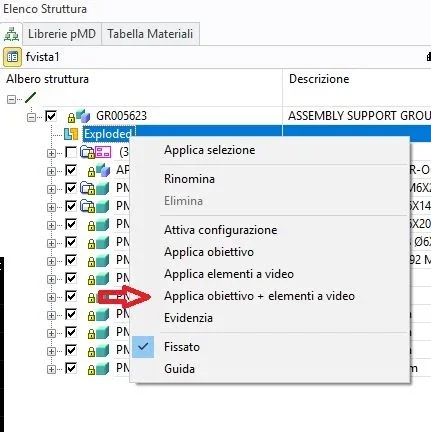
hi I only add that it is convenient once you create the configuration, explode the components and have chosen the view direction to be able to save everything in the configuration by clicking the dx button on the created configuration and then on apply lens + video elements. so doing all the time you activate the configuration not only you will have the explosion of the components, but the view will rotate you to see everything from the best angle, chosen previously.
 

Attachments

  • Immagine.webp
    Immagine.webp
    24.4 KB · Views: 5
if you do not hi the model manager you have to use a unique folder and save with "modified 3d" and not "save 3d". sd recognizes the modified models or combinations and saves only those. remember that it is more important the "content name" of the name part, when saving sd recognizes as identical (shared) parts with the same name contained. two identical parts cannot have different content names and different parts can not have the same name contained. when you create a new part you must be rigid in giving it a unique content name immediately, if you do not do it when you go to save sd recognize the conflict and will automatically try to save the part in a different file (named xxx-1) to recognize it. when you see that sd tries to change the file name, check immediately if you were wrong to give an incorrect, existing content name, and change it before saving. with model managers you can save in different folders and he cares about managing common parts. if you can get into symbiosis with the names contained and think of the projects as variations of the same "world", the unique folder, is not difficult. I am one of those who have always used the "salva_3d" without model manager:)
 

Forum statistics

Threads
44,997
Messages
339,767
Members
4
Latest member
ibt

Members online

No members online now.
Back
Top