
• This forum is the machine-generated translation of www.cad3d.it/forum1 - the Italian design community. Several terms are not translated correctly.

apply different materials on the same wall

  • Thread starter Thread starter wikilivia
  • Start date Start date

wikilivia

Guest
Bye to all,
I am working in 3d. I have to apply two different materials to the same wall (to understand us lower part of the wall of one color, high part of another. I tried to work on the wall style by creating components to which I then assign different materials, but I can't understand how this window works (see attached image) : can you explain how to do it? or where can I find tutorials related?
Thank you.stile muro-componenti.webp
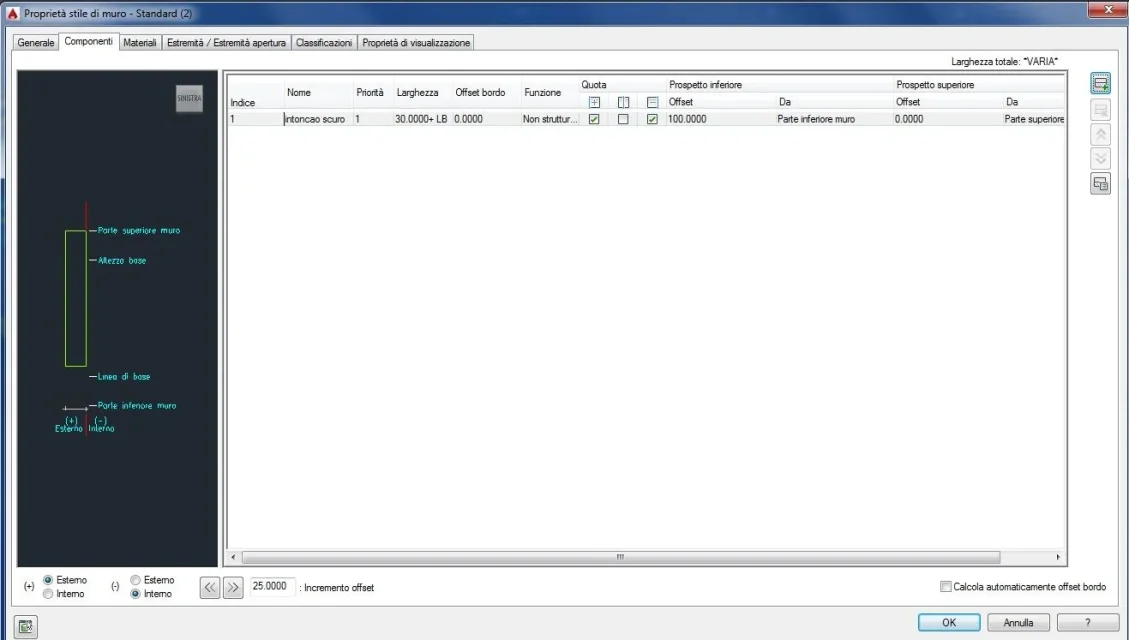
 
you have to act on the parameters that you find on the right "lower prospect" and "upper prospect" with relative offset...but if I can advise you (I think you're still at the abc) leave aca and go on revit. autocad architecture is a product now without any future
 
Bye to all,
I am working in 3d. I have to apply two different materials to the same wall (to understand us lower part of the wall of one color, high part of another. I tried to work on the wall style by creating components to which I then assign different materials, but I can't understand how this window works (see attached image) : can you explain how to do it? or where can I find tutorials related?
Thank you.View attachment 38902
http://exchange.autodesk.com/autoca...#ws64d9a2f0cce095131796abef985cc14ba-7fec.htm
- - - updated - - - -
you have to act on the parameters that you find on the right "lower prospect" and "upper prospect" with relative offset...but if I can advise you (I think you're still at the abc) leave aca and go on revit. autocad architecture is a product now without any future
Why do you say he has no future? Do you have any first-hand news?
 
Why do you say he has no future? Do you have any first-hand news?
you do not need eye of lynx to see (and understand) that is a product arrived at the end of the race. look at the news introduced in the last 3 releases...it is more than obvious that autodesk, even in the face of the investments made (graitec, robot, eagle point, etc...), is pushing on revit. take a look at the labs page (https://beta.autodesk.com/callout/?callid=73a1e2a95b1848fc8e4fe48d12a4d95a), look at how many plugins are developing on aca and you draw conclusions.
 
you do not need eye of lynx to see (and understand) that is a product arrived at the end of the race. look at the news introduced in the last 3 releases...it is more than obvious that autodesk, even in the face of the investments made (graitec, robot, eagle point, etc...), is pushing on revit. take a look at the labs page (https://beta.autodesk.com/callout/?callid=73a1e2a95b1848fc8e4fe48d12a4d95a), look at how many plugins are developing on aca and you draw conclusions.
probably you're right, looking at the autodesk forum there are three post pages for autoarch in November and 13 for revitarch
 
you have to act on the parameters that you find on the right "lower prospect" and "upper prospect" with relative offset...but if I can advise you (I think you're still at the abc) leave aca and go on revit. autocad architecture is a product now without any future
Okay, thank you. Actually, I am at the abc for some things, that is, I have a method of using the program a little 'creative', but I got tired of struggling like a damn to do certain things when I'm almost certain that there are simpler roads..if only I knew how to exploit all the potential. I was hoping to find some tutorials in Italian but I will manage with what's in English.
Anyway...thank you!
 

Forum statistics

Threads
44,997
Messages
339,767
Members
4
Latest member
ibt

Members online

No members online now.
Back
Top