
• This forum is the machine-generated translation of www.cad3d.it/forum1 - the Italian design community. Several terms are not translated correctly.

apply fabric and color

  • Thread starter Thread starter genesis1975
  • Start date Start date

genesis1975

Guest
Good morning.
I am in a set and I want to apply a fabric with default color right in the aspects in one part, tells me to do alt+ drag but it does not apply me anything.. .
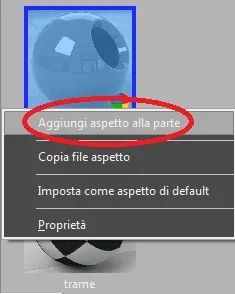
 
when you move it must compress an icon bar where you have to specify what you want to apply the color. if you move the mouse too far from where the bar was placed disappears
 
then if I take other painted metals it immediately gives me color with alt+transcin, while for what I want even if they select from the barn the part does not give me the right color and opens the window that makes me choose to me with the color palette, but I want just the default one that I already used for other parts but that now does not apply it to me
 
Now that I've been tapping a little bit, when I open an ordinary set at the beginning, it makes me see dark blue, and then after 2 seconds, it becomes a slightly different color from before... How do I return to the colors before?
 
It's such a general question that I can't answer. .

What do you mean by: first color?
is the default color?
What comes out in the color chart?
Have you changed your monitor?
 

Forum statistics

Threads
44,997
Messages
339,767
Members
4
Latest member
ibt

Members online

No members online now.
Back
Top