
• This forum is the machine-generated translation of www.cad3d.it/forum1 - the Italian design community. Several terms are not translated correctly.

assembly due party.

  • Thread starter Thread starter p@po
  • Start date Start date

p@po

Guest
I realize that for the most skilled the following problem will make laugh but......
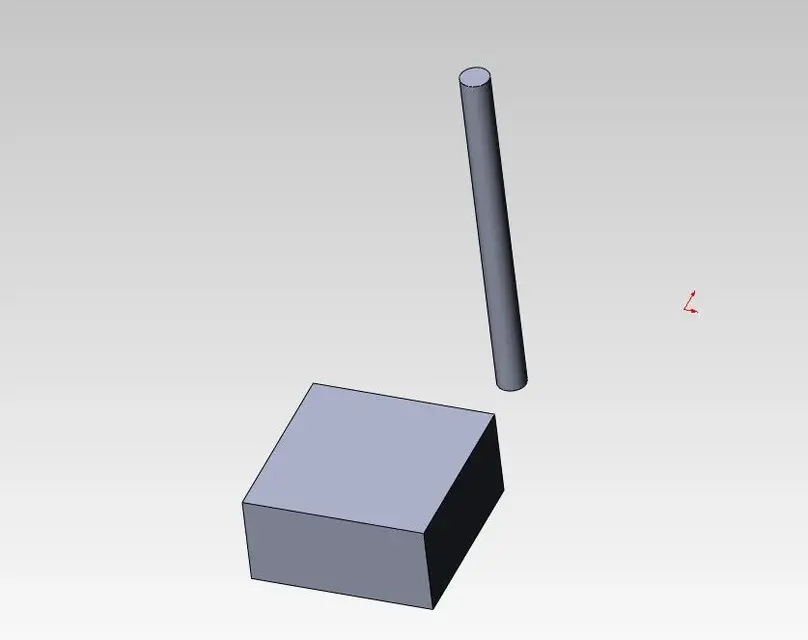
how do I make sure that the center of the cylinder coincides exactly with the center of the upper face of the "middle" cube? ?

I thought I'd bypass the problem by creating a flattening nap on the rectangular base, but am I forced to do it?
 

Attachments

I realize that for the most skilled the following problem will make laugh but......
how do I make sure that the center of the cylinder coincides exactly with the center of the upper face of the "middle" cube? ?

I thought I'd bypass the problem by creating a flattening nap on the rectangular base, but am I forced to do it?
if you have designed with all the climes of the case, selecting the respective plans
and in three clicks you the cable.
senno go to edit part (parallelepipedo) select the face where it should
support the round and sketch a point.
Use that point and the cylindrical part of the round.
easy.

mhhh 28 kb... it stinks me together without the parts...
 
I realize that for the most skilled the following problem will make laugh but......
how do I make sure that the center of the cylinder coincides exactly with the center of the upper face of the "middle" cube? ?

I thought I'd bypass the problem by creating a flattening nap on the rectangular base, but am I forced to do it?
if the cube modeled it symmetrical with respect to the planes you can exploit those and the axis of the cylinder (or its planes, if even that is symmetric).
in alternate you have to create a sketch on the cube face with a point in the center and then ties the center of the cylinder face with the point.
 
Besides the solutions of others, there is the coupling 'width', to be performed twice.
this as the ultimate solution, that of the plans is the first and that of the sketch the second.
 
Besides the solutions of others, there is the coupling 'width', to be performed twice.
this as the ultimate solution, that of the plans is the first and that of the sketch the second.
width also works with cylindrical surfaces? It leaves me puzzled.. .
I add symmetry coupling between the planes that cross the cylinder length centrally (if not found in budapest) and the cube faces
 
width also works with cylindrical surfaces? It leaves me puzzled.. .
I add symmetry coupling between the planes that cross the cylinder length centrally (if not found in budapest) and the cube faces
no, "width" requires the selection of two faces for ciscun component. probably soliduser meant "symmetrical" to be set between a cylinder plane and two cube faces, then repeated for the other direction.
 
senno go to edit part (parallelepipedo) select the face where it should
support the round and sketch a point.
Use that point and the cylindrical part of the round.
easy.
I finally managed with the sketch method.
I tried last night but I couldn't because the cylinder was fixed and so, at the time I said in the center of the circumference to fill with the point of the cylinder did not.
then I selected the cylinder, right click of the mouse mobile and I did.
if you have designed with all the climes of the case, selecting the respective plans
and in three clicks you the cable.
if the cube modeled it symmetrical with respect to the planes you can exploit those and the axis of the cylinder (or its planes, if even that is symmetric).
I have not understood these two posts:confused:

I see the axis of the cylinder, but what plans is it?
 
I finally managed with the sketch method.
I tried last night but I couldn't because the cylinder was fixed and so, at the time I said in the center of the circumference to fill with the point of the cylinder did not.
then I selected the cylinder, right click of the mouse mobile and I did.


I have not understood these two posts:confused:
the axis of the cylinder I see it but of what plans is spoken?
Yes, but at least one leaflet on the guide to know the basic things
You can also give it to me.
Excuse me, but how did you draw the extrusion profiles? ?
Didn't you just select a plan?

I recommend reading this paragraph, find the basis for starting
to draw with this cad.
a small example of what we meant in the two posts
defendants.
 

Attachments

Yes, but at least one leaflet on the guide to know the basic things
You can also give it to me.
Excuse me, but how did you draw the extrusion profiles? ?
Didn't you just select a plan?

I recommend reading this paragraph, find the basis for starting
to draw with this cad.
a small example of what we meant in the two posts
defendants.
I read it, but honestly, I never would have done what you did in the video.
I wouldn't have come.
But tell me a little,
Are you eye-catching?
Because I see you move them slowly.
I mean, you're moving until you make points match?
Thank you.
 
Do you know how many plans exist in the world?? :biggrin:
I gave the leaflet but by plans it could also be understood that iche constituted the parallelepipedo.
You miss the abc of the cad, those are
faces. ;-)
 
I read it, but honestly, I never would have done what you did in the video.
I wouldn't have come.
But tell me a little,
Are you eye-catching? noooooooooooooooooooBecause I see you move them slowly.
I mean, you're moving until you make points match? No!
Thank you.
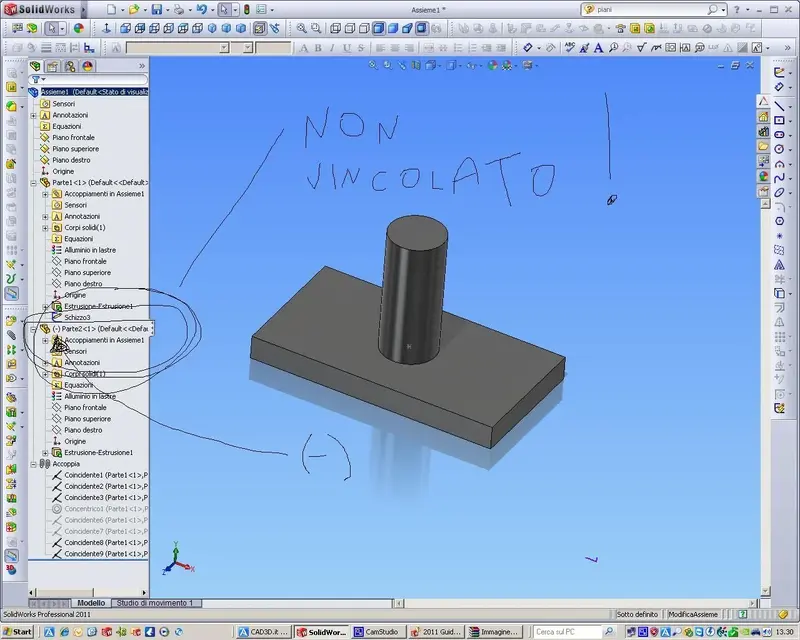
select the plans you want to match (in swx report "co incident") holding down the ctrl and you will see that the plans will be positioned that way.
repeat the operation until the piece is fully bound ("totalmemte defined").

read and do the tutorials, they are the basis for leaving, these are basics that you cannot
do without having.
 

Attachments

  • Non vincolato.webp
    Non vincolato.webp
    136.3 KB · Views: 5
  • Vincolato.webp
    Vincolato.webp
    133.5 KB · Views: 5

Forum statistics

Threads
44,997
Messages
339,767
Members
4
Latest member
ibt

Members online

No members online now.
Back
Top