
• This forum is the machine-generated translation of www.cad3d.it/forum1 - the Italian design community. Several terms are not translated correctly.

assi catdrawing

  • Thread starter Thread starter peloritano
  • Start date Start date

peloritano

Guest
Hello everyone....... I have a simple question to ask, but I didn't find an answer... .
I opened a new catdrawing file inside which I have to create a 2d design..
I would like the axes that are created automatically to be placed in the middle of the sheet...
How could you do that? ? ?
Does anyone know the answer? ?
 
I press that I do not know the answer, but I can't understand the need, you would give me directions, because I don't see the need to move.

Hi.
 
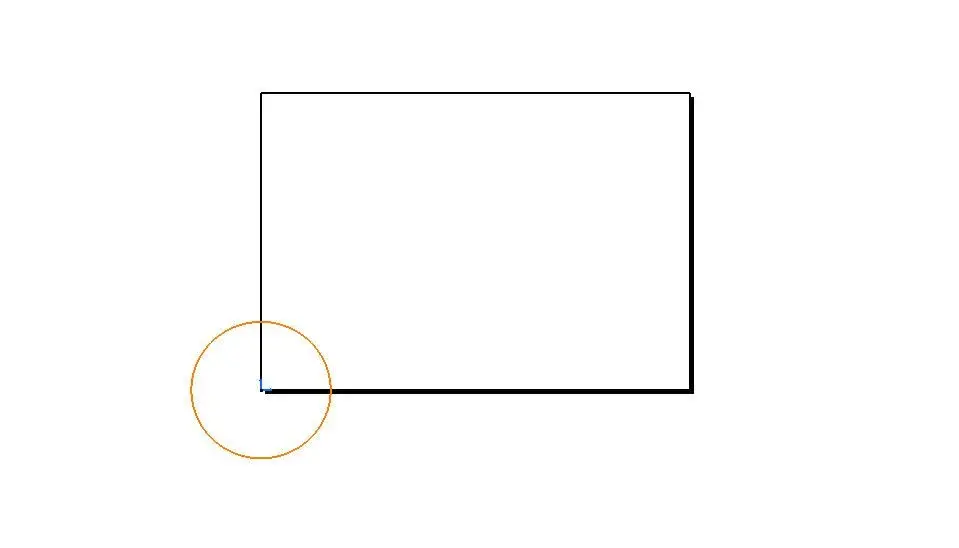
if I have to create a new catdrawing I need to use the axle system for quotation. If for example I have to draw a circle whose origin is in point 0.0 the result will be as in the attached image.
How do I carry the drawing (and then my axle system) to the middle of the sheet?? ? ? ?
 

Attachments

  • catdrawing.webp
    catdrawing.webp
    3.7 KB · Views: 8
if I have to create a new catdrawing I need to use the axle system for quotation. If for example I have to draw a circle whose origin is in point 0.0 the result will be as in the attached image.
How do I carry the drawing (and then my axle system) to the middle of the sheet?? ? ? ?
Bye-bye.

I believe that the solution is to create the tarpart x0 y0 z0 build the circumference and then make the table of the same, you should find the terna in the middle of the sheet

Let me know.

Hi.

 
this could be a solution...
But if I don't want to go through the catpart? ?
the problem I found it when I made copy paste from a dwg file. I placed my design in the origin but exactly as the circle I found it for 3/4 out of the sheet..... .
possible that there is no way to move the created axes by default to the middle of the sheet?? ? ?
 
this could be a solution...
But if I don't want to go through the catpart? ?
the problem I found it when I made copy paste from a dwg file. I placed my design in the origin but exactly as the circle I found it for 3/4 out of the sheet..... .
possible that there is no way to move the created axes by default to the middle of the sheet?? ? ?
Then if you want to get over the catpart, do this:

put a point in the middle of the sheet, then do new view you select the point and I click it, then copy and paste the dwg geometry into that view

I do so usually and it works


try hair and let me know it works


Hi.

 
It works...... but does someone know what exactly does the "new dict" button? ? ?
seems to allow the axes to be repositioned, but who knows exactly what it is for and what does it do? ?
 

Attachments

  • nuovo ditto.webp
    nuovo ditto.webp
    4.4 KB · Views: 12
It works...... but does someone know what exactly does the "new dict" button? ? ?
seems to allow the axes to be repositioned, but who knows exactly what it is for and what does it do? ?
you solved hair then you or not what you mean by it works? ?

new dict would be if you want to add a detail type screw bolt bracket.. not belonging to other views

I hope I've been helpful

Hi.

 
if I have to create a new catdrawing I need to use the axle system for quotation. If for example I have to draw a circle whose origin is in point 0.0 the result will be as in the attached image.
How do I carry the drawing (and then my axle system) to the middle of the sheet?? ? ? ?
I imagined that the reason was this, but you're wrong to use the drawing environment.
If you want the correlation between axis system and 3d you need to enter a view, (see image) and create your geometry in relation to the two-dimensional system that you find at its intermode.
then running the copy/paste view you will see that the system correctly places the sketch in the reference system of the part.

prose in the same way if you have to create projected views, and use the function "project lines" to find the equivalences between views.

Hi.
 

Attachments

  • vista draw.webp
    vista draw.webp
    51.9 KB · Views: 10
I imagined that the reason was this, but you're wrong to use the drawing environment.
If you want the correlation between axis system and 3d you need to enter a view, (see image) and create your geometry in relation to the two-dimensional system that you find at its intermode.
then running the copy/paste view you will see that the system correctly places the sketch in the reference system of the part.

prose in the same way if you have to create projected views, and use the function "project lines" to find the equivalences between views.

Hi.
Bye-bye.

I believe that the solution is to create the tarpart x0 y0 z0 build the circumference and then make the table of the same, you should find the terna in the middle of the sheet

Let me know.

Hi.

How are you doing?

I had proposed the same thing myself, but he has to work with dwg and he doesn't want to pass through the catpart...:smile:

Hi.

 
you solved hair then you or not what you mean by it works? ?

new dict would be if you want to add a detail type screw bolt bracket.. not belonging to other views

I hope I've been helpful

Hi.

I mean, your method works perfectly. I followed your instructions and it's okay... but even if I make it creates new dict it seems that things are good the same....

ferrezio quote:
originally written by hairitano
if I have to create a new catdrawing I need to use the axle system for quotation. If for example I have to draw a circle whose origin is in point 0.0 the result will be as in the attached image.
How do I carry the drawing (and then my axle system) to the middle of the sheet?? ? ? ?

I imagined that the reason was this, but you're wrong to use the drawing environment.
If you want the correlation between axis system and 3d you need to enter a view, (see image) and create your geometry in relation to the two-dimensional system that you find at its intermode.
then running the copy/paste view you will see that the system correctly places the sketch in the reference system of the part.

prose in the same way if you have to create projected views, and use the function "project lines" to find the equivalences between views.

Hi.

Your method is fine, but I would like to know if there is a way to move the generated axes when creating a new catdrawing without having to create a catpart....
 
p.s. excuse my ignorance but how do I "quote" more messages found in this post??? I didn't find any other solution than sticking copy, but the graphic aspect is not the best.
 
but even if I make it creates new dict it seems that things are good the same....
you ok does the same thing in part!!! depends on me you can use it if you have so many different details not just one view!!! so you have the possibility to pass from one detail to another easily, I explain better we talk about the minute you want to order in a sheet apart with many "details"

I hope I've been clear

Hi.
 
Your method is fine, but I would like to know if there is a way to move the generated axes when creating a new catdrawing without having to create a catpart....
I simplify your life: click dx on the drawing tree sheet and in the properties remove the check from "view" sheet, at this point you can place your drawing wherever you want.

But now I repeat the question: what do you need to have the axle system in the center?

tries to get out of the method of pro-e that remains very valid, but created a logical flow of work, exploiting the prerogatives of caia.

Hi.

Hi.
 
I simplify your life: click dx on the drawing tree sheet and in the properties remove the check from "view" sheet, at this point you can place your drawing wherever you want.

But now I repeat the question: what do you need to have the axle system in the center?

tries to get out of the method of pro-e that remains very valid, but created a logical flow of work, exploiting the prerogatives of caia.

Hi.

Hi.
The answer is very simple.... in the catdrawing, there's a sheet that I set a4... The whole printer is configured with that size....... I think that placing everything in the middle of the sheet makes me easier my life in the printing stage or is it wrong?? ?
If you draw the shape of a sheet why not use it?? ?
 
for me wrong, but I don't know your needs, normally in the press panel the sheet adapts automatically.

you also have various modes of selection of print areas, so I can't figure out why, but surely there will be one.

Hi.
 
p.s. excuse my ignorance but how do I "quote" more messages found in this post??? I didn't find any other solution than sticking copy, but the graphic aspect is not the best.
third box in the bottom right, after "quota" (multi-cite this message).
click on every post that interests you to quote (become orange).
then "respond"....

hi and good work
 
The answer is very simple.... in the catdrawing, there's a sheet that I set a4... The whole printer is configured with that size....... I think that placing everything in the middle of the sheet makes me easier my life in the printing stage or is it wrong?? ?
If you draw the shape of a sheet why not use it?? ?
I'm sleeping too. .

I do not understand this type of need only for a print!!!! with catia you can do any type of printing area select what you want to print, or you automatically print all the format

Hi.

 
for me wrong, but I don't know your needs, normally in the press panel the sheet adapts automatically.

you also have various modes of selection of print areas, so I can't figure out why, but surely there will be one.

Hi.
I'm sleeping too. .

I do not understand this type of need only for a print!!!! with catia you can do any type of printing area select what you want to print, or you automatically print all the format

Hi.


I'll try to do as we recommend and let you know... .
 

Forum statistics

Threads
44,997
Messages
339,767
Members
4
Latest member
ibt

Members online

No members online now.
Back
Top