
• This forum is the machine-generated translation of www.cad3d.it/forum1 - the Italian design community. Several terms are not translated correctly.

assign a command to a mouse button

  • Thread starter Thread starter p@po
  • Start date Start date

p@po

Guest
autocad 2010

I want to assign to the 3 additional keys that I have on the mouse the autocad commands that I use most often for example the "line" command to the button placed laterally to the mouse and pressed from the thumb, move to that on the back and so on.
How do you do that?
I tried to write hiuprapida in the command line, I entered the mouse section but then I lost.

thanks for the availability.
 
first you have to see if the side buttons are recognized by the program

By default the recognized keys are only 3 (left, central, right), I don't know if automatically your mouse lets you recognize in native way 6 keys to the program.

almost always the management of those keys is required to a special mouse software itself, which interposes between the hardware device and the operating system, simulating certain operations through the pressure of a single key.
but not always this works in programs.
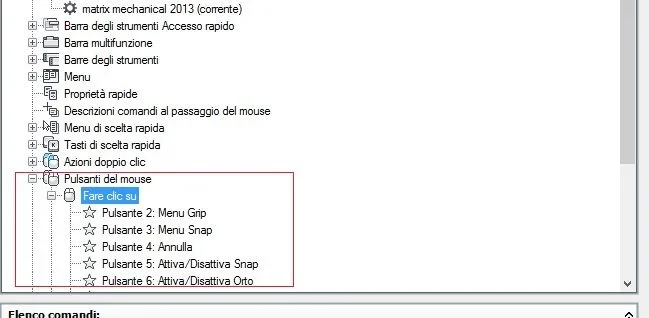
Open _cui, go to the mouse button
the keys normally are:
1: left click - not editable
2: right click
3: click central key

within each single action, autocad also allows you to insert other buttons (4,5,6) but I don't know if you see them on a hardware level, never had a 6-key mouse.
try from them
 
first you have to see if the side buttons are recognized by the program

By default the recognized keys are only 3 (left, central, right), I don't know if automatically your mouse lets you recognize in native way 6 keys to the program.

almost always the management of those keys is required to a special mouse software itself, which interposes between the hardware device and the operating system, simulating certain operations through the pressure of a single key.
but not always this works in programs.
Open _cui, go to the mouse button
the keys normally are:
1: left click - not editable
2: right click
3: click central key

within each single action, autocad also allows you to insert other buttons (4,5,6) but I don't know if you see them on a hardware level, never had a 6-key mouse.
try from them
You made me think of something:
Actually, I, at the additional mouse button, associated a keyboard key so that to the lateral one for example is associated with the 4 of the numeric keypad.
in this autocad mode should not matter that it is a mouse button but only that it is the number 4 of the numeric keypad.
then I repeat the question:
I do so that in autocad, if I press 4 [tn] You're putting me on the line?

thanks for the attention.
 
I don't think you can.
The numeric keypad serves for numbers.
It's just a normal keyboard extension. It's not a control key.
 
I don't think you can.
The numeric keypad serves for numbers.
It's just a normal keyboard extension. It's not a control key.
I finally managed to edit the acad.pgp file.
well understood that the 4 [tn] for him is the 4 "normal"

thanks for the help:finger:
 
I finally managed to edit the acad.pgp file.
well understood that the 4 [tn] for him is the 4 "normal"

thanks for the help:finger:
hello, could you say how to edit the acad.pgp file?? I've been trying for two days. in particular I have a mouse with two extra keys but I can not program them.. in the browser they make me forward and behind in navigation. I tried to edit the file in question but I don't understand how to attribute the command to the key. those already present refer to the keyboard

Thank you so much!!
 
the acad.pgp file is used to set the buttons.
try to set in tools>options> interface pulsanti del mouseImmagine.webp
 

Forum statistics

Threads
44,997
Messages
339,767
Members
4
Latest member
ibt

Members online

No members online now.
Back
Top