
• This forum is the machine-generated translation of www.cad3d.it/forum1 - the Italian design community. Several terms are not translated correctly.

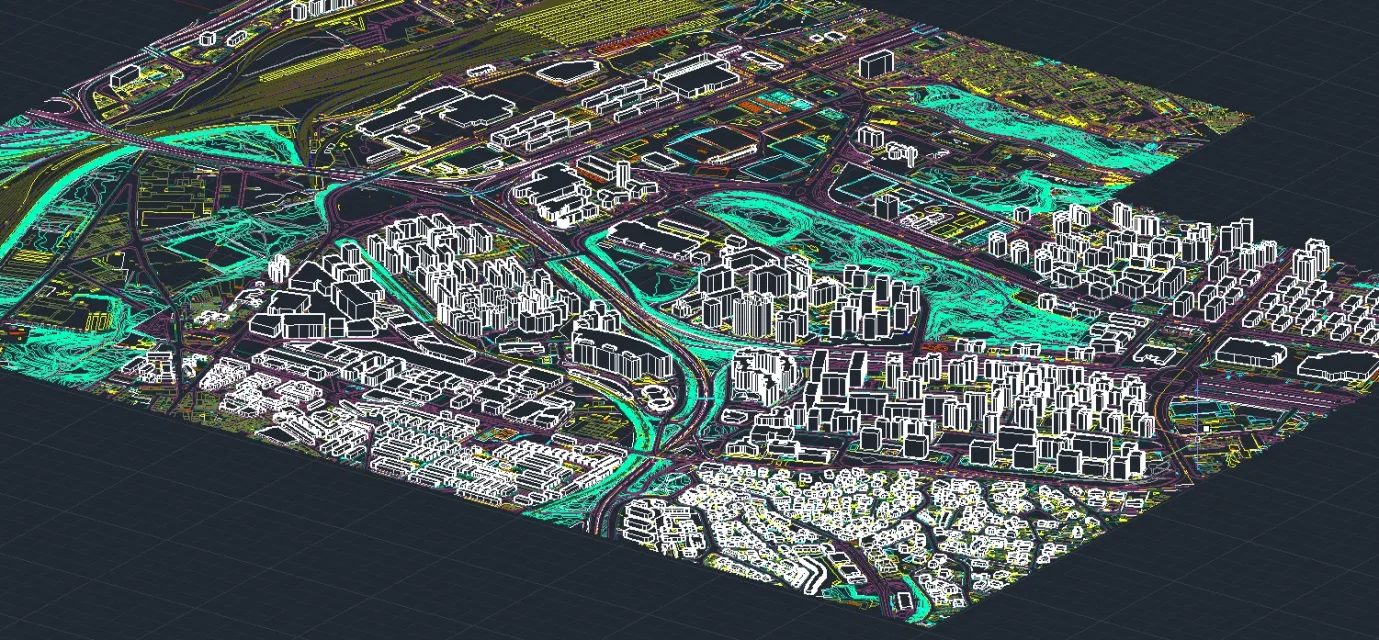
assonometry 3d autocad of a portion of urban fabric

eeeleee

Guest
Hello everyone,

I created a 3d model of a portion of fabric, extruding buildings in simple volumes over a 2d base. I would like to export an image
assonometric of the "pulita" model, without overlapping lines and maintaining the right layers. I tried the flatshot command that works on geometries but does not export the base already drawn in 2d, there is a way to have a clean assonometric image and maintain the base?
(I have already tried commands like _solprof from layout, obscuredlayers etc., but in my specific case they all seem inadequate)

Thank you.
 
try to explain to us better what you are trying to do and get, because put down so it is not very clear
 
try to explain to us better what you are trying to do and get, because put down so it is not very clear
Cattura.webpThanks endlessly I will try to be clearer. I attach a catch of the "model". with the hidden view you see so, and it is more or less an idea of the result that I would like to get, in black and white and with the right pennines (without lines hidden in transparency, with the base in evidence). the problem is that on layout with this type of display layers and colors cannot change. I thought it was better to create a 2d image, but with the flatshot command I only carry a two-dimensional image of the buildings, without base.
 
In theory the press. I can't change them because with the display "hidden" print styles don't work, they only work with the wireframe but the design is too complex to use such a visual, they overlap a thousand lines and comes a black stain...I think I will try to import it on rhino
 
and why not plot and save a jpeg image defining the pcf with black pennins and its thicknesses?
 
they are not applied to the layout with this view, the only difference you see with the capture is that there is the white sheet under the press..... however thanks to all I solved by exporting the model on rhino and using the make2d command, a bit 'smart but better than nothing!
 

Forum statistics

Threads
44,997
Messages
339,767
Members
4
Latest member
ibt

Members online

No members online now.
Back
Top