• This forum is the machine-generated translation of www.cad3d.it/forum1 - the Italian design community. Several terms are not translated correctly.

axiemi: active parts only in the created configuration, how?

  • Thread starter Thread starter czar
  • Start date Start date

czar

Guest
Hey, don't quit, please. where is the setting to ensure that the insertion of the part into the axieme is only in the active configuration and suppressed in all others (and vice versa)?
I ask why the system to open the dialog box of the "configure part" works as we know badly and to put the check on 20 configurations for a dozen components is disnerving as well as useless since often the setting is not applied. thanks to those who want to help me, always if there is a solution.
 
the system to open the dialog box of the "configure part" works as we know bad and to put the check on 20 configurations for a dozen components is disnerving as well as useless since often the setting is not applied.
i.e. that table where you have to check on the components to disable?
 
at the moment I do not see any other system, insert the part, then right click on the part, click on "configure component" and click on the configurations where you want it to be suspended
 
That's exactly the one. It practically never works. @atreiou: years pass, releases pass but this function continues not to do its duty or does it when it pleases.
 
That's exactly the one. It practically never works.
to me it is working correctly.
select dozens of details and set the spuns (to speed up the operation you move with arrows and press spacebar) and by memory never had problems
 
an alternative method and group all interested components into a folder and from one configuration to another suspend/activate the folder
 
Hey, don't quit, please. where is the setting to ensure that the insertion of the part into the axieme is only in the active configuration and suppressed in all others (and vice versa)? ...
Hi.
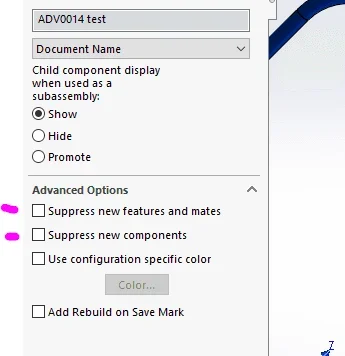
I think the setting you're looking for is this, you need to set all the configurations this wayconfigurazione.webp
 
Nothing, even doing as suggested here in "advanced settings", does not work. I insert new parts and when I do right button "configure" is active in all other configurations. It's a curse.
 
boh, to me as described by sperx works, great!
only defect is that if I have to add parts in other configurations I must remember to change the advanced settings to make that in use the configuration "receptive"
 
update: I'm popping up voices in every configuration on several parts and assemblies made in the past where, for some reason, someone must have used a template where they were unchecked, for now it seems that everything works properly. (y)
 

Forum statistics

Threads
44,997
Messages
339,767
Members
4
Latest member
ibt

Members online

No members online now.
Back
Top