PiegatoreSolidworks
Guest
I can add on 2010 the property voice where you change the data of the side file next to maybe that of "options".
Thank you and excuse the rush!
Thank you and excuse the rush!

I apologize for ignorance, but I knew that! the speech is that "ownership" (the one in the file menu) is not there. or better you can add between the mouse gestures but not as a top icon next to that of "options" or to the quick menu....Right-click on the toolbar and then 'personality'.
use the help no?
disassembled a brush of satin sheets that is this:I apologize for ignorance, but I knew that! the speech is that "ownership" (the one in the file menu) is not there. or better you can add between the mouse gestures but not as a top icon next to that of "options" or to the quick menu....
Am I wrong?
Thank you.
go to the command tab, look for the command and do drag&drop wherever you want.I apologize for ignorance, but I knew that! the speech is that "ownership" (the one in the file menu) is not there. or better you can add between the mouse gestures but not as a top icon next to that of "options" or to the quick menu....
Am I wrong?
Thank you.
I found that, too, but it's not the "property" I mean... what I'm looking for is in the previous post, that of mike. is it possible to add that "ownership" on the quick menu or on the top bar without going to search all the times from the file menu?go to the command tab, look for the command and do drag&drop wherever you want.
exact mike is what I'm looking for! I saw that you can add it on mouse gestures but I would like it on the quick menu as an icon... is there a way without going to take it from file - property?disassembled a brush of satin sheets that is this:
okkio, if you do not have open documents, the property item is not default. :smile:
I suggest you put it under the "s" button.exact mike is what I'm looking for! I saw that you can add it on mouse gestures but I would like it on the quick menu as an icon... is there a way without going to take it from file - property?
Thank you.
for now I put it under the "p" button but I wanted to put it on the quick and mobile menu that appears when you press the "s" button. the dilemma is: how do I do it?I suggest you put it under the "s" button.
or, as I prefer, put it on your keyboard, for sempio alt+p.
See you.
after pressing s, click on a free space with the right button...for now I put it under the "p" button but I wanted to put it on the quick and mobile menu that appears when you press the "s" button. the dilemma is: how do I do it?
you mike the theory I know, in fact I deeply changed the menu we are talking about! But I was wondering where I find the property we're talking about? the only property is under the standard group but it is not the "property" to which we matched the "p" button....after pressing s, click on a free space with the right button...
I don't understand the problem, if he's not there, he'll be somewhere else... who seeks to find.you mike the theory I know, in fact I deeply changed the menu we are talking about! But I was wondering where I find the property we're talking about? the only property is under the standard group but it is not the "property" to which we matched the "p" button....
Hello and thank you.
As I told you, I couldn't find him!alt... alt... you are trying with 2010... while I have 2011...:frown:
....ok, I'm tired, but in the end I think I'm a bit of a reason too! Anyway I won't write here anymore, I don't want to bother you about the other super users who are already geniuses.What I said from the beginning is what he's looking for.
but if he sleeps... it's not my fault.
2 pages to explain how to add an icon...we are to fruit.
One of them disappears, another one comes.
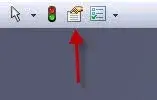
I downloaded the image 'properties I look for' and that's what I told you to look for and also shown with an image.....ok, I'm tired, but in the end I think I'm a bit of a reason too! Anyway I won't write here anymore, I don't want to bother you about the other super users who are already geniuses.
Good night.
(I will sleep as you say but if you read well you realize that I have the swx 2010!)
since I am not so dumb as you say you look at this thing opens me with the icon you kindly indicated me you (remember that I have solidworks 2010 sp4!!!!).I downloaded the image 'properties I look for' and that's what I told you to look for and also shown with an image.
do not do the offense and it is not even the fault of the version that as an icon there is from a couple of versions.