
You are using an out of date browser. It may not display this or other websites correctly.
You should upgrade or use an alternative browser.
You should upgrade or use an alternative browser.

TECNOMODEL
Guest
at first glance it seems that the view (discuss the game of words) is not aligned.
post the two files if you can take a look.
post the two files if you can take a look.
tuttamanetta
Guest
without making a new discussion, I can't attach the file.... .at first glance it seems that the view (discuss the game of words) is not aligned.
post the two files if you can take a look.
TECNOMODEL
Guest
Of course you can train.
you have the bar above the window where you edit the text, or the "go to advanced mode" button
you have the bar above the window where you edit the text, or the "go to advanced mode" button
tuttamanetta
Guest
pardon... .Of course you can train.
you have the bar above the window where you edit the text, or the "go to advanced mode" button
Attachments
TECNOMODEL
Guest
with only the table i can do little, it would also serve the part.
test the orientation of the view that gives you the wrong share.
test the orientation of the view that gives you the wrong share.
tuttamanetta
Guest
I'm trying to send you the part.
Zac69
Guest
sure that the part has a slightly staggered plan compared to the main triad
tuttamanetta
Guest
TECNOMODEL
Guest
to me is quoted correctly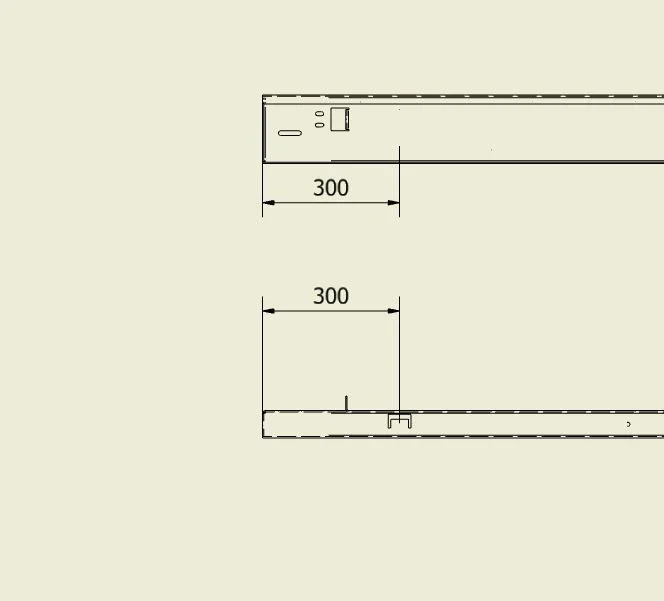 I think you put down a view with a non-orthogonal orientation on the floor.
or you have selected a wrong entity for the share
I think you put down a view with a non-orthogonal orientation on the floor.or you have selected a wrong entity for the share
smoking
Guest
Good morning, I regret this debate hoping to get some tips. the problem raised by allmanetta I am unfortunately finding it in different circumstances. It is not a vision orientation problem, but the system measures the distance "inline air" between the two points (head of the prisoner and edge of the fold) and not the projection on the plane. In fact, in the positioning of the quota 301,86 from the context menu (right) it is possible to select " annotation plan>use sheet plan". Note also that once the quota is placed it is no longer possible to move its references. I haven't figured out what it was supposed to be. I hope that someone will have a solution for a rather important problem. Thank you.
stefanobruno
Guest
But that's not true.Note also that once the quota is placed it is no longer possible to move its references.
the fact is that, normally, the first quotation is done without looking at what type of selection you are using and everything goes smoothly.
instead, if you want to move a reference from one point to another of the putting into the table, you must have the "election faces and edges " active, otherwise it does not work.
smoking
Guest
the selection of faces and edges is always active (or in the vast majority of cases). That's not the problem. here you are looking for the solution to an anomaly by virtue of which remarkable points are acquired on space and not on the plane. Do you understand why?But that's not true.
the fact is that, normally, the first quotation is done without looking at what type of selection you are using and everything goes smoothly.
instead, if you want to move a reference from one point to another of the putting into the table, you must have the "election faces and edges " active, otherwise it does not work.
stefanobruno
Guest
I don't have the 2017 set, so I can't see the file of the handset.have you been taking?
I happen not to see the correct quotas, only on files imported from other systems and only if I try to put quotas relative to non-flat surfaces, but I am aware and avoided these situations.
In fact, if I really need a quota that I can't put, I pass to the quotation "basic line " and, with this, I can always put the quota.
the piece proposed by the handkerchief is very simple, so it seems strange to me to give it these problems.
the view not aligned with the general plans is a classic, in fact it is the model that, by force of turning around while you do the study and rise and lower the levels of the components and change the constraints and sometimes you forget to bind, a nice moment lies wrong, of a few cents but crooked is.
It is also up to me that I have been behind this programme for years, however, as a straight model, the table with its quotas is always in place.
As I wrote, I didn't mount 2017, so never say, maybe they improved more and ran away this little thing.
smoking
Guest
I refer to this video more clearly [video=youtube_share;wuh7lN8Myag]https://youtu.be/wuh7ln8myag[/video]
eugenesis
Guest
Guys, I think you're all off the road. .
What kind of quota did you select for the view in question??
projected or true??
you will arrive by exiting the menu from the right mouse button after selecting the view ..
otherwise inventor how would he manage the assonometric views? ?
Remember that even the table you see in 2d is actually 3d!
What kind of quota did you select for the view in question??
projected or true??
you will arrive by exiting the menu from the right mouse button after selecting the view ..
otherwise inventor how would he manage the assonometric views? ?
Remember that even the table you see in 2d is actually 3d!
smoking
Guest
eugenesis, you saw right, this is the problem: by default the share should always be projected. It happens instead that the system "places" impunely the flag on "true" in the positioning of certain views. you understand that this can be an important problem: I find it absurd to check that the type of generic quota for every view.
eugenesis
Guest
the quotation is put "real" if you are not perfectly coordinated with the terna of the origins; for him otherwise it is as if you are quotating an assonometric design.
However, when you know how to handle this, it is so obvious that it never represents a real problem.
However, when you know how to handle this, it is so obvious that it never represents a real problem.