• This forum is the machine-generated translation of www.cad3d.it/forum1 - the Italian design community. Several terms are not translated correctly.

calculation volume of a shaped cavity

  • Thread starter Thread starter MORENO100
  • Start date Start date

MORENO100

Guest
Hello everyone,
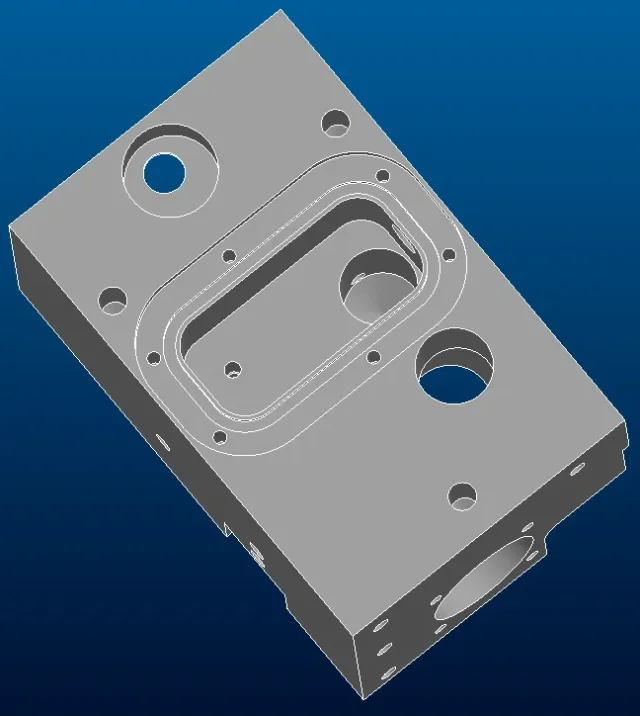
I need to calculate the volume of a shaped cavity (see attached image) obtained within a part, what procedure could I use to do so?
I hope that the programme will give me the opportunity to do so easily.

p.s. use wf5 and I have never worked with the surfaces.

thanks and good work to all.
 

Attachments

  • cavità.webp
    cavità.webp
    32.9 KB · Views: 10
Do you have an advanced license for axioms? If yes, I answer you in one way. If not in another. If yes, you can keep everything together in an associative way without problems. If not, I think you have to make a family table. in any case you must use the surfaces, even if not advanced.
 
Bye!

or you could try to play with intermediate analysis between one feature to another, and then with relationships you get your volume by difference.
but of course it is a little more maccheronic and less elegant. If your geometry is quite "stable" over time could be fine.
 
Hi.
in similar cases, see liquid tanks, I do so:
at the level of assembly I create a part that follows exactly the container using references, copy geometry etc. so that it remains stable even after any changes. By doing so it is elementary to set the filling level, calculate the volume, weight and I find in distinct also the amount of fluid to buy.
I don't know if this method can help you, you see.
greetings
 
Hi.
If you have no interest in creating a set, you could select all the walls of your cavity, do ctrl+c and ctrl+v, in this way create the surfaces copy of the walls. then close your created surface with a fill both up and on the wall in front of your image where the hole is present. put the surfaces on. then create a cutting extrusion to eliminate solids. at this point you only have your closed surface, solidify and calculate the volume.
with this method however you have to use the surfaces even if not advanced.
greetings
 
Bye!

or you could try to play with intermediate analysis between one feature to another, and then with relationships you get your volume by difference.
but of course it is a little more maccheronic and less elegant. If your geometry is quite "stable" over time could be fine.
I agree with truffle80, on the contrary it seems to me the best / elegant method, calculate the volume before the excavation and immediately after, as it says truffle80 then with the relationships you get your volume by difference.

greetings
 
Do you have an advanced license for axioms? If yes, I answer you in one way. If not in another. If yes, you can keep everything together in an associative way without problems. If not, I think you have to make a family table. in any case you must use the surfaces, even if not advanced.
Hi.
I don't know. I'll give you the detail of my license.
 

Attachments

  • DETTAGLIO.webp
    DETTAGLIO.webp
    14.4 KB · Views: 4
Hi.
If you have no interest in creating a set, you could select all the walls of your cavity, do ctrl+c and ctrl+v, in this way create the surfaces copy of the walls. then close your created surface with a fill both up and on the wall in front of your image where the hole is present. put the surfaces on. then create a cutting extrusion to eliminate solids. at this point you only have your closed surface, solidify and calculate the volume.
with this method however you have to use the surfaces even if not advanced.
greetings
great viollo!! !
That's exactly what I was looking for, but I didn't have the necessary knowledge. ! ! !
thanks anyway to all, there is always to learn, good to make! ! ! !
allego of images of the result:
 

Attachments

  • Q__Moreno_IMMAGINI_x.webp
    Q__Moreno_IMMAGINI_x.webp
    76.4 KB · Views: 7
  • solido.webp
    solido.webp
    27.9 KB · Views: 6
I think you do.
in any case you have been suggested 4 different ways to do so:
1) through solidification of surfaces (all in one file) (no advanced license)
2) through solidification of published surfaces (two files) (advanced license)
3) through solidification of copied surfaces (two files) (no advanced license)
4) through relationships (all in one file) (no advanced license)
Monday, I reinstall the wf5 and I'll run an example file for the four hypotheses.
If I do it with Creo3, I think you can't open it.
Good we.
 
I think you do.
in any case you have been suggested 4 different ways to do so:
1) through solidification of surfaces (all in one file) (no advanced license)
2) through solidification of published surfaces (two files) (advanced license)
3) through solidification of copied surfaces (two files) (no advanced license)
4) through relationships (all in one file) (no advanced license)
Monday, I reinstall the wf5 and I'll run an example file for the four hypotheses.
If I do it with Creo3, I think you can't open it.
Good we.
thanks mad76 for the extreme availability, but it is not necessary.
the viollo method is perfect for my need.
thanks for the final summary, very interesting and precise.
Great all!! !
 
great viollo!! !
That's exactly what I was looking for, but I didn't have the necessary knowledge. ! ! !
thanks anyway to all, there is always to learn, good to make! ! ! !
allego of images of the result:
happy to have been useful to you;)
greetings
 

Forum statistics

Threads
44,997
Messages
339,767
Members
4
Latest member
ibt

Members online

No members online now.
Back
Top