• This forum is the machine-generated translation of www.cad3d.it/forum1 - the Italian design community. Several terms are not translated correctly.

center of rotation space mouse

  • Thread starter Thread starter Sp4rk0
  • Start date Start date

Sp4rk0

Guest
Good morning.
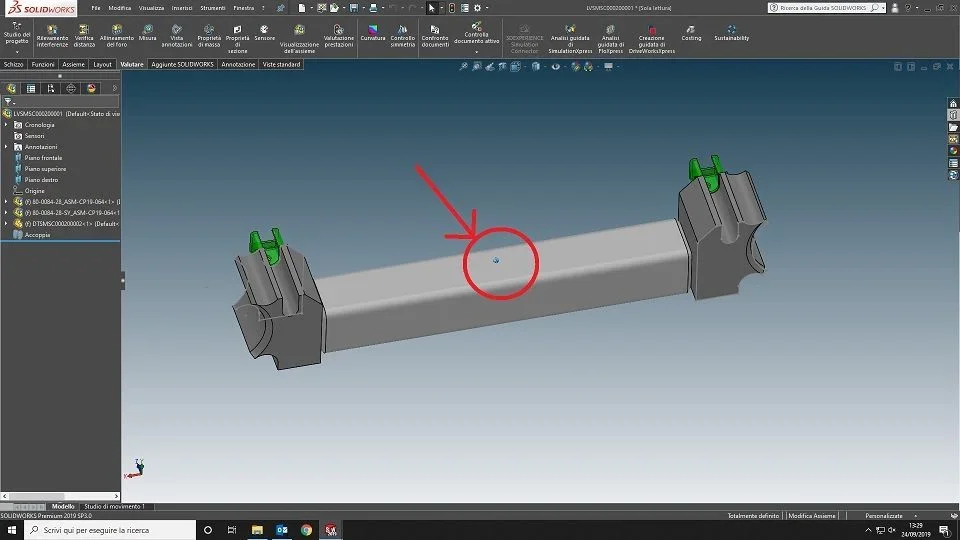
When I roar the assemblies using space mouse 3d, I appear that blue circle, in theory it is the center of rotation, I don't think it is the center of mass but I'm not sure.
is there any way to change it, or always set it at the center of the view? so that when I rotate the model, rotation and 0.0.0 is at the center of the monitor and not that blue dot?? ?
Thank you.
 

Attachments

  • Centro.webp
    Centro.webp
    38.7 KB · Views: 30
It doesn't seem to me that you can change the center of rotation, even because if you want to put it where you say you won't be able to turn the piece again, your piece will begin to rotate in a uncontrollable way.
the blue dot is the centerpiece.

Hi.
 
I am not convinced both the baricentro of the piece, because it is not fixed, if I move the piece also the blue dot but without a precise logic, with the single piece I go well but when I have big asses to rotate I go in confusion.
 
I am not convinced both the baricentro of the piece, because it is not fixed, if I move the piece also the blue dot but without a precise logic, with the single piece I go well but when I have big asses to rotate I go in confusion.
to me when moving the piece also moves the dot always according to the "centre of the piece"...boh
I looked at the settings and I see no other setting of the rotation center apart from those for its display. ....
Hi.
 
I am not convinced both the baricentro of the piece, because it is not fixed, if I move the piece also the blue dot but without a precise logic, with the single piece I go well but when I have big asses to rotate I go in confusion.
in solid edge is the center of view, unless specific input from the user.
 
in edge yes, but I went to solidworks and it is quite different, boh I will make some evidence, thank you very much.
 
I also found the hardship of teseus.

I am new to solidworks and on my system the spacemouse behaves like this:
- the rotation center is in the middle of the window
- during a movement the rotation center follows the component on the monitor. if I stop and restart a new movement then the rotation center returns to the center of the monitor.

I'm in trouble every now and then. In some cases in the center of the monitor there are no solids and the center of rotation is at a point not well specified in the space, which makes the solid move in a strange way.

before solidworks I had experience with nx11, wherewith click dx > set rotation point fixed the center of rotation and everything turned on a fixed point. was changed by hand in case of need.
I didn't find a similar function on sw. .... someone else has suggestions?
 
I think he's right. sp4rk0, it is not the mass center but it is very close it would be nice to be able to move it anyway I don't understand why you can't do it, or better because they didn't think about it1571986710387.webp
ciao
 

Forum statistics

Threads
44,997
Messages
339,767
Members
4
Latest member
ibt

Members online

No members online now.
Back
Top