
smeshata
Guest
Good morning to all,
I am exercising in the modification of details in step format of which, therefore, I do not possess the tree with all the operations but only the final solid. I have experienced difficulties since my level is not very high. as you see in the first picture I would like to add that "block" to my initial piece. the problem is that I can't remove the edges 1 and 2 after the union. the two splines are not in the same plane of the flat surface but a little higher. the curve on face I used it as a construction curve for the spline that is tangent. to build that solid I used the function through curves mesh using spline and other construction curves and then I used sew. in the creation of surfaces I set tangency with the flat surface but it was not enough to eliminate the edges 1 and 2. I therefore ask you what would be the best approach (altenative to my spline->through cuvre mesh->sew) to deal with these changes in light also of the subsequent modification I would like to try to do as you see in the second image.
thanks for the answers.
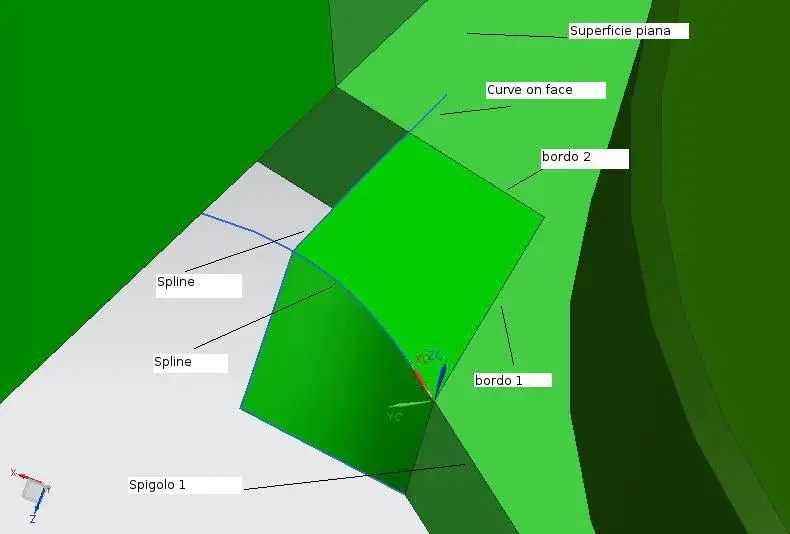

I am exercising in the modification of details in step format of which, therefore, I do not possess the tree with all the operations but only the final solid. I have experienced difficulties since my level is not very high. as you see in the first picture I would like to add that "block" to my initial piece. the problem is that I can't remove the edges 1 and 2 after the union. the two splines are not in the same plane of the flat surface but a little higher. the curve on face I used it as a construction curve for the spline that is tangent. to build that solid I used the function through curves mesh using spline and other construction curves and then I used sew. in the creation of surfaces I set tangency with the flat surface but it was not enough to eliminate the edges 1 and 2. I therefore ask you what would be the best approach (altenative to my spline->through cuvre mesh->sew) to deal with these changes in light also of the subsequent modification I would like to try to do as you see in the second image.
thanks for the answers.