
• This forum is the machine-generated translation of www.cad3d.it/forum1 - the Italian design community. Several terms are not translated correctly.

change of files again(cold at its side)

  • Thread starter Thread starter Antodima77
  • Start date Start date

Antodima77

Guest
I ask you all a support, also because I do not know how to look for the answers on this subject, had already been treated.
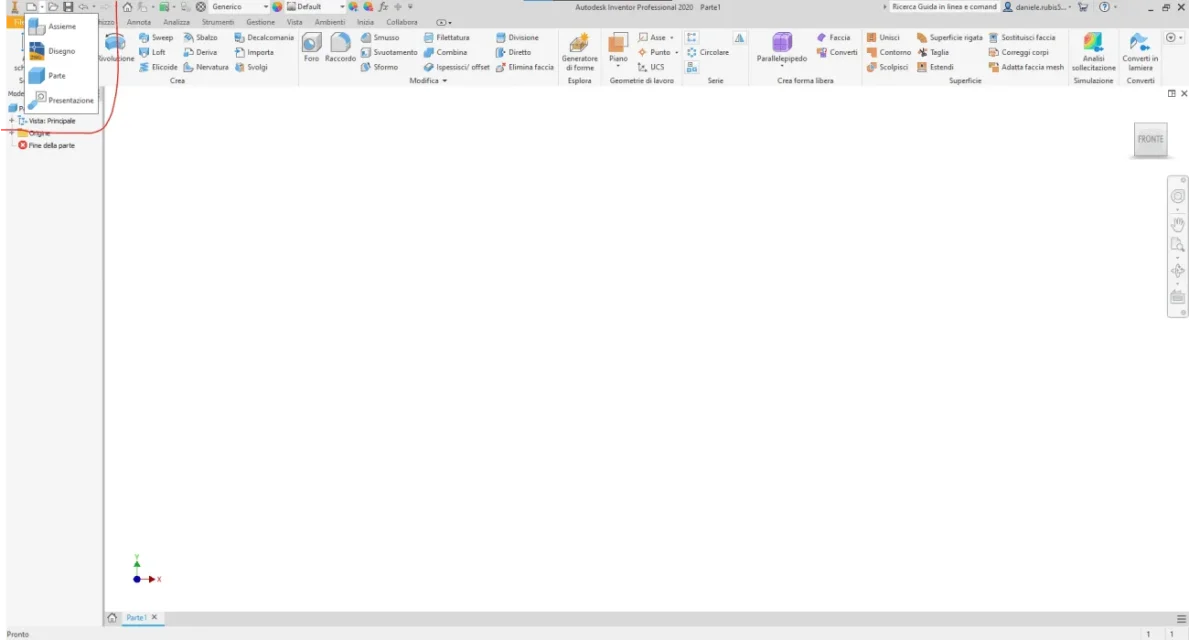
the new icon(inventor) has an arrow at its side, clicking there are files, which I would like to be my models, but I do not find the setting to do so, it proposes its defaults.
someone knows how to set up their own models.
Thank you in advance
 
I ask you all a support, also because I do not know how to look for the answers on this subject, had already been treated.
the new icon(inventor) has an arrow at its side, clicking there are files, which I would like to be my models, but I do not find the setting to do so, it proposes its defaults.
someone knows how to set up their own models.
Thank you in advance
if I understand what you ask you just save your templates in the directory where you indicated to fish templates, by default is this:
"c:\users\public\documents\autodesk\inventor 20xx\templates\"
with instead of 20xx the year of your inventor version.
those files that default he opens by pressing on the dart should be those called "standard".idw/ipt etc. so you should replace the "standard" model with your model called the same.
 
hi I don't know much but I think you can change them from this screen but I'm not 100% sure1.webp
 

Forum statistics

Threads
44,997
Messages
339,767
Members
4
Latest member
ibt

Members online

No members online now.
Back
Top