• This forum is the machine-generated translation of www.cad3d.it/forum1 - the Italian design community. Several terms are not translated correctly.

change properties in multiple elements

  • Thread starter Thread starter skimans
  • Start date Start date

skimans

Guest
Good morning to all
I just started using solid edge 2d.
I would have the need to change the properties of multiple selected items and not only one element.
I can currently change porpriety only of a selected item.
Thank you.
 
bye, for the elements that predict it you can press the "property" button in the command bar.
for all other elements you can use the command "ownership" in "home" - "quota" - "property"
1681801903602.webp
 
@be_on_edge Thank you for the answer and I apologize if I answer only now.
Unfortunately, the problem persists.
I'll explain. .
I would first of all like to set the properties of each level.
1707726008588.webpI see that there is this option by right-clicking on each level, but I do not understand what to indicate in the name and value field.
so doing I would have at least the possibility by activating each level of already having color settings, type line, etc...

Moreover, as indicated initially I would like to move different elements (lines and texts) by selecting them all together and moving them all on an altor layer. I see that solid edge tells me to select one by one... slowing down the job a lot.

Thank you.
 
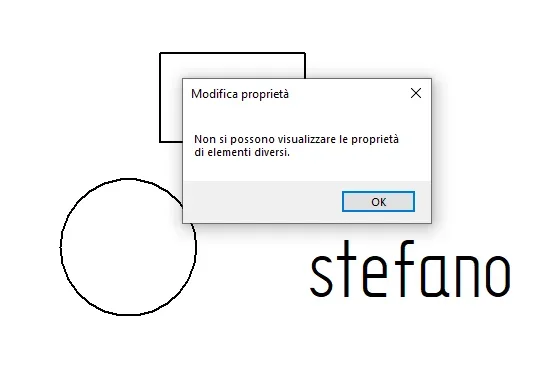
Basically selecting multiple items. . . example: a text and a circle (which I would like to move on another level) get this error msg
1707726749614.webp
 
@be_on_edge Thank you for the answer and I apologize if I answer only now.
Unfortunately, the problem persists.
I'll explain. .
I would first of all like to set the properties of each level.
View attachment 70399I see that there is this option by right-clicking on each level, but I do not understand what to indicate in the name and value field.
so doing I would have at least the possibility by activating each level of already having color settings, type line, etc...

Moreover, as indicated initially I would like to move different elements (lines and texts) by selecting them all together and moving them all on an altor layer. I see that solid edge tells me to select one by one... slowing down the job a lot.

Thank you.
hi; the properties of the level do not serve to do what you ask.

each element has its own properties including the style used. you will then have to act on line style, quota, filling etc. depending on the element. By selecting multiple items of the same type, you can change the style used directly from the command bar at the same time.

to move multiple items from one level to another is enough to select them and use the "Set Items" button creation of a sketch
 
hi; the properties of the level do not serve to do what you ask.

each element has its own properties including the style used. you will then have to act on line style, quota, filling etc. depending on the element. By selecting multiple items of the same type, you can change the style used directly from the command bar at the same time.

to move multiple items from one level to another is enough to select them and use the "Set Items" button creation of a sketch
@be_on_edge Thanks again for the answer.
already with moving elements I solve most of my problems.

but I find myself with different elements maybe with different colors on the same level.
in this case I could cmq select all the elements of the level and attribute it to all the same color?
I guess if I click on properties after having dissected them all...I can't cmq make them all of the same color. .
 
@be_on_edge Thanks again for the answer.
already with moving elements I solve most of my problems.

but I find myself with different elements maybe with different colors on the same level.
in this case I could cmq select all the elements of the level and attribute it to all the same color?
I guess if I click on properties after having dissected them all...I can't cmq make them all of the same color. .
levels in itself do not serve this.

as I said colors, line thickness, line type etc. do not depend on the level; The level is for something else. for these properties are used styles.

It is true that you can work so that you have all the elements on the same level of the same color etc, but for what purpose? you wouldn't take advantage of it, losing time to do something little useful (in solid edge).
 
levels in itself do not serve this.

as I said colors, line thickness, line type etc. do not depend on the level; The level is for something else. for these properties are used styles.

It is true that you can work so that you have all the elements on the same level of the same color etc, but for what purpose? you wouldn't take advantage of it, losing time to do something little useful (in solid edge).
can happen to make comparisons and overlaps of each level to make some feasibility assessments.
example:
in a department of a company you can do simulations of positions of machines.
a simulation with one color, another with another color. both on different levels so you can turn on or off each one.

thanks again for the precious indications.
 
@be_on_edge I would be cmq curious to understand how this screen works for the setup of the levels:
1707726008588-png.70399
on the web I did not find info about it...
I tried to insert name = color and value = red....but it seems not to work.
It's just my curiosity I'd like to go through.
do you have any info or examples of how to set the data?

Thank you.
 
can happen to make comparisons and overlaps of each level to make some feasibility assessments.
example:
in a department of a company you can do simulations of positions of machines.
a simulation with one color, another with another color. both on different levels so you can turn on or off each one.

thanks again for the precious indications.
I understand, what I repeat is that in if the various characteristics of the elements are not related to the level; you can still select all the elements that are in one level and assign it a color, type line, thickness through the smart select.
 
@be_on_edge I would be cmq curious to understand how this screen works for the setup of the levels:
1707726008588-png.70399
on the web I did not find info about it...
I tried to insert name = color and value = red....but it seems not to work.
It's just my curiosity I'd like to go through.
do you have any info or examples of how to set the data?

Thank you.
this screen is not what you think; in itself it is possible for each object to assign properties; the main use is in automation to store information. to reproduce your similarity before, you could add details to each level that better describe the layout contained in that level.
 
I solved it with selection options.
Basically, by activating the affected layer where I can have every type of element (wireframe, text, etc.) I can select only text or other to change the properties.
in the past I used autocad and gave me the possibility to select all the elements and to change the properties.
but it's okay with it.
thanks to the info.
 

Forum statistics

Threads
44,997
Messages
339,767
Members
4
Latest member
ibt

Members online

No members online now.
Back
Top