
• This forum is the machine-generated translation of www.cad3d.it/forum1 - the Italian design community. Several terms are not translated correctly.

change properties to multiple configurations simultaneously

  • Thread starter Thread starter Biggmetals
  • Start date Start date

Biggmetals

Guest
good morning to all, as I think you can (in part) understand from the title, I would need to change the options of a mine together with about 200 configurations. in particular I would need to activate this option to all configurations:
Immagine.webpI have already tried to search on the forum but I didn't find anything and the classic (I thought) shift + click selecting them all doesn't work because it just goes to change the one on where we make right button to enter the drop down menu, then go into the options.

I thank you in advance and if it is na stru......zata I ask vein.
 
I imagined, in fact, I've been driving this morning but found nothing about a string that allowed me to activate that option on all configurations.
we always talk about lights on/off, configurations and functions active/unactivated (to talk about the things I saw that would interest me now) and I never used them. . .
 
I imagined, in fact, I've been driving this morning but found nothing about a string that allowed me to activate that option on all configurations.
we always talk about lights on/off, configurations and functions active/unactivated (to talk about the things I saw that would interest me now) and I never used them. . .
macro made quickly, try it.
inside the code this line
...
boolstatus = part.editconfiguration3(configuration name, configuration name, "", 52)
. .
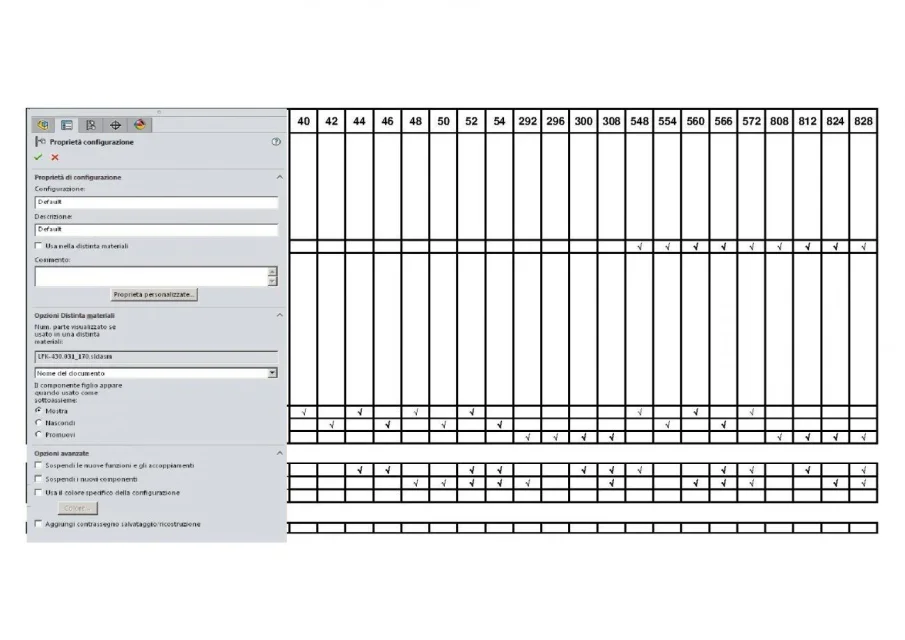
contains the number 52 that sets the combination of configuration options as from the attached image. modifying this number you get other options combinations.
I look forward to posting the scheme of combinations.
 

Attachments

macro made quickly, try it.
inside the code this line
...
boolstatus = part.editconfiguration3(configuration name, configuration name, "", 52)
. .
contains the number 52 that sets the combination of configuration options as from the attached image. modifying this number you get other options combinations.
I look forward to posting the scheme of combinations.
 

Attachments

  • OPZIONI_CFG.webp
    OPZIONI_CFG.webp
    51.2 KB · Views: 26
Sorry for the delay in responding but having never used a macro I just took a free time to try it on a new file and.... it works! Thank you so much!
 

Forum statistics

Threads
44,997
Messages
339,767
Members
4
Latest member
ibt

Members online

No members online now.
Back
Top