- Home
- Forums
- mechanical engineering
- creo parametric (ex pro/e)
- creo parametric - modeling of parts and sheet
You are using an out of date browser. It may not display this or other websites correctly.
You should upgrade or use an alternative browser.
You should upgrade or use an alternative browser.

Prof.
Guest
sterl is not seen by creo as a solid so you can't use it for boolean operations between bodies.
you better import the sl into one part, so make a save copy as packing (shrinkwrap).
This way you should generate a solid that you can use for boolean operations.
Bye.
you better import the sl into one part, so make a save copy as packing (shrinkwrap).
This way you should generate a solid that you can use for boolean operations.
Bye.
Half65
Guest
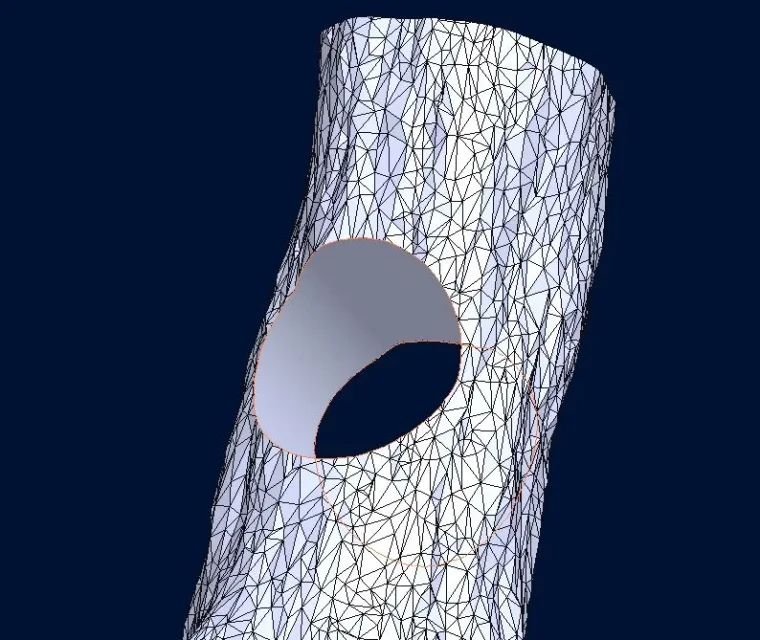
You know I can't do what you say? inmemorise it with shrinkwrap and reopen it I only see the part but not the sl. I wanted to drill and head what I coach you but I can't really, even if I have an open part I don't have the command to import. I must first import the stl and then add the part but remove it does not make me cut anything.
Attachments
+forte
Guest
but why don't you reverse that trunk and then cut it, with creo it's a moment
Half65
Guest
I know it is a form to pay aside and it is not active in my creo7 accidents otherwise it was not bad at all. is it not that if you have time you would convert me to it?but why don't you reverse that trunk and then cut it, with creo it's a moment
Attachments

+forte
Guest
but you have reverse click on restyle:
user interface restyle
the restyle board consists of commands. click on model (model) > surface (surface) > restyle to open the restyle tab.
commands
• curve (curve) >
 on facet (on facet)- inserts a curve projected on a facet feature.
• curve (curve) >
 on surface (on surface) - inserts a curve projected on a surface.
• curve (curve) >
 through snap points (through snap points) - inserts a free curve through snap points to geometry.
• curve (curve) >
 section (section)- inserts a curve to the intersection between a floor and a facet feature.
• curve (curve) >
 from edge - inserts a curve on the edge of a surface.
• curve (curve) >
 analysis - extreme (analysis - extremum) - inserts a curve on the extreme of a saved surface analysis.
• curve (curve) >
 analysis - isolinea (analysis - isoline) - inserts a curve on the isoline of a saved surface analysis.
• curve (curve) >
 from facet edge (from facet border) - inserts a curve on the edge of an open facet feature.
• curve (curve) >
 from living edges (from sharp edges) - inserts a curve along the living edges of a facet feature.
• curve (curve) >
 style (style) - inserts a style curve.
•
 combine (combine) - combines due curve.
•
 divides a curve into two.
•
 creates domain (create domain) - creates a domain within a closed loop.
•
 add loop (add loop) - adds a domain loop. removes facets within the loop from the domain.
•
 Remove loops (remove loops) - removes a domain loop. adds facets within the loop in the domain.
•
 join domains (merge domains) - joins two domains.
•
 allocates domain to supfce (assign domain to srf) - assigns a domain to a polynomial surface. ...... ... ... ... ... ... ... ... ... ... ... ... ... ... ... ... ... ... ... ... ... ... ... ... ... ... ... ... ... ... ... ... ... ... ... ... ... ... ... ... ... ... ... ... ... ... ... ... ... ... .... ... ... ... ... ... ... ... ... ... ... ... ... ... ... ... ... ... ... ... ... ... ... ... ... ... ... ... ... ... ... ... ... ... ... ... ... ... ... ... ... ... ... ... ... ... ... ... ... ... ... ... ... ... ... ... ... ... ... ... ... ... ... ... ... ... ... ... ... ... ... ... ... ... ... ... ... ... ... ... ... ... ... ... ... ... ... ... ... ... ... ... ... ... ... ... ... ... ... ... ... ... ... ... ... ... ... ... ... ... ... ... ... ... ... ... ... ... ... ... ... ... ... ... ... ... ... ... ... ... ... ... ... ... ... ... ... ... ... ... ... ... ... ... ... ... ... ... ... ... ... ... ... ... ... ... ... ... ... ... ... ... ... ... ... ... ... ... ... ... ... ... ... ... ... ... ... ... ... ... ... ... ... ... ... ... ... ... ... ... ... ... ... ... ... ... ... ... ... ... ... ... ... ... .
interfaccia utente restyle (ptc.com)
user interface restyle
the restyle board consists of commands. click on model (model) > surface (surface) > restyle to open the restyle tab.
commands
• curve (curve) >
• curve (curve) >
• curve (curve) >
• curve (curve) >
• curve (curve) >
• curve (curve) >
• curve (curve) >
• curve (curve) >
• curve (curve) >
• curve (curve) >
•
•
•
•
•
•
•
interfaccia utente restyle (ptc.com)
Half65
Guest
Prof.
Guest
most likely you do not have the rex license (reverse engineering extensions).
few have it because it costs a bang!
Bye.
few have it because it costs a bang!
Bye.
Half65
Guest
Exactly, I've been informed and we don't have a license.most likely you do not have the rex license (reverse engineering extensions).
few have it because it costs a bang!
Bye.
But my relative has and I have found it, but he can't use the restyle; we have tried but we can't turn the slate into solid.
Do you have any plans?
Prof.
Guest
I once (memory vade) I managed to get a solid by saving the creo file with inside the only stl by saving the copy and choosing the packaging format (shrinkwrap), you should get a faceted solid part like the sl. if not erro you have to pounce the solid or solid option joined. Moreover it is likely to work only if the sl is perfectly closed. I don't know why I don't make it available.
Prof.
Guest
Half65
Guest
You're a myth! I don't know how to thank you! how you see it worked well! :I converted your model. I hope you can open it.