• This forum is the machine-generated translation of www.cad3d.it/forum1 - the Italian design community. Several terms are not translated correctly.

change the layout of the room schedule!

  • Thread starter Thread starter Strumble
  • Start date Start date

Strumble

Guest
Bye!
I'm having big problems with changing the layout of a room schedule.
I would like to imagine it in various a4, each of which describes the characteristics of one room.
for each a4, then, I would like to see the name of the room, the number and the area at the top, as a title, while in the various rows below the finish of the wall, floor, doors, etc.
I have almost 80 rooms, so it's hard to handle.
I hope very much in your feedback!
Thank you.
 
If you have to do it individually for each club you should use a label in my opinion
 
create a new family of local labels and use the lyrics labeled to popular fields, so the loads in the project and the annota card find the command label by category.
https://www.youtube.com/watch?v=2al0emc57ic
I thank you for your help, but I'm a little lost, once I create the family where I put in the family I just created? Excuse me, could you explain me step by step?
I am looking on the internet but I cannot find anything:(
 
in the insert tab, when you are in the project, you will find "family charge"
I created the family from generic model tags, is it correct? Then I have to put labels and give properties? I'm not getting the procedure, I'm sorry. I also have many types of walls, floors etc, and especially many rooms. . .
 
if you start from a generic annotation you must first change the category in local label, then you can enter the fields. Maybe it's the case that you get help from someone who knows a little more otherwise you don't come out. .
 
if you start from a generic annotation you must first change the category in local label, then you can enter the fields. Maybe it's the case that you get help from someone who knows a little more otherwise you don't come out. .
The problem is no one can do it! :(and on the internet I found nothing; However with your method I would be able to have many sheets a4 each of which represents a room with all the features? Would I find them all on revit under the sheet individually?
 
What data do you need to represent for each club?
I would serve up as a title the name of the room, the number and the area, while below the description of the wall, the floor, countertop, interior doors, exterior doors, windows, accessories all in line: left the title to the right the relative description. . are all descriptions, have no formula as a parameter and many repeat. I hope I've explained well!
 
the name of the door taken from the catalog with its description, by accessories I mean ironmongery i.e. the handles of the door, sorry I did not get the name in Italian
 
mhm...no, those details in a local label cannot be inserted automatically; it would be necessary to match the labels of the doors/windows. more difficult!
--
at this point perhaps it is better to go of schedule with special filters, but the doors/windows should be made with shared components for the part of "accessories". If you really don't have someone who gives you a hand, I see you badly:frown:
 
Me too! :(I have no idea how to do, even if I use filters I can not change the location of column walls, windows etc in rows true? I was thinking of opening it in excel, editing it from them and connecting both files, is it possible?
 
Bye!
I'm having big problems with changing the layout of a room schedule.
... the number and area at the top, as a title, while in the various rows below the finish of the wall, floor, door, etc.
...
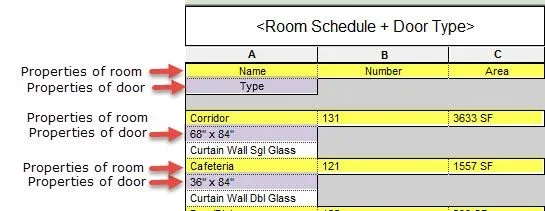
this can be done in revit, of a very limited way, using "embedded schedules". in a local table, you can "put" a table of doors (but, only you can use 1 "embedded schedule"not two or three, as you want.

it would be better to export several tables to the excel and continue the activity there.

or, using dblink from the revit, exporting information to a database to make a relationship of premises with doors, windows, etc., in microsoft access. However, this solution is advanced and needs knowledge of the dblink and use of a database.

this image shows the option of "embedded schedule":
2016-02-02_10-47-22.webp
 
this can be done in revit, of a very limited way, using "embedded schedules". in a local table, you can "put" a table of doors (but, only you can use 1 "embedded schedule"not two or three, as you want.

it would be better to export several tables to the excel and continue the activity there.

or, using dblink from the revit, exporting information to a database to make a relationship of premises with doors, windows, etc., in microsoft access. However, this solution is advanced and needs knowledge of the dblink and use of a database.

this image shows the option of "embedded schedule":
View attachment 43025
Thank you very much, but it really needed that imagination, and in the end we gave up!
 
with revit you can do everything or almost but as every software you also need to know how to use it. If you are in the first weapons you should rely on someone who can support you or risk letting everything go and go back to doing things by hand to the cad
 

Forum statistics

Threads
44,997
Messages
339,767
Members
4
Latest member
ibt

Members online

No members online now.
Back
Top