• This forum is the machine-generated translation of www.cad3d.it/forum1 - the Italian design community. Several terms are not translated correctly.

clarification on loft command

  • Thread starter Thread starter MARCOC
  • Start date Start date

MARCOC

Guest
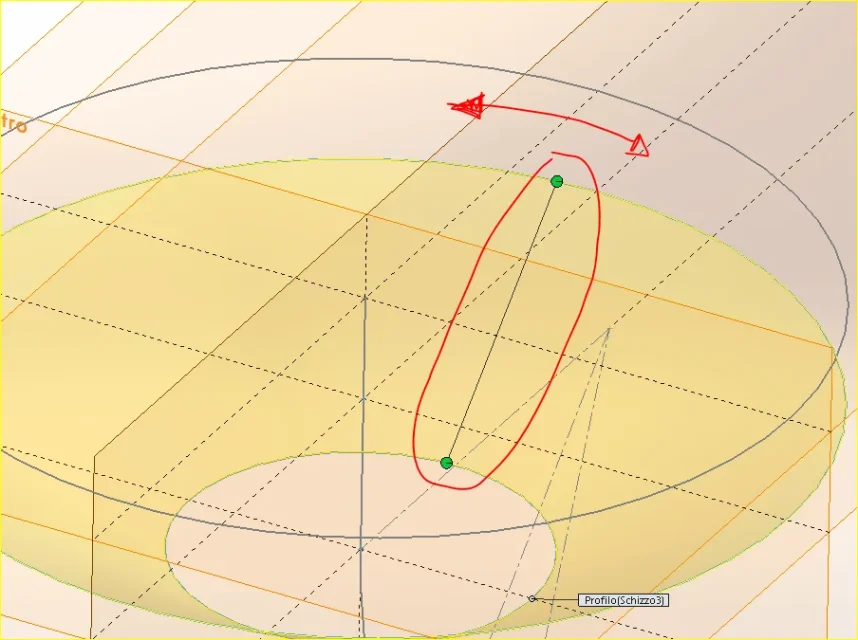
Hello everyone.. By running a simple loft between two circles, I get a line with 2 green balls (see image) that and libara to rotate on the surface of the loft, of course moving it changes the external profile of the loft, are to ask you, how to bind such line? ? ?

Thank you very much
loft.webp
 
generally exploits the top of the sketches. in your case draws sketch points that will ease line alignment, or draw a guideline
 
Thank you so much vassivon... it works if I do a sketch of driving... only with the points the line continues to be mobile and does not feel the points coma hooking. . .according to you and normal, do I have a problem or a kiss?? ?
 
with points the line is not blocked as on the edge, but serves as a reference point. If you need to securely manage the loft you need to use the driving sketch
 
Bye.
How come with the loft command I even have problems selecting profiles created from 3d sketches? ? ?
on the guide expressly says that you can use non-planar profiles with the loft function.
 
because obviously wrong something
As always I would say...xd!
in practice by means of "intersection curves" I obtained the section of a solid with a plan. sw tells me "the sketch cannot be glued on a face not to plan" but if I do ok it brings back the profile on the plan I created.
 
So what? you should waste time trying to recreate a situation that you already have in your hand to analyze what might be the problem that you vaguely described?
 
So what? you should waste time trying to recreate a situation that you already have in your hand to analyze what might be the problem that you vaguely described?
I didn't say this, I reported the error believing that's the problem, I see if I can attach the file by cellular it's complicated...xd!

Thank you
 
that you cannot attach the file because you use the cell phone was not mentioned and since other times you had to pray on your knees to have at least one example of what happened to you I drew my conclusions.
I repeat that without file, when you have error messages or a function does not come as you expect, it is difficult to understand what is actually the hippo, which can depend on an option of function, a sketch, existing geometry, modeling system and other variables also simultaneous
 
that you cannot attach the file because you use the cell phone was not mentioned and since other times you had to pray on your knees to have at least one example of what happened to you I drew my conclusions.
I repeat that without file, when you have error messages or a function does not come as you expect, it is difficult to understand what is actually the hippo, which can depend on an option of function, a sketch, existing geometry, modeling system and other variables also simultaneous
You're right.
In fact the problem is related to the other post I created on getting the boundary curves of a section between a plane and a solid step.

I tried with another step from simple geometry; There is always the same mistake, but the loft brings it to an end, at this point I presume it is a complex geometry problem that sw cannot handle.

thanks 1000 for all the always precious explanations.
 
Hello, more doubt...xd!

the guide curves must be passed for the "to join" profiles and up to here there are no problems.
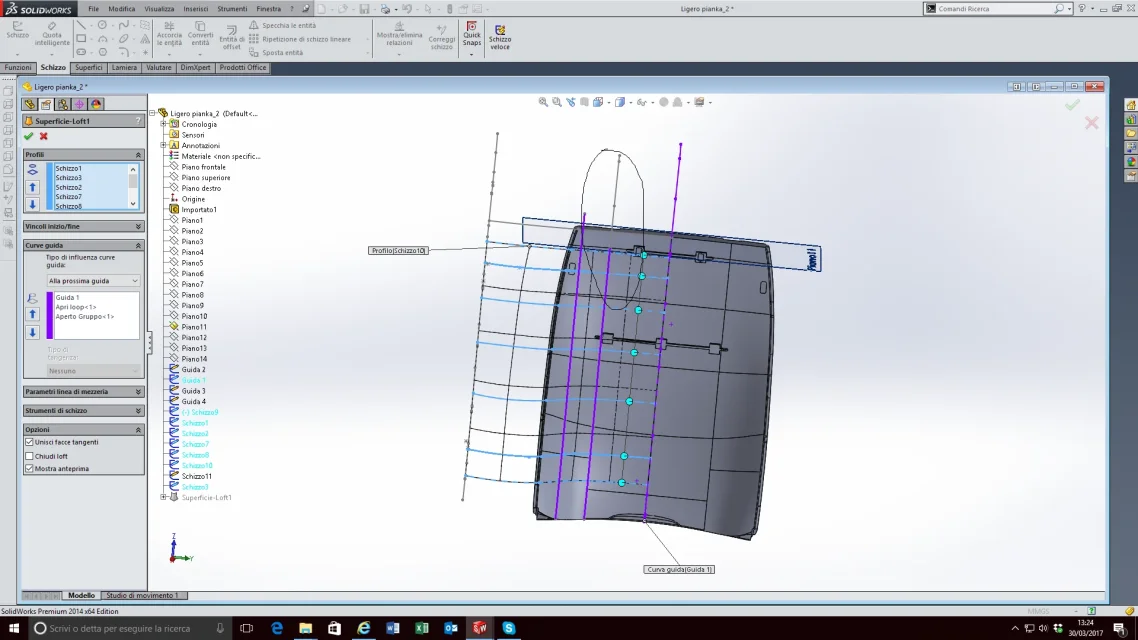
How come, for example, in the selected profile not only does it make me select the open loop but it does not even end with the end of the driving curve?
that it is a problem of construction of the latter?

from a step I got the various sections to join and the curves guide as intersection between various floors and my solid step, but I have the feeling that there is some geometry error that does not make me create the "canonical" guide curves.
As soon as I can attach an exemplifying file.

Hello waglio!
thanks as always.

ps: usually how would you reproduce a geometry like that in figure?? ? ? ?
Is there any technique/consiglio more indicated than another?
 

Attachments

  • Immagine.webp
    Immagine.webp
    123.4 KB · Views: 2

Forum statistics

Threads
44,997
Messages
339,767
Members
4
Latest member
ibt

Members online

No members online now.
Back
Top