skia51
Guest
Bye to all,
I have a problem with the substitute component command, in practice I follow this sequence of operations.
I open the main aid, save it as a copy and open it, I take the sub-committee that interests me, also this I save it as a copy and open it, within this together I take the part that interests me, also this save as a copy and open it, I modify and close it. Now I am in the background, I try to support the part I have modified, but in the command I see the assemblies that I opened before and I can't exclude them, so besides the part that I have modified, in my subset I find all the open assemblies.
I hope I explained.
Is there something wrong with this procedure?
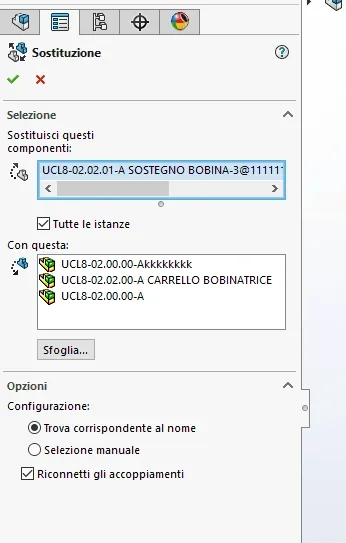
I attach the command image in which you see the axioms that solidworks wants to replace, and that I can't delete.
I have a problem with the substitute component command, in practice I follow this sequence of operations.
I open the main aid, save it as a copy and open it, I take the sub-committee that interests me, also this I save it as a copy and open it, within this together I take the part that interests me, also this save as a copy and open it, I modify and close it. Now I am in the background, I try to support the part I have modified, but in the command I see the assemblies that I opened before and I can't exclude them, so besides the part that I have modified, in my subset I find all the open assemblies.
I hope I explained.
Is there something wrong with this procedure?
I attach the command image in which you see the axioms that solidworks wants to replace, and that I can't delete.