
• This forum is the machine-generated translation of www.cad3d.it/forum1 - the Italian design community. Several terms are not translated correctly.

compilation cut list

  • Thread starter Thread starter Tantocattivo
  • Start date Start date

Tantocattivo

Guest
Hi.
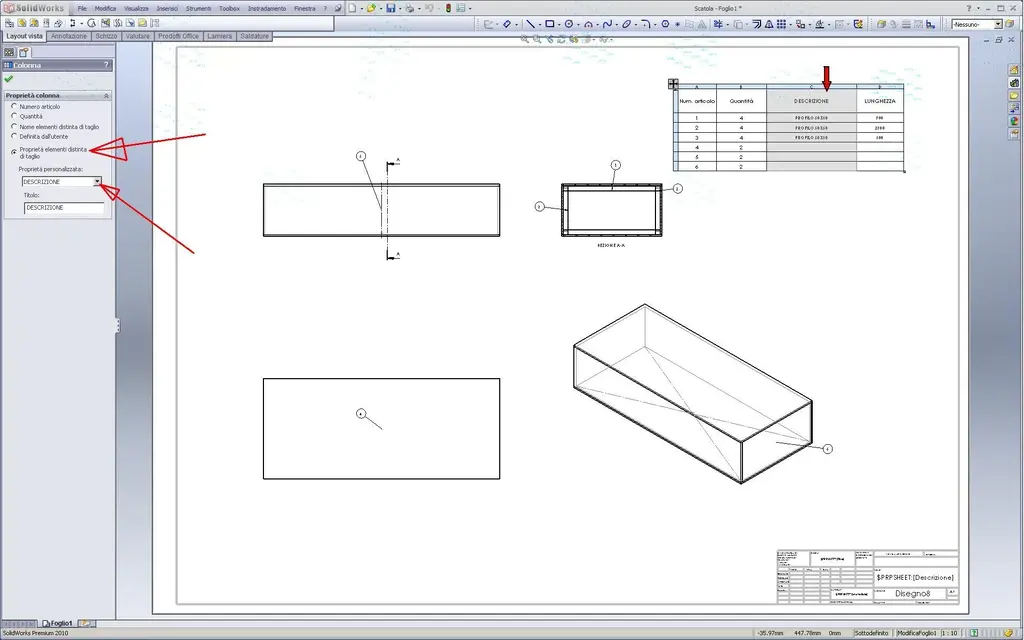
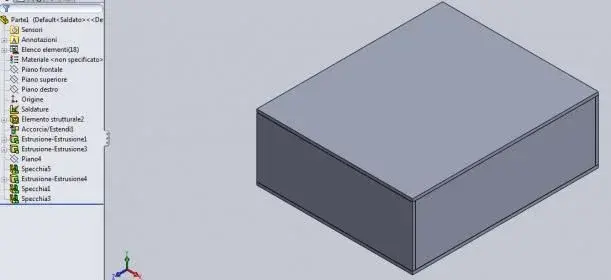
Premitting that I'm self-taught, I've got a problem on the cut-off. I was creating my own profiles by following the advice of http://www.cad3d.it/forum1/showthread.php?t=12698&highlight=distinta+taglio . the distinct comes out with the number of correct pieces, but does not fill me the description and length. I practically correctly see article number and quantity but not description and length. I press one thing, the design is a multibody part made with the struttral member and the rest modeled in the part. for clarity I attach the design in sw 2010.

Thanks

added:
I did a section in a position and I would like to move it exactly on the line of half-carry but does not make me put relationships like coincidence type or a quota equal to zero, so now that the alien section is made, like the exact shifteming on a line?
 

Attachments

Hi.
Premitting that I'm self-taught, I've got a problem on the cut-off. I was creating my own profiles by following the advice of http://www.cad3d.it/forum1/showthread.php?t=12698&highlight=distinta+taglio . the distinct comes out with the number of correct pieces, but does not fill me the description and length. I practically correctly see article number and quantity but not description and length. I press one thing, the design is a multibody part made with the struttral member and the rest modeled in the part. for clarity I attach the design in sw 2010.

Thanks

added:
I did a section in a position and I would like to move it exactly on the line of half-carry but does not make me put relationships like coincidence type or a quota equal to zero, so now that the alien section is made, like the exact shifteming on a line?
- click on the top edge of the columns. opens the property manager where you check the correct breeding to the column:DISTINTA TAGLIO.webpof course the elements must have a name.. as you correctly did for the beams you entered as structural members, assigning it in the properties of the file.
the lengths automatically gives you only for the structural members and also that column must be "updated" by the property manager.
for the panels that you subsequently modeled the properties (description, length etc.) the checks by right clicking on an element of the cast cast in the feature manager, choose property and you will open a table to fill out where among the cards you will also find a preview of the distinction you will have on the table.
for the eye material that there is a small bug: does not accept the translation in Italian "material". Just take off. e final using English "material" and everything works (in the table the column you can rename it in Italian).

in the table the distinct works roughly as an excel table, you can add all the columns/properties you want, always assigning values from the property manager with the right clik on the top edge of the column.

- when you pull the section line approaching the center of a line/bord should automatically take the "snap" average point.
otherwise wanting to change the section line, from the table feature manager expand the view in section, right clikki on section line and choose modifica lo schizzo. here you quietly use the usual sketch constraints by moving and fixing the line as you think.. make a reconstruction and the view updates.

greetings
Marco:smile:

p.s. remember to always use the right clik; below there is a little bit of everything:
 
Hi.
Premitting that I'm self-taught, I've got a problem on the cut-off. I was creating my own profiles by following the advice of http://www.cad3d.it/forum1/showthread.php?t=12698&highlight=distinta+taglio . the distinct comes out with the number of correct pieces, but does not fill me the description and length. I practically correctly see article number and quantity but not description and length. I press one thing, the design is a multibody part made with the struttral member and the rest modeled in the part. for clarity I attach the design in sw 2010.

Thanks

added:
I did a section in a position and I would like to move it exactly on the line of half-carry but does not make me put relationships like coincidence type or a quota equal to zero, so now that the alien section is made, like the exact shifteming on a line?
Hi.

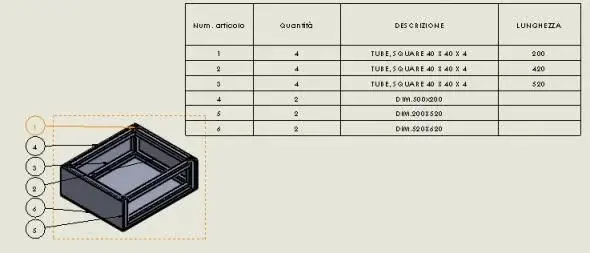
for the distinction it was enough to educate the columns, clicking above a column in the proprety manager leaves the menu to set the properties to be recalled.
for the section line I do not understand: I put it symmetrical without problems. when you do these operations and all sketch operations on active views before the view and then proceed.
to put the symmetrical line I had to make it "for construction" otherwise you could not.
look at the attached files and let me know if it is clearer; in the table I formatted it a bit different from the standard.
 

Attachments

thanks for the answer,
- for structural members I solved by following your advice and it works very cool.
- for the panels I clicked with the right and I tried everything that contained the written property and not, but it doesn't work, I don't see anything to assign the properties as I did for the structural member or similar.
- as for the section line, if I have to do it from the beginning too I do as it says re_solidworks but the problem was precisely to move it after it was created and also here unfortunately the constraints do not come out as in the sketch and doing some tests I realized that the problem is that I used the command line of half-work that is located on the annotation tab and did not make a line of construction symmetrically bound to the edges of the box.

ciauz
 
thanks for the answer,
- for structural members I solved by following your advice and it works very cool.
- for the panels I clicked with the right and I tried everything that contained the written property and not, but it doesn't work, I don't see anything to assign the properties as I did for the structural member or similar.
- as for the section line, if I have to do it from the beginning too I do as it says re_solidworks but the problem was precisely to move it after it was created and also here unfortunately the constraints do not come out as in the sketch and doing some tests I realized that the problem is that I used the command line of half-work that is located on the annotation tab and did not make a line of construction symmetrically bound to the edges of the box.

ciauz
the properties of the panels can be assigned by hand. go to the part, unroll "elements list" and make clik dx on the panels folders. select properties and fill out the properties you want to see in the cut list. with 2010 you can not intervene by hand in the separate cut and you have to pass this way.
for the section line I simply edited the line you had already made with sketch modification, I turned it into construction and put it symmetrical. then I came out of the sketch and the section updated in half-carry.
 
the properties of the panels can be assigned by hand. go to the part, unroll "elements list" and make clik dx on the panels folders. select properties and fill out the properties you want to see in the cut list. with 2010 you can not intervene by hand in the separate cut and you have to pass this way.
for the section line I simply edited the line you had already made with sketch modification, I turned it into construction and put it symmetrical. then I came out of the sketch and the section updated in half-carry.
for the properties I was wrong because I went into the single item and not in the folder!!! ! ! ! ! ! !!!!!!!!!!!!! (I'm trying to fill it out for good)
for the section line I did now as you say and it turned out to me, I was wrong because I wanted to make hillside the existing section line to the existing halfway line, instead you suggested to make the line that had already made symmetrical to the edges.

Thanks again
 
In addition to the advice of others, I suggest you also try to hang yourself with the facilities.
I'll get you an image where I show you don't need all those cuts.
also uses the symmetry command bodies, avoid sketches and extrusions and decrease recalculating times.
I tell you this because the structure is simple, but if it were complicated...you must learn how to exploit all the tricks to make your project as slender and as fast as possible.
 

Attachments

  • weld.webp
    weld.webp
    11.5 KB · Views: 49
  • WELD2.webp
    WELD2.webp
    12.9 KB · Views: 62
  • Parte1.zip
    Parte1.zip
    502.4 KB · Views: 12
In addition to the advice of others, I suggest you also try to hang yourself with the facilities.
I'll get you an image where I show you don't need all those cuts.
also uses the symmetry command bodies, avoid sketches and extrusions and decrease recalculating times.
I tell you this because the structure is simple, but if it were complicated...you must learn how to exploit all the tricks to make your project as slender and as fast as possible.
umh, maybe you did the design in 2011 because just trying to open it tells me future version!! for simplifying keep in mind that I had constraints, in fact the pieces must have the forms that I had given, that is the four pillars must start from below and get up to the entire height of the structure (excluding panels). cmq surely I have to impratichize, from self-taught it is very difficult to acquire a correct methodology in a short time.
cmq thanks.
 
umh, maybe you did the design in 2011 because just trying to open it tells me future version!! for simplifying keep in mind that I had constraints, in fact the pieces must have the forms that I had given, that is the four pillars must start from below and get up to the entire height of the structure (excluding panels). cmq surely I have to impratichize, from self-taught it is very difficult to acquire a correct methodology in a short time.
cmq thanks.
I'm not accusing you of inability, but I made you notice that there are solutions that can streamline the project.
Sometimes you don't see things until others notice them.
 
I'm not accusing you of inability, but I made you notice that there are solutions that can streamline the project.
Sometimes you don't see things until others notice them.
Absolutely, I was confirming what you told me. and I said more that unfortunately I couldn't make less cuts because I had restrictions.

ciauz
 
In addition to the advice of others, I suggest you also try to hang yourself with the facilities.
I'll get you an image where I show you don't need all those cuts.
also uses the symmetry command bodies, avoid sketches and extrusions and decrease recalculating times.
I tell you this because the structure is simple, but if it were complicated...you must learn how to exploit all the tricks to make your project as slender and as fast as possible.
I recently developed a big project using the welding environment. As for repetitions and mirrors you have to be careful as there are a couple of basins that are resolved but sometimes they return, which prevent the correct recognition of mirrored bodies. Basically they are not grouped correctly within the folders and it is expensive in terms of time as well as unreliable to intervene by hand.
for this reason I decided to use as little as possible the mirrors (with repetitions goes a little better).
 
I have another curiosity, I understood how to make cutting lists, put new profiles in the library, but if in a sketch I want to use a normalized profile of the hea type I have to do it every time remake or can I take it somewhere?
 
Absolutely, I was confirming what you told me. and I said more that unfortunately I couldn't make less cuts because I had restrictions.

ciauz
When I did my example, I looked at your first and apart from the profile and size, it turns out identical.
so cuts can be avoided.
 
I recently developed a big project using the welding environment. As for repetitions and mirrors you have to be careful as there are a couple of basins that are resolved but sometimes they return, which prevent the correct recognition of mirrored bodies. Basically they are not grouped correctly within the folders and it is expensive in terms of time as well as unreliable to intervene by hand.
for this reason I decided to use as little as possible the mirrors (with repetitions goes a little better).
Look, if I don't see, I don't think so.
It's easy when a project becomes big, losing sight of small details that lead to an unexpected result.
just select a small icon that can change the result.
the file I attached uses symmetries and are recognized without problems.
solidworks recognizes objects for equality of bodies, so a slight difference is enough that they lose equality.

why don't you attach the file that presents the problems we look at.
 
I have another curiosity, I understood how to make cutting lists, put new profiles in the library, but if in a sketch I want to use a normalized profile of the hea type I have to do it every time remake or can I take it somewhere?
I don't understand. .
You always take it from the library of the structural members (if you have it in the library) and build it on the usual sketch of support.

look at the discussion Useful resources for solidworks users, I have inserted a library of "standard" fe profiles quite complete.. Hea's here.

greetings
Marco:smile:
 
I typed download hea profiles and one of the first links was this http://www.archweb.it/tecnologia/acciaio_lamiere_profilati/profilati_metallici.zipyou just need to have a little good will and on the web everything is found.
I mean I don't know how to put them in the drawing of a part not in the welded.
I don't understand. .
You always take it from the library of the structural members (if you have it in the library) and build it on the usual sketch of support.

look at the discussion Useful resources for solidworks users, I have inserted a library of "standard" fe profiles quite complete.. Hea's here.

greetings
Marco:smile:
the profiles I use in the structural members I am doing them and I put them in c:\program files\solidworks corp\solidworks\data\weldment profiles
creating the folder pictures, hea, heb etc etc. but while I am doing a sketch of a part and I have to strudere una heb dove lo take the profile? I saw that there's a design library, but I only find 3d parts.
 
Look, if I don't see, I don't think so.
It's easy when a project becomes big, losing sight of small details that lead to an unexpected result.
just select a small icon that can change the result.
the file I attached uses symmetries and are recognized without problems.
solidworks recognizes objects for equality of bodies, so a slight difference is enough that they lose equality.

why don't you attach the file that presents the problems we look at.
in the last 3 years I have opened several juices for welded, some of which resolved and others not.
I can assure you that before accusing the cad I look at us 20 times, but I guarantee that it happens, even if not very often.
I try to use statistically more stable functions and with mirrors opened a few sprs.
now I have a big problem open for months that concerns the mirrored parts (always with welds), 2 spr open from May and no solution for the moment.... too few reports!
 
I mean I don't know how to put them in the drawing of a part not in the welded.


profiles I use in structural members I am doing them myself and I put them in c:\program files\solidworks corp\solidworks\data\weldment profiles
creating the folder pictures, hea, heb etc etc.
but while I'm doing a sketch of a part and I have to rub a heb where I take the profile? I saw that there's a design library, but I only find 3d parts.
You just said... open (right button on the profile) the item from the welding profile library, go edit sketch, select everything, copy, odds covered,
and paste it on a floor or a face of the part where you want to extrude.
easy. :finger:
 
I mean I don't know how to put them in the drawing of a part not in the welded. .
...mha?
the "saved" è una parte!
the profiles I use in the structural members I am doing them and I put them in c:\program files\solidworks corp\solidworks\data\weldment profiles
creating the folder pictures, hea, heb etc etc. but while I am doing a sketch of a part and I have to strudere una heb dove lo take the profile? I saw that there's a design library, but I only find 3d parts.
you looked in resources. . . How did I tell you? ?
there are all profiles already made:http://www.cad3d.it/forum1/showthread.php?t=13375&page=2Hello
marco
 

Forum statistics

Threads
44,997
Messages
339,767
Members
4
Latest member
ibt

Members online

No members online now.
Back
Top