
• This forum is the machine-generated translation of www.cad3d.it/forum1 - the Italian design community. Several terms are not translated correctly.

compose of walls in revit with what approach?

  • Thread starter Thread starter davide33
  • Start date Start date

davide33

Guest
hi to all, when I insert walls in revit inside the compute of walls or abachi I noticed that as wall length, from the actual length less than half the thickness.
the reason I happen to because it behaves so by reading around the web, but in the end the calculation of the area of the walls is mistaken with this procedure.
you how you solve this problem, if you can solve
By spraying the other forum posts I read of various alternative solutions like overlaying different layers walls, enabling the division of parts and making an abacus for layers etc, but it seems strange to me that such a simple thing foresees all these steps?
Thank you very much
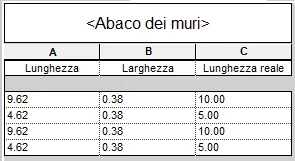
 
the area is actually correct and you do not need to calculate it. if you create a calculated field given by area/height you will see how the result is accurate to the millimeter
 
hello thanks for the answer first of all
In fact, I had doubts that a program of such complexity was lost on something so simple, I have to do some tests.
the thing that bothers me is that at the length of the walls always removes half the thickness (for the calculation of the area is a right reasoning) but for the calculation of the surface to plaster nn so I have to try.
a method that seemed good enough for the walls was to create a layered wall, separate the various layers and calculate the area of the thinner layer at the extreme, when the difference on that is really very little
 
You're losing yourself in a glass of water...you can always create a simple calculated field that gives you the right value
 

Attachments

  • Annotazione 2020-07-13 085429.webp
    Annotazione 2020-07-13 085429.webp
    8.6 KB · Views: 31
  • Annotazione 2020-07-13 085500.webp
    Annotazione 2020-07-13 085500.webp
    6.2 KB · Views: 31
I thought about it too, (only for the walls that cross the value would not be correct) but it seemed strange to me that you have to use these expedients to get the real length of a wall
 
only for the walls that cross the value would not be correct
Just create a filter for that.. .
but it seemed strange to me that you have to use these expedients to get the real length of a wall
There are other strange things, but if you just above said that "the reason I happen to because it behaves like this" what you're amazed at. Is it an operation that takes away as much? 10 seconds? think about what you should do in autocad drawing in 2d to pull out these values.. .
 
but now you confirm that it is a real problem, i still take advantage of your availability for another question, but do you see if the paid plugins that are around the revit compute present the same problem?
 
but look, it's not a problem. it's your way of thinking that turns it into a problem. i can't answer the other question. never used external plugins to make the compute, just because if you know how to use revit, these are fake issues. there are many other roars that should settle.
 
Good morning, I read to the discussion...I approach the bim (revit) from a very short time but I immediately entered in live with a modeling not too precise in details.
question: modeling non-structural walls and pillars and beams and structural floors, I went to make the compute of materials and the quantities of individual wall thicknesses do not reflect reality (I went to compare with an analytical result executed on cad....what could I have mistaken?
It's like the beams and the pillars were counted as a wall... .
Premetto....in section I have the situation as from attached images...I see the beam only if they select the passing wall. . .
 

Attachments

  • sez muro.webp
    sez muro.webp
    20.5 KB · Views: 17
  • sez muro2.webp
    sez muro2.webp
    20.9 KB · Views: 8
You obviously did not join the structural elements on the architectural wall. so doing you have a blank compute for full
 
thank you so much tristan...even if some travails (to me modified) do not apply me to join......look case in that default you...idee on error?? ? ? ?

Moreover after joining the pillars in the plant I do not understand why on the same wall I have different fields (see attachment) but above all.... because pillars of the same famifglia behave on the same wall in a different way (the upper pillar does not join, while the lower one is)....
 

Attachments

  • sez.webp
    sez.webp
    11 KB · Views: 10

Forum statistics

Threads
44,997
Messages
339,767
Members
4
Latest member
ibt

Members online

No members online now.
Back
Top