
• This forum is the machine-generated translation of www.cad3d.it/forum1 - the Italian design community. Several terms are not translated correctly.

convert a polysurface to control points

  • Thread starter Thread starter kubin4
  • Start date Start date

kubin4

Guest
Good morning. I'm a new rhino user. I'm trying to edit a solid from a boolean operation.
I would need to edit the solid through the control points but nn I can, and I forgot the ways to convert the solid so as to get the points.
I have done 3 days of course mc neel after which my teacher has volatilized in nothing and nn answers my questions about the software.

:mad:

thanks to all those who will help me and will be more available to him
 
Good morning. I'm a new rhino user. I'm trying to edit a solid from a boolean operation.
I would need to edit the solid through the control points but nn I can, and I forgot the ways to convert the solid so as to get the points.
I have done 3 days of course mc neel after which my teacher has volatilized in nothing and nn answers my questions about the software.

:mad:

thanks to all those who will help me and will be more available to him
a solid composite, which is the result of a boolean union between more solid, cannot be changed directly through control points because the surfaces that make up it are multiple.

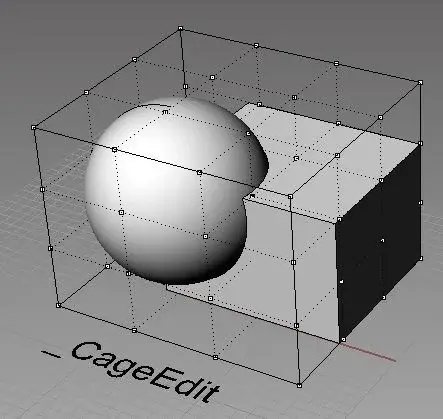
maybe you refer to the _cageedit command that allows you to "model/deform" a solid or a polysurface through the control points of its boundingbox (see image attached)

Maybe you put an image to let us know what solid you're talking about and how you would change it.
 

Attachments

  • cage.webp
    cage.webp
    24.9 KB · Views: 3

Forum statistics

Threads
44,997
Messages
339,767
Members
4
Latest member
ibt

Members online

No members online now.
Back
Top