
• This forum is the machine-generated translation of www.cad3d.it/forum1 - the Italian design community. Several terms are not translated correctly.

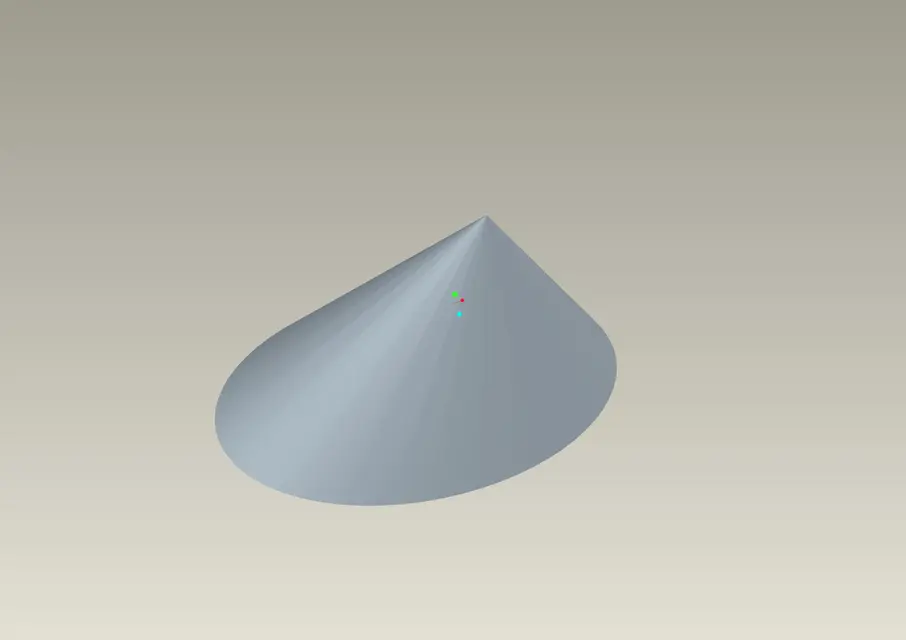
create an oval cone

  • Thread starter Thread starter MarioMcP
  • Start date Start date

MarioMcP

Guest
hello to all and good Sunday:smile:
I would like to create a conical part with oval profile...for you it is definitely simple but for me not since I do not have much dimisticness with the proe...
Could someone explain how to do by pointing out all the steps to do?thanks
 
hello to all and good Sunday:smile:
I would like to create a conical part with oval profile...for you it is definitely simple but for me not since I do not have much dimisticness with the proe...
Could someone explain how to do by pointing out all the steps to do?thanks
you can use the blend command. (input -> blend -> protrusion).

Like something like that.. .

Bye!
p-h
 

Attachments

  • cono.webp
    cono.webp
    50 KB · Views: 23
Thanks partner:) sorry if I thank you late but I have no connection when I am away...
Now I see what I can get out of here:)
 
Unfortunately I have some difficulties... I understand how the blend command works... but I think it doesn't happen to me...
basically I have to create a biril whose section is not circular but oval...in practice I leave with a "small" helix and end with a "enlarged" helix all along a straight trajectory...any advice?
 
Unfortunately I have some difficulties... I understand how the blend command works... but I think it doesn't happen to me...
basically I have to create a biril whose section is not circular but oval...in practice I leave with a "small" helix and end with a "enlarged" helix all along a straight trajectory...any advice?
you can create a trajectory and use various sections and use the blend sweep... but also in the blend command in environment 2d right button -> switch section... (you must use the parallel option)

If you have an image everything would be easier... :wink:

Bye!
p-h
 
just to make the idea I attach you photo of this motorcycle exhaust. ..as you can see, you start with a certain helix and then end with a larger helix. .

So I don't need a revolution of a profile along a certain trajectory but, rather, an extrusion of a profile whose value is amplified of a certain value... I don't know if it is now clearer:
 

Attachments

  • 08mistralof7.webp
    08mistralof7.webp
    16 KB · Views: 12
just to make the idea I attach you photo of this motorcycle exhaust. ..as you can see, you start with a certain helix and then end with a larger helix. .

So I don't need a revolution of a profile along a certain trajectory but, rather, an extrusion of a profile whose value is amplified of a certain value... I don't know if it is now clearer:
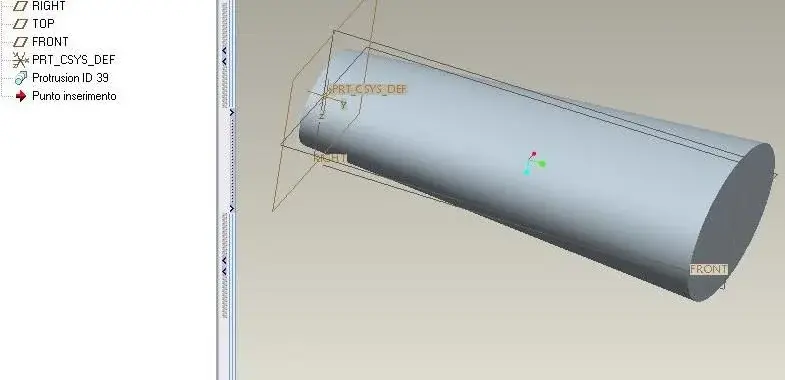
ma si command blend.
Enter -> blend -> protruding -> parallel -> [attributi] Direct -> select the work plane (red arrow indicates the direction in which geometry will be created) -> create the first ellipse -> tasto dx -> switching section -> create the second ellipse -> confirm the sketch just created -> insert the length of your protrusion -> confirmation :finger:

This is just an example

Bye!
p-h
 

Attachments

  • MCP.webp
    MCP.webp
    17.7 KB · Views: 22
hi preparation h I wanted to tell you that thanks to your advice I realized the idea that was whipping me for the mind... thank you again!!!
 

Forum statistics

Threads
44,997
Messages
339,767
Members
4
Latest member
ibt

Members online

No members online now.
Back
Top