• This forum is the machine-generated translation of www.cad3d.it/forum1 - the Italian design community. Several terms are not translated correctly.

create one geometry in ansys

trest21

Guest
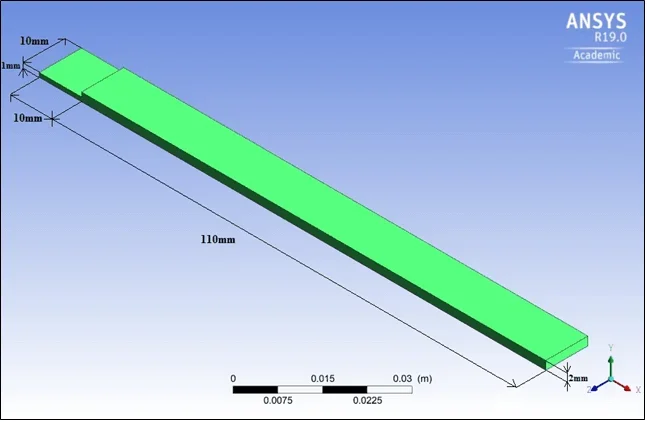
good afternoon to all, I have to realize a simple geometry in ansys 19, in practice two very thin parallelepiped channels, how can I proceed? Or can I relic the figure in autocad and import it?

Thank you very much.
 
in ansys workbench you can have the design modeller to draw without having external cad. You should make sure you have it in your license.

alternatively designs with the cad you prefer, save in step and amounts.

third most refined alternative: your ansys license must include the interface with the cad. This way you can draw with the software you prefer and import the native model directly. so if you change it, the changes will automatically update even in the pre-processing environment of ansys (clearly you have to remake the mesh and raise the solutor).
 
I opened workbench and from component system by clicking geometry find in white space a pane, this would be the first geometry? I want to realize what is attached. now how do I continue? Thank you so much.
 

Attachments

  • Geometry.webp
    Geometry.webp
    13.9 KB · Views: 12
ok you should have created the block that will contain the cad pattern in the logical diagram of ansys (what you see in the “white picture”). now if you do right-click on that block should appear edit and you will be able to access the design modeller that you use more or less like all cad (I usually amount, do not find it very user-friendly). if you can't use it, there are a lot of tutorials
 
if you do not have 3d programs you can use freecad which is completely free and you can make your model and export it in step.
 
Obviously if you have the integrated modeler it is simple to change and maintain the geometric bond. If not, every time you import the model, you must reinstate all constraints and properties
Hi.
 
third most refined alternative: your ansys license must include the interface with the cad. This way you can draw with the software you prefer and import the native model directly. so if you change it, the changes will automatically update even in the pre-processing environment of ansys (clearly you have to remake the mesh and raise the solutor).
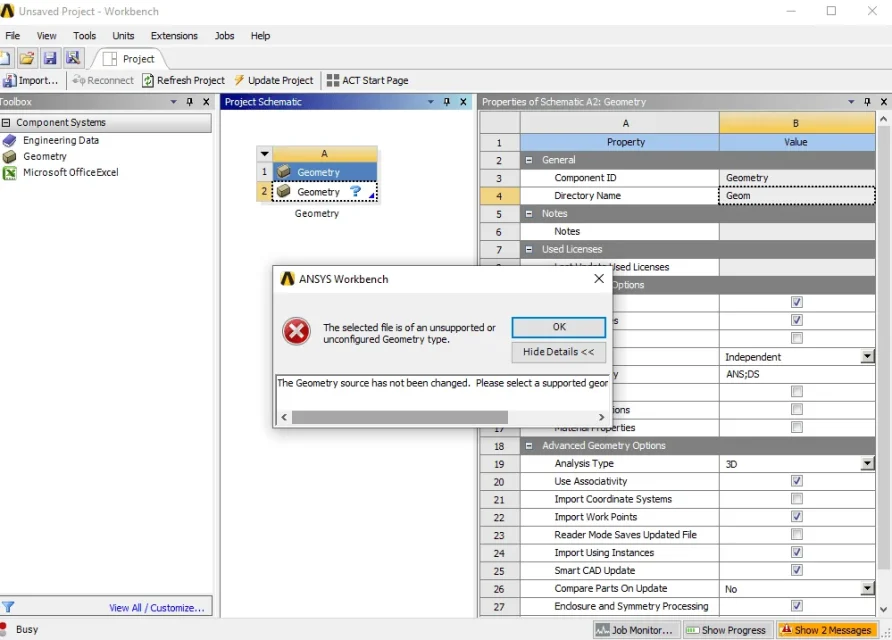
is not present design modeller. I designed the model in cad 3d but ansys does not allow the import of (.dwfx). I tried to import the dwg file of the same geometry but an error appears. (Annex)

I could try on sketchup.
alternatively designs with the cad you prefer, save in step and amounts.
what do you mean by "saving in step", I don't have to import geometry as did it on cad?
 

Attachments

  • error.webp
    error.webp
    54.7 KB · Views: 15
if you take any true 3d modeler, in addition to saving the file with program and its native extension, expose the files step that you can be imported in neutral format from your fem solutor.
an import of dwg or dxf is usually allowed only for 2d silhouettes.
 
Step format is a neutral format ... has .stp extension, allows you to model an object and open it with another software. is something known to anyone using the cad

it is clear that ansys does not allow the import of a proprietary format of the autodesk. are different companies.

It seems strange to me that you propose to do a finite element analysis and you don't know this.
 
I saw you're a student. is a little more understandable than the fact that you do not know the step format.... but not ahaha. explore the possibilities of saving your software. otherwise change software
 
from the screen you sent I see that on the left in the component system you have no analysis module .. only geometry, material library and extension for excel. or the other modules are hidden somewhere, or your ansys license is missing......... everything!
 
The version of ansys you use is that student?
from the screen you sent I see that on the left in the component system you have no analysis module .. only geometry, material library and extension for excel. or the other modules are hidden somewhere, or your ansys license is missing......... everything!
you have just made a clean installation of v. 2020 r1 student
I saw you're a student. is a little more understandable than the fact that you do not know the step format.... but not ahaha. explore the possibilities of saving your software. otherwise change software
I'm an engineering student, I don't take care of 3d modeling, in my course of studies we haven't used other sw besides autocad and sketchup. However it is never late to learn and if we are here it is because we have a common goal to confront ourselves-learn and improve our knowledge.
I miss the presentation post there is among those he wrote....
He's right. As previously written, I am an engineering student and I am studying a matter called numerical thermofluidodynamics that requires the use of ansys.


I am trying to draw on designmodeler geometry.
 
but by chance, just to, your prof has made you use the software or, he showed you, how to use it for his course?
 
but by chance, just to, your prof has made you use the software or, he showed you, how to use it for his course?
Unfortunately I could not follow the lessons, because of the work. the prof. has dedicated to the sw only 4h, the matter also has so much theory. Whatever.

Here's the figure I drew, not as bad as I begin.

how do I add quotas, as shown in the first post?

Thank you all.
 
You have nothing attached.
how to add quotas
I try to answer without attachment: If you click on a feature you have designed, a small panel appears on the bottom left where you can edit the basic size. but I repeat, if you are looking for some tutorials, these things can solve them independently.
numeric thermodynamics
fourth/fifth year material I would say.
the prof. has dedicated to the sw only 4h
Preoccupante.
 
However I discovered that you can define geometry in autocad and save the file in sat (ascii), then import it to ansys.
 

Forum statistics

Threads
44,997
Messages
339,767
Members
4
Latest member
ibt

Members online

No members online now.
Back
Top