• This forum is the machine-generated translation of www.cad3d.it/forum1 - the Italian design community. Several terms are not translated correctly.

created a more realistic material for prospectus

  • Thread starter Thread starter blizzard883
  • Start date Start date

blizzard883

Guest
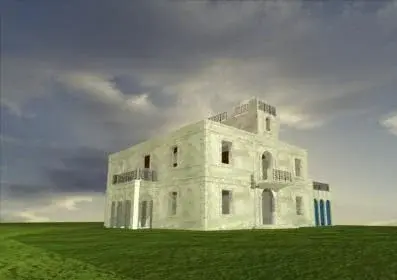
Hey, everybody! It's been a few weeks since I tried rendering with autocad 2010. through my curiosity and the precious discussions of this forum, I managed to get the first results. Now I'm facing a problem on which I've been slapping my head for a few days. My 3d is almost complete, I fixed the lights, arranged the materials and mapped them. Unfortunately, however, the rendering of proof always has an unrealistic aspect. I did a million tests but the prospect always looks like cartoon. perhaps for incompetence I did not find a specific article on this forum or comprehensive tutorials on the web. I send you an image of my first result in the hope that someone can help me! thanks early and good evening to all!:smile:
 

Attachments

  • render.webp
    render.webp
    11.6 KB · Views: 50
Hi.
the rendering is not bad, but as you say there is to work there. I can give you some suggestions
1) the lack of elements (hotels, houses, cars, people) detracts more than you think quality
2) the image of the sky is out of scale.
3) the grass has no particularly visible texture
4) the lights appear disconnecting with the shade of the lawn, sky and house
5) the wall has a color too uniform.

useful ideas you can draw from this image http://www.treddi.com/forum/gallery/image/5901-927/ that is not the maximum, but precisely for this could be a goal reached with the agreements indicated.

remember however that autocad 2010 has limits in the constructions to render.
 
would be to understand how you set the lights (sunstatus and skystatus on or off) and how did you set the rendering (fg and gi activated or disabled?) as well as give, as it rightly says gil, a ritoccatina to the materials
 
Hi.
the render is not .... ..... ... limits in construction to render.
If I could achieve that result, it was very satisfied. I will try to work on the straights you gave me and finally I will post another render.
I read that the material of a solid to have a realistic look, is composed of several layers, each of which adds a value to the final yield. Is it really important? in all the materials I used only the "diffused compound" because I can not use the other two well :-s
 
would be to understand how you set the lights (sunstatus and skystatus on or off) and how did you set the rendering (fg and gi activated or disabled?) as well as give, as it rightly says gil, a ritoccatina to the materials
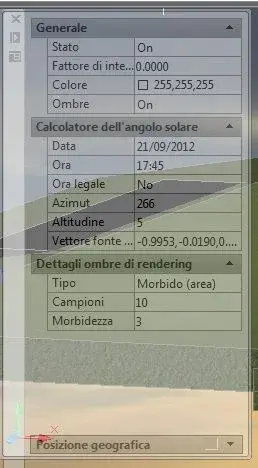
about alone and sky I hold them both in position on (I also annexed a jpeg with sunshine). about fg and gi unfortunately I'm not sure... I don't know what features they are. if they match "filter and gizmo" then I set: "No filter" and "gizmo move".
 

Attachments

  • Immagine.webp
    Immagine.webp
    17.9 KB · Views: 18
Last edited:
about fg and gi unfortunately I'm not sure... I don't know what features they are. if they match "filter and gizmo" then I set: "No filter" and "gizmo move".
no, this is final gathering and global illumination.
blizzard do not take it, mine wants to be a constructive criticism, but how do you expect to make photorealistic renderings if you have no idea how to set materials and rendering?
 
no, this is final gathering and global illumination.
blizzard do not take it, mine wants to be a constructive criticism, but how do you expect to make photorealistic renderings if you have no idea how to set materials and rendering?
tranq tristan, I do not take it because in fact I non I demand. I'm trying to move from a scarce to a better way. I want it to be more realistic than it's "absolutely realistic." ..all here.
cmq I attach the details of fg and gi that I had previously modified just to make some attempt.:finger:
 

Attachments

  • Immagine.webp
    Immagine.webp
    32.6 KB · Views: 15
I think I have improved the prospect a bit by changing the mapping and intervening on the texture by changing the colors. now I will try to improve the lawn and the background. place also the values of gi and fg (now I know what are:biggrin:)
 

Attachments

  • Immagine.webp
    Immagine.webp
    34.6 KB · Views: 18
  • render5.webp
    render5.webp
    35.2 KB · Views: 28
I feel so much better. decrease the scale of the texture "grass"
tomorrow I think I will post the render with the changes you have suggested to me, then I will try to work again on fg and gi and on the background:finger:
 
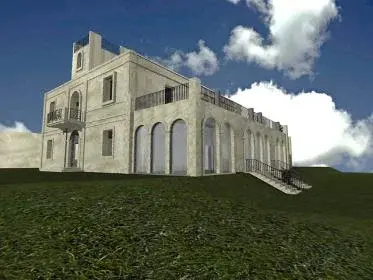
Okay, sorry for the delay. I slightly decreased the scale of the grass texture and added a file for the embossed composition map generated by crazybump. However the grass is not very embossed. during the generation of rendering, when the grass is seen as a draft, it clearly sees the grass in relief, then, when the render becomes defined this returns to be flat. ...boh! in rendering you also see glass, but on those I still have to work. Some straight?
 

Attachments

  • render8.webp
    render8.webp
    9.6 KB · Views: 23
for glasses if there are too overhanging.
However with autocad realize a credible window, that quiondi also show all the frame, begins to be laborious.
 
here you see the glass that at the moment is only in these arcate openings.
 

Attachments

  • Render_3_sud.webp
    Render_3_sud.webp
    19.7 KB · Views: 19

Forum statistics

Threads
44,997
Messages
339,767
Members
4
Latest member
ibt

Members online

No members online now.
ciao
Back
Top