• This forum is the machine-generated translation of www.cad3d.it/forum1 - the Italian design community. Several terms are not translated correctly.

created elements disappear when you activate another view

  • Thread starter Thread starter Staedtlerp
  • Start date Start date

Staedtlerp

Guest
Hello everyone,
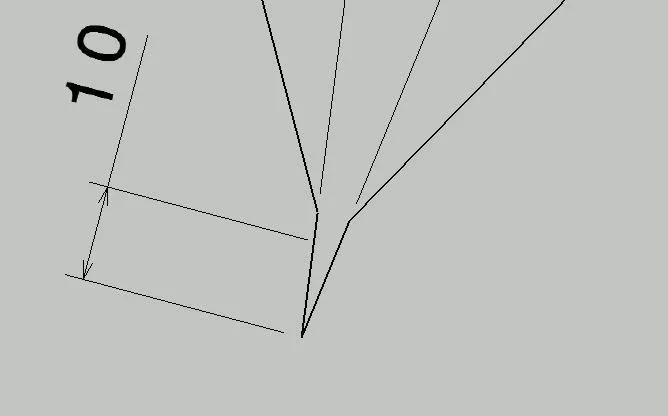
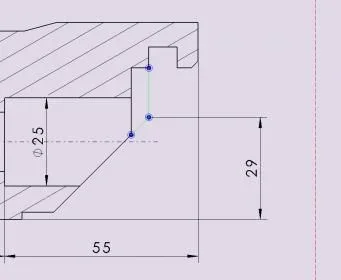
I have a problem, I think small and solveable:wink:. Sometimes I happen to have to quote outlines where I need to find an intersection between two lines for example. so far everything ok, active the detection option of the intersection point and the game is done, appears the extension of the lines concerned (tracked) and their intersection identified by a clear green point. Now, apart from the color of that point I have to change, as soon as I activate a different view than the one in which I found the intersection, I disappear the extension of the two lines (the lines drawn to understand us). reappear as soon as the view reacts. I put some photos for clarity. in the first two visible dotted lines with active view, in the second the lines disappear with deactivated view.1.webp 2.webpthe problem is that if I go to print do not appear such lines drawn and this makes the drawing a little unreadable since the references of quotas are missing.
another thing: I noticed that the lines outlined in intersection are considered by catia as elements created, in fact if I activate the view and press on the button "filtra created elements" such lines are highlighted. :confused:
exists a way to avoid all this and to ensure that such lines/intersections are always visible?grazi thousand:biggrin:
 
for intersections you must connect as "cat administrator" and change the standard , the procedure has been explained + times ......
then go to standard / drafting / quotas and at the bottom there is the cfg of the intersection to activate x see it and print it ........... .

for the other problem you have to activate a square-shaped icon with a light bulb............ if the active you get all the drafting costrains............ .

I hope I understand what you were looking for.
 
Thank you very much mcbramby. I had already activated the procedure to connect me as administrator (in fact I changed the background of dafting bringing it from an annoying white to a more acceptable gray). cmq went on standard, I positioned myself on the standard in use ie iso and I followed your procedure, then I restarted caia. nothing has changed the lines are not visible except when active the view.
about the square-shaped icon with the bulb do not know where it is?it in the display bar? Thank you.
 
you have restarted caia x which should work . . . . . . . . . . . . . . . . . . . . . . . . . . . . . . . . . . . . . . . . . . . . . . . . . . . . . . . . . . . . . . . . . . . . . . . . . . . . . . . . . . . . . . . . . . . . . . . . . . . . . . . . . . . . . . . . . . . . . . . . . . . . . . . . . . . . . . . . . . . . . . . . . . . . . . . . . . . . . . . . . . . . . . . . . . . . . . . . . . . . . . . . . . . . . . . . . . . . . . . . . . . . . . . . . . . . . . . . . . . . . . . . . . . . . . . . . . . . . . . . . . . . . . the drawing you are using set the standard one?? ? ?aa.webp ............... bb.webp using this in the quota cc.webp ... ....

the button I told you is this... . dd.webp
 
the standard I use iso a1. for security I checked by clicking on file/set the page and I stayed standard iso but nothing. As for the button it was already active as I disabled it the dotted lines disappeared and only the points remained. :confused:
 
strange............ try to close catia reopen it and make a new catdrawing.
for the speech button I realized that you wanted to activate the visualization of the costrains in 2d ..... practically the blue signs that you see as the horizontal, vert, perpend, parall....... and the lines of conjunction................................. If you tell me what you need, maybe I can help you, because I don't understand:)
 
other thing I saw rereading your post............... It is normal for you to see the constrains (the blue dotted) only on the active view, while if you change the std the cat creates you some lines and you always see them:)
 
the constrains (the big blue points representing the intersections or as happens for me of the light green points) appear only when active the view as well as the dotted lines, but ques'ultime disappears as soon as the view disables.:confused:
 
disappear because they are also constrains ......... if you want to see lines you have to understand why it is not with the modification of the std.......... otherwise you have to draw by hand as you did once .................... By the way, but are you using ?? ?
 
I use catia v5r20...I did a further test saving the changes to the standard as a new .xml file that I called iso_mio but nothing changed. surely there will be something set in the options that goes into conflict with the change of standard:mad:
 
try to copy the catsetting folder and then delete the content (of the catsetting not of the copy :) ) and share it ................................... .
If you see my image where there is the quota the green lines are lines created automatically by catia and those remain and print .................
 
Good evening boys and apologize if I only answer now.. .then I first followed the advice of mcbramby and deleted the catsetting folder (after copying it). Of course, as soon as I restarted caia in the administrator mode, it gave me an initial notice in which he told me not to find the settings. then I copied the folder where it was but nothing changed...:frown:. I don't know how to do it, or I never did it. . .
 
guys I managed....:finger: I activated cadua from tools->utility and started cleaning the catpart file and its links, also I restarted the computer. Now, I don't know which of the two actions has worked but it is that now the lines of intersection no longer appear as constraints then drawn, but they appear continuous, and I do not disappear if I disable the view. The only thing I can't understand is the light green color. how to change it? using the controls of the graphic properties I can change the thickness and type of line but not the color. .
cmq thanks to mcbramby and falonef:finger:
 
green color indicates that you forced a manual bond. if you look in the options of the drafting tool -> options etc. you should find a panel where if you are enabled you can define the colors you want.

the green color is by default so 'set gisuto to prevent the user to instantly see on the screen what he created or forced ...

I find it practical. then if it bothers you at the moment to print just that in the bottom disable the appropriate icon and everything will appear black.

attention to this option: If you have broken or magenta odds (so no longer active or corrupt) you will not notice why they will be in this case also displayed in black....
 
ok perfect thanks a thousand:finger: but is it possible from tools->options to change the type of line of these constraints? I explain: I want these lines to be thinner to indicate that they are lines that represent how the piece was at the beginning before the modification for the carving....is it possible?
 
another thing...I don't know why but now the lines of intersection created (the constraints 2d to understand us) appear black and not light green, while if I remake everything (I repeat the detail) I reappear green chairo? What the hell happened?
 
everything always appears on the same design....I did a test, erasing the detail I had created and doing it again; the lines appear green!!!boh. I think cmq is a problem of cleaning the cache memory of catia.
another very strange thing is this: yesterday I saved the work done and the lines of the constraints 2d seemed clear green as they are set; today I reopened that file (I turned off cat and pc) and the same lines appear black! ! !
I noticed that also the control mode display analysis works, as in yesterday (when they were green) nor today (black) changes the coloring of the lines belonging to the 2d constraints imposed.:confused::confused:
 

Forum statistics

Threads
44,997
Messages
339,767
Members
4
Latest member
ibt

Members online

No members online now.
Back
Top