
• This forum is the machine-generated translation of www.cad3d.it/forum1 - the Italian design community. Several terms are not translated correctly.

creation of metriche balaustre

  • Thread starter Thread starter cesco
  • Start date Start date

cesco

Guest
Hello everyone
I'm trying to make a railing using the metric balustrade without being able to get any education?
the railing that I would like to create and a tubular of iron with some curves if you need it from indication. ....
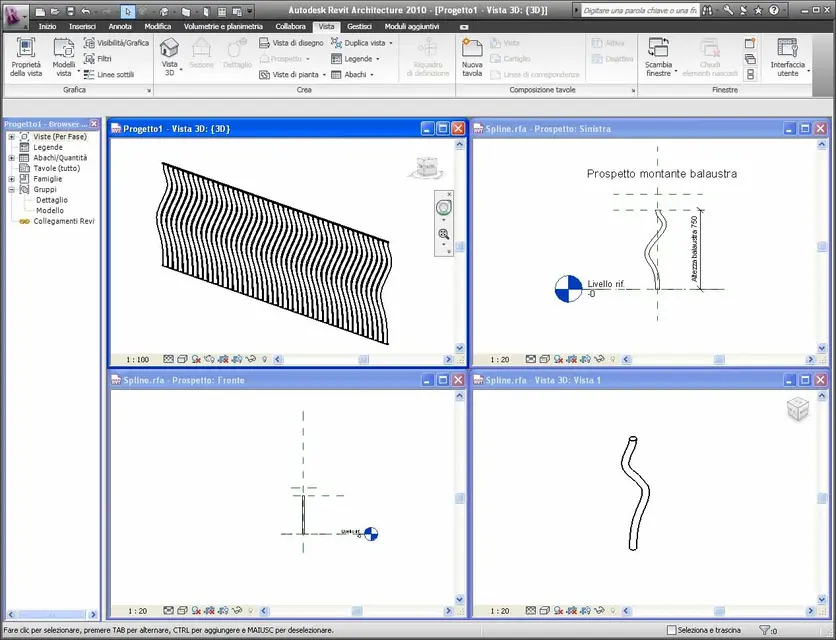
 
thank you but I had already seen these forums....
my difficulty and when I'm creating the balustrade, I drew the profile with a view on the "front" plan then I would like to give it a thickness so not making it flat and here I can't do what I should or can do?
 
... sure you read correctly ...
draws a new family of mountaineers:
- new>family>mounting metric balustrade, by means of a route extrusion (path in the prospectus; floor view profile)
save the family of mountaineers
- upload it to the project
- open a railing»property element>modification
- balustrade positioning
- insert into the balustrade family the model created
 

Attachments

  • Montante.webp
    Montante.webp
    105.8 KB · Views: 127
Yes but when I design the profile with extrusion path after what I have to do in the family to get out the iron donor?scusa maybe and a very simple thing but I don't get there!!!I have to propio make a dondino of safomato iron differently but similar to the file attached by you!!!thanks for patience
 
select:
- new > family > mountain metric pool
- open the view : left prospectus
- command: create>solido> route extrusion
- command: draw route
from the "work plan" menu window that opens. Segli:
- from the drop-down menu: Refence plan : left/right
- confirmation
from the tool draws, select the necessary object (line, circle, etc.) and track the path
possibly insert quotas and path management parameters
command: end path
you move into the view: floor > reference level
command : change profile
from the tool draws, choose the circle, and above the magenta point draws the circle of the necessary diameter
command: end profile
command: end extrusion on path

save the family of mountaineers
open a project
- charge the family of the mountaineer in the project
draws a railing
highlights the railing
key dx mouse>property element>modification
- balustrade positioning
- insert into the balustrade family the model created
save everything
 
thanks done everything but there is a problem the image of the balustrade is flat! !
My balustrade has a bow that protrudes and lines to 45 that stick from the poggiolo... what should I do?
Thank you very much
 
instead of drawing the profile of the mount (in the prospectus) on the floor "left/right" choose the plan "forward/back"
in practice you must draw the "movement" of the mountaineer on its "plan" reference.
if the "movements" of the mount are on two different planes (parallel to the current and perpendicular to the current) you must draw each piece of the mount in the respective reference plan
 

Forum statistics

Threads
44,997
Messages
339,767
Members
4
Latest member
ibt

Members online

No members online now.
Back
Top