
bonf2
Guest
Good morning to all, I would have a problem with the demolition of some windows, their representation in the two phases and the "filling" of the masonry.
place an image to better clarify the concept.
the project previews to demolish a door and a window and realize a new window in the phase of project (current state to dx, state of project to sx).
in the project phase I must also realize an external coat insulation; I laid a new masonry consisting of only insulating layer of 10 cm.
on the forum I read that so that even this last wall is drilled from the existing window I have to join the existing wall with the new "insulating" wall.
the problem is that the hole left by the existing door is not filled and that you create an additional hole in the current state in the position of the new window..idee on how could I proceed?
Thank you.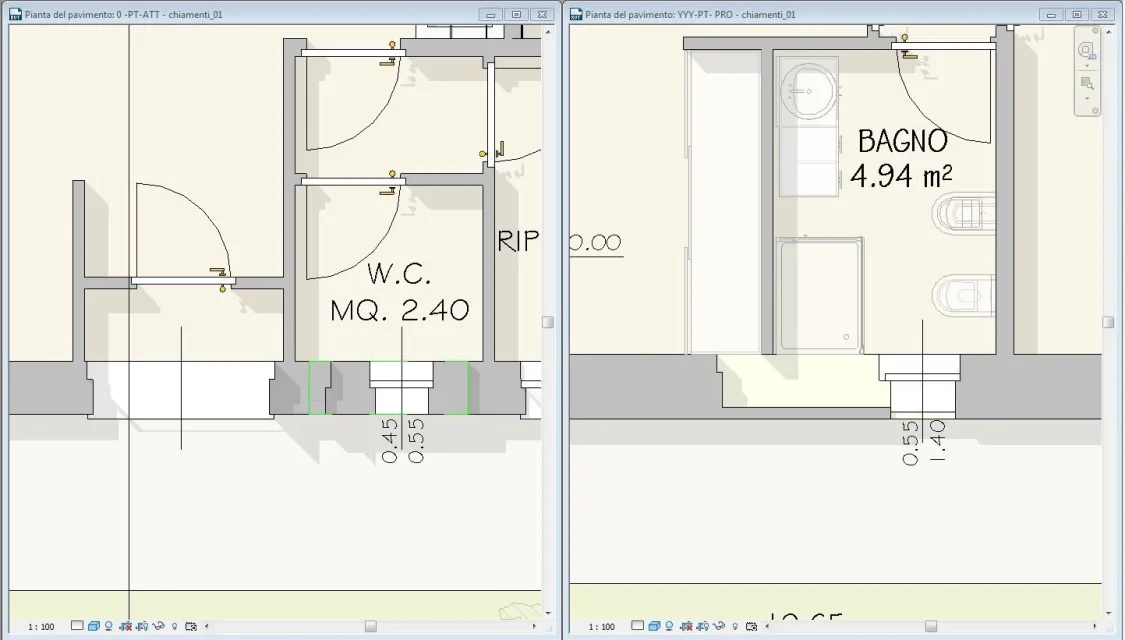
place an image to better clarify the concept.
the project previews to demolish a door and a window and realize a new window in the phase of project (current state to dx, state of project to sx).
in the project phase I must also realize an external coat insulation; I laid a new masonry consisting of only insulating layer of 10 cm.
on the forum I read that so that even this last wall is drilled from the existing window I have to join the existing wall with the new "insulating" wall.
the problem is that the hole left by the existing door is not filled and that you create an additional hole in the current state in the position of the new window..idee on how could I proceed?
Thank you.