
• This forum is the machine-generated translation of www.cad3d.it/forum1 - the Italian design community. Several terms are not translated correctly.

custom parts in inventor content center

  • Thread starter Thread starter Dany
  • Start date Start date

Dany

Guest
Good evening,
I wish to ask a question to which I have not yet found an answer, and that I have not been able to find even on the forum.
when I create a part, like a tubular, sketch profile and random extrusion (100mm), then I put it in the center contained in the personal library with its procedure.
Now when I insert this tubular from my c.c. library into a set, how can I get to have the length to set on the moment, like any one profile that has l. 0,001-50.000 ?
practically does not allow to change length and maintain that of the extrusion I had created in the part.
in the generator frames the problem does not arise as it adapts to the length of the sketch.
I tried some solution without results. Do you need any variables to be inserted in the parameters on the length of the part?

Thank you.
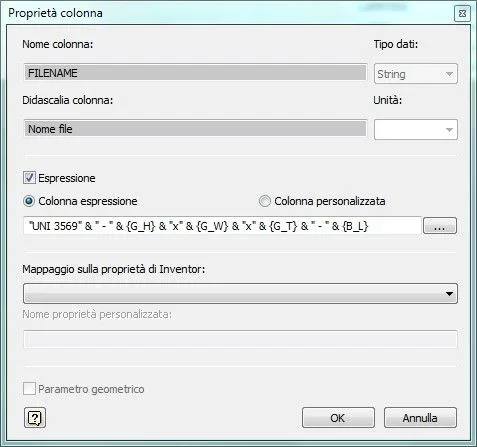
 
open the editor c.c.
open the family table
go to the column of the length and the heires ( column property)
put the flag on "expression" and then active "custom color" instead of "column expression"
in the field below, if you want to set limits and default values, click on the three dx dots (...) and set the values that will be written in the field.
Okay.
Remember to add it to the key columns.
Okay.
 
Thank you, perfect. I followed your message. I almost got there until the family table, then I lost....
Thank you again.
 
Good morning.
it seems a little complicated to create new properties (type mass kg/m, section
profile, volume) to be inserted in the family table to be immediately available
certain information.
in the family table I tried to change expressions to make the profile
imported is already saved with your data (eg 20x20x2 ok) plus the
length for each imported detail, but the latter always remains 0.001 which
would be the minimum inserted by me in the variable length expression. I change
manually to save files, but something wrong in settings. In theory
the information with expression should be blue, but just made the
changes are blue, then become black. I hope I've explained clearly. .
 
I have not actually understood the problem, but I try to clarify some points:
the variable length, at the time of insertion, proposes the default value you set in the table. no matter whether it is 0.001 or 1000, he proposes that and you enter the value you want within the minimum and maximum range you set. you can also not set anything and it would work anyway, that of the "default", "minimum" and "maximum" are optional additional details.
for mass details, section, volume, etc... are useful and necessary only in some cases. As far as I am concerned, I do it correctly only the mass (kg/m) in order to calculate the weights and the centerpiece together, and the profile section to have a data to be able to use in autocompilants fields. of course also what is necessary for the construction of the profile at modeling level, but of the other values (type moment of inertia etc... are necessary only if you do structural analysis, which I do not need to do).
for the formulas "blue", basically, the cells compiled automatically by the formulas set by the column properties appear of that color, while the written cells "hand" appear black. if you have set a column values compilation formula, if you select the cells (or even the whole column) of black color and press "canc" from the keyboard, all values will take autocompilation.
I hope I've explained something to you.
 
regarding the variable length works. I've put limits like you have me
said and to insert the specific I manually. when however save the file of the
profile, with those uni,din... saves me "uni,...-20x20x2 - inserted length
manually", with my custom saves "...-20x20x2 - 0.001" , so all
files, any size I put. is not a problem, in the sense that the rescue
I insert the length instead of 0.001 and away. it was more personal
to be able to get everything working as in the various unified profiles.

as far as mass is concerned, I also need -kg/m- and -section mmq- of
profile, but I don't know exactly how to add these properties.

in the family table, if they select columns of expressions on uniso,... the
columns are blue, apart from that of the material, in my custom library
columns with expression (dimension, length, designation,...) were blue when I
inserted or modified the expression, then became and remained black. If you're not
I add a new line and change value to width, height, thickness, all
columns update automatically, the part inserted in the drawing is right and
So I think it's okay.
 
when save the profile file inserted from the content center -es: "...-20x20x2 - 0.001"-, 0.001 should be replaced by the new length set by me. after a few tests I realized that if in the family table the columns of the expressions are blue the length is varied in the file name, if instead these are black is not replaced (as from photo).
the fact is that after the changes in family table when I do apply and ok everything comes black. Can it be an internal problem to inventor?
Espressione Parametri.webpTabella famiglia.webpHow do I build an equation to get the section in cm^2 of a profile and the mass in kg/m?
Do I need to insert them into user parameters or custom properties?

Thank you!
 

Forum statistics

Threads
44,997
Messages
339,767
Members
4
Latest member
ibt

Members online

No members online now.
Back
Top