
• This forum is the machine-generated translation of www.cad3d.it/forum1 - the Italian design community. Several terms are not translated correctly.

da part a product

  • Thread starter Thread starter p2000
  • Start date Start date

p2000

Guest
Good morning to all, I have a big problem,
I often import stp files from axioms of other programs
the catia file I get is a side file with n° parts inside
I need a file produced with a catpart for each solid.
Until now I can't find a way that is not the manual copy/paste (in which I lose hours and hours) to do this.
programs as proes have this option in opening but cautious no.
then in the filtering catia module I can switch from product to side and not vice versa.
Help!
 
test with questo script.
the .txt spread to .catscript
marco
This script also affected me, but it doesn't work.
Maybe I'm wrong with the procedure?
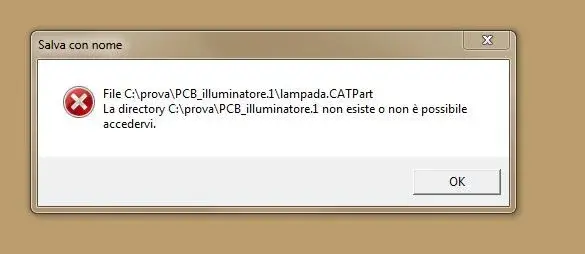
I opened a catpart with many leotards, but when I run the script it gives me the following error:" I attach image"

Thank you, victorious
 

Attachments

  • messaggio.webp
    messaggio.webp
    9.1 KB · Views: 157
The script works perfectly.
read the message well and understand the meaning.
the file indicated or does not exist or cannot be opened because corrupt.
creates even empty part
insert two or three leotards also empty.
launches the macro and you will find a product with so many parts as the body.
Mar
 
The script works perfectly.
read the message well and understand the meaning.
the file indicated or does not exist or cannot be opened because corrupt.
creates even empty part
insert two or three leotards also empty.
launches the macro and you will find a product with so many parts as the body.
Mar
Hi.
I did as you said, but the same problem. What can that be? use version 19
the file is not corrupt because I open it properly.
if I read the meaning of the message I interpret it as if the script looks for folders, with the name of the body, which finds in the .catpart to be transformed into .catproduct
cmq, thanks
 
try with a different file to see if it is only a problem with that file or if it is a more general problem.
or take the lamp.catpart file, move it to the desktop, open it in the cat and launch the macro: If lamp.catpart has leotards you should find a lamp.catproduct with many catparts.
Mar
 
try with a different file to see if it is only a problem with that file or if it is a more general problem.
or take the lamp.catpart file, move it to the desktop, open it in the cat and launch the macro: If lamp.catpart has leotards you should find a lamp.catproduct with many catparts.
Mar
I already did everything you just told me, but nothing to do.

thanks cmq for your interest
 
Good morning to all, I have a big problem,
I often import stp files from axioms of other programs
the catia file I get is a side file with n° parts inside
I need a file produced with a catpart for each solid.
Until now I can't find a way that is not the manual copy/paste (in which I lose hours and hours) to do this.
programs as proes have this option in opening but cautious no.
then in the filtering catia module I can switch from product to side and not vice versa.
Help!
have you tried to provide the created step file with the step format 203 or 214 and set the various options in cv5? usually you should be able to open the step file with each single component as separate files
 
reply to falonef:
cat’s options do not give way to choose how to import the step, whether as part or as product, I have already tried 1000 times.
answer to marcofa:
congratulations on the macro, it works t thank you so much only I would need small changes; I would need the body to appear directly as the main partbody copied as result without keeping it connected as now and finally that the name of the part does not even have the prefix of the axieme before.
Congratulations again
 
The script works perfectly.
read the message well and understand the meaning.
the file indicated or does not exist or cannot be opened because corrupt.
creates even empty part
insert two or three leotards also empty.
launches the macro and you will find a product with so many parts as the body.
Mar
hi marcofa, having the same victorious problem I found your script, I tried to download it and start it on catia v5. it gives me the same problem as the victorious image, but doing it with blank parts created at the moment it works! the step file I'm trying to convert though is working, so I don't understand where the error is! Did you find a solution in the years?
Thank you very much for your help
 
hi marcofa, having the same victorious problem I found your script, I tried to download it and start it on catia v5. it gives me the same problem as the victorious image, but doing it with blank parts created at the moment it works! the step file I'm trying to convert though is working, so I don't understand where the error is! Did you find a solution in the years?
Thank you very much for your help
Hi.
Sorry I never saw this 3d, but...
In catia options there is expressly the possibility to open a step through a part for each individual component. I didn't try the script so I don't know what logic you work with. However, in the import/export tab of the step files (inside the general options) there is just a box to check to make them create a part for each code found in the step. This way if a component is established n times. he creates a single file (of that component) and in the distinct will appear n times.
I apologize for the Italian... written in a hurry:cool:
 
Hi.
Sorry I never saw this 3d, but...
In catia options there is expressly the possibility to open a step through a part for each individual component. I didn't try the script so I don't know what logic you work with. However, in the import/export tab of the step files (inside the general options) there is just a box to check to make them create a part for each code found in the step. This way if a component is established n times. he creates a single file (of that component) and in the distinct will appear n times.
I apologize for the Italian... written in a hurry:cool:
Excuse me, but are you talking about the attached photo command? He's the only one I found inherent in the subject.
but alas doesn't work. In practice I have a step containing more body, and I would like to make all these body catparts. that instead refers to a step containing more catproduct
 

Attachments

  • step.webp
    step.webp
    70.5 KB · Views: 22
This script also affected me, but it doesn't work.
Maybe I'm wrong with the procedure?
I opened a catpart with many leotards, but when I run the script it gives me the following error:" I attach image"

Thank you, victorious
I was at first getting this mistake.
After several failed attempts in which I opened the step and immediately launched the macro, I tried to open the step, save it in catpart, close and reopen the catpart and from there launch the macro. That way it works. I don't know what changes, but try to make this attempt.
p.s. all the ex body (now catpart of the product) but I remain connected to something as if they were publications, although in the tree there is no more file origin. This is not clear to me. what are they connected to and why?
Thank you very much
 
a strong digital experience includes a design that suffices all your needs without being in your face. elements used are only there because you can't do without them. understanding human behavior is vital to create a remarkable user experience. this is where client research and testing becomes an integral factor, and we foster the experienced designers who are pros at what they do.hire ui design designer
 
I was at first getting this mistake.
After several failed attempts in which I opened the step and immediately launched the macro, I tried to open the step, save it in catpart, close and reopen the catpart and from there launch the macro. That way it works. I don't know what changes, but try to make this attempt.
Thank you very much
 
test with questo script.
the .txt spread to .catscript
marco
hello to all, I need to use a macro that does this
, my caty version is v5 r22

I tried to paste the text of the macro above into the macro catia editors but the catscript seems nn to be more supported.

would someone help me and possibly provide 1 macro in vba that can be used in the catia version in my possession?

Thank you.
 

Forum statistics

Threads
44,997
Messages
339,767
Members
4
Latest member
ibt

Members online

No members online now.
Back
Top