
• This forum is the machine-generated translation of www.cad3d.it/forum1 - the Italian design community. Several terms are not translated correctly.

demand for quotas.

  • Thread starter Thread starter p@po
  • Start date Start date

p@po

Guest
Then,
taken as reference the following design of the tutorial:
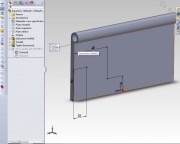
Could you explain how to insert/add a quota to 3d design? ?
for example I wanted to quote the segment that goes from the point identified by the coordinates of the edge on top left up to down but I can not.
I try to go to a smart altitude but it doesn't work.
 
Then,
taken as reference the following design of the tutorial:
Could you explain how to insert/add a quota to 3d design? ?
for example I wanted to quote the segment that goes from the point identified by the coordinates of the edge on top left up to down but I can not.
I try to go to a smart altitude but it doesn't work.
you are in the sketch then you can quote between sketch entities or between a sketch entity and a reference (bord, edge..etc.) of the model 3d possibly present. you can't just put the quota between elements of the 3d model (as you seem to have in mind to do). At least one point must be sketchy.

when you leave the sketch and return in part you can put the reference quotas on the model.

in 3d sketch to quote from a face/floor not on the same floor as the sketch size, instead of the edges/pigoli go to "touch" just that plane/face.

..I would ask you to attach the images using the appropriate function in the message filling form:ALLEGARE IMMAGINI E FILES.webpdo not use links to external sites that weigh and intax the server in addition to not guarantee security. Thank you.

greetings
Mar
 
you are in the sketch then you can quote between sketch entities or between a sketch entity and a reference (bord, edge..etc.) of the model 3d possibly present. you can't just put the quota between elements of the 3d model (as you seem to have in mind to do). At least one point must be sketchy.

when you leave the sketch and return in part you can put the reference quotas on the model.

in 3d sketch to quote from a face/floor not on the same floor as the sketch size, instead of the edges/pigoli go to "touch" just that plane/face.
Mah,
I can't... obviously wrong something.
If I go to 3d sketch, I can't even share the height of that edge.
 
Mah,
I can't... obviously wrong something.
If I go to 3d sketch, I can't even share the height of that edge.
you don't have to open a 3d sketch and you don't even have to be changing a 2d sketch as you see in the image you posted. click on intelligent altitude, select a edge and a face, a edge and a face, two faces, etc. to quote in 3d distances and angles. in the image model the odds are between the upper edge and the colored faces.
I don't know if that's what you needed. .
 

Attachments

  • quote3d.webp
    quote3d.webp
    26.1 KB · Views: 9
Mah,
I can't... obviously wrong something.
If I go to 3d sketch, I can't even share the height of that edge.
I told you in the sketch you can not directly quote parts of the model (the length of a edge, the distance between a edge and a edge..etc.); at least one of the 2 references must be one entità di schizzo. So a line, a point, that you tracked.

out of the sketch, in the part, you can do it; as I told you before and as Marcof explained to you.

greetings
Mar
 

Forum statistics

Threads
44,997
Messages
339,767
Members
4
Latest member
ibt

Members online

No members online now.
Back
Top