
• This forum is the machine-generated translation of www.cad3d.it/forum1 - the Italian design community. Several terms are not translated correctly.

description in cutting table for welding

  • Thread starter Thread starter Freddygol
  • Start date Start date

Freddygol

Guest
Good afternoon to all,
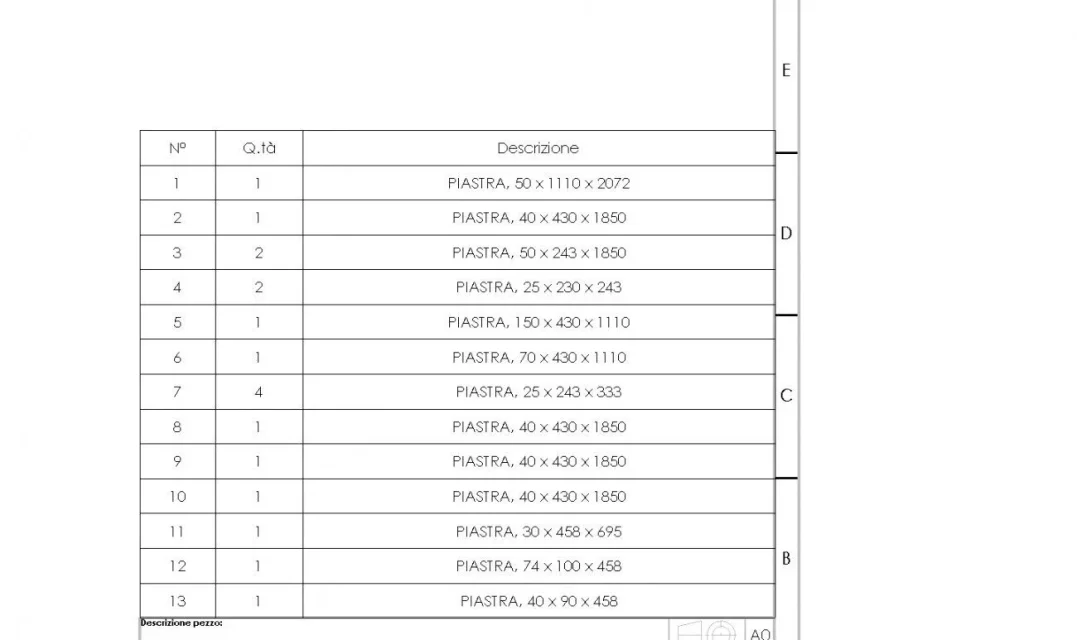
as written in the subject I would like to understand how to insert the description in the table described. Moreover if possible I would also like to put the measures in the length box. Can anyone tell me anything about this?? ? Thank you all.
 
topic treated dozens of times.
the description must be compiled in the separate cut.
length is an automatic property.
both need to be recalled in the cutting distinction in the environment together
 
topic treated dozens of times.
the description must be compiled in the separate cut.
length is an automatic property.
both need to be recalled in the cutting distinction in the environment together
environment together??? I would like to put the length or better the maximum size in the cutting table welds.......
 
and so far ok. then I don't understand what to connect the length, sw mi da lxx, lxy, and so on saying other values. I tried them all, but none of them gives me the right measure
 
did you create the cut distinction in the part?
Are you using the cut in the drawing?
sw mi da lxx, lxy,
these file properties and have nothing to do with what you ask
 
What does it have to do with description and length?
create pane creates a dense 3d sketch corresponding to the element's encumbrance then adds a standard description and size of the encumbrances in which the length is the longest size, which may not be true (a 100mm long upn200 will have with the box method the length of 200)
 
I was trying to insert the maximum measurements in a table of a multibody welded part, with create pane I do the measurements of the crude automatically, and I can even export it to excell to order the material. .
 
I was trying to insert the maximum measures
is slightly different from what asked in the first post where you ask how to insert the length.
Moreover as anything does not have its own insita description, as the structural members, will have a standard description that by default should be plate, so that you have a cylinder, a hexagon or a sheet will be described as plate, also this is not exactly what you asked
 
rereading your old posts I see that you often ask questions unclear and that quite often drop the discussions in the void.
is not the best for a forum
 
description in table cut welds, it does not seem unclear, and I do not let anything fall, indeed I also gave a suggestion to those who read.... and below is the result.... obvious to customize, but in the meantime the table fills in automatically! ! ! !1.webp
 
I would like to understand how to insert the description in the table described.
In addition, [...]I would also like to put the measurements in the length box
that description as I wrote does not specify anything of the object that could also be a particular round, so much so it is worth leaving the blank field.
If you ask for the length you can't go out with all the dimensions.
so the solution you found is not relevant with your initial question.
if the one you found was your need then the initial question was misconcepted.
 
2 questions the second consequence of the first...... the length that in the image is not there because being only plates and not structural elements I preferred to erase it.....comanywhere in description sw comes out with the dimensions, in length in the case of structural element, with the measure of the length. I apologize for possible little clarity
 
2 questions the second consequence of the first...... the length that in the image is not there because being only plates and not structural elements I preferred to erase it.....comanywhere in description sw comes out with the dimensions, in length in the case of structural element, with the measure of the length. I apologize for possible little clarity
hello to all and excuse me, I do not know if it is consistent with the discussion, but when I create a sketch to use as a structural member, in saving it, I add the description, and in separate puts it in automatic, then the length draws it alone. I use it very often for the preliminary piping, and for the structures.
 
This is not about structural members, I hope, but of elements from other functions.
 
we can say that in a welded part there are structural elements, (catalogue downloadable from the site, I do not remember where) and plates. for the plates I managed to automatically fill in the description box of the welding cutting table with the measurements of the plates to be made. for the profiles there is the length box that you fill out by yourself when using the structural elements of sw. I am working to insert in the table also the profile description so that you have a complete table automatically......... now however I don't have time to do it.... if someone knows....
 
profiles are found in the useful resources section of solidworks of this forum.
properties appearing in the cut-off are nothing but the properties of the profile file.
open the profile, fill the file properties, these will be propagated to the cutting table in the part where you insert the structural profile
 

Forum statistics

Threads
44,997
Messages
339,767
Members
4
Latest member
ibt

Members online

No members online now.
Back
Top