• This forum is the machine-generated translation of www.cad3d.it/forum1 - the Italian design community. Several terms are not translated correctly.

design of a "flexible" wiring

  • Thread starter Thread starter fabrizio_brescia
  • Start date Start date

fabrizio_brescia

Guest
Good morning to all, I looked in the various forums but I did not find an answer to this function that I think it is possible to do with proe wf3 .
I'm pressing that my reasoning is electronic, so it could be an obvious thing.
I have the need to realize some conenssion drawings of electronic control units for the control of led we produce and I would like everything to be done by the 3d having of these the complete model.
I assume to manage the import from the ecad for which in the electronic cad drawing the model 2d of the details then I carry it in idf and then load the relative assemblies 3d from proe.
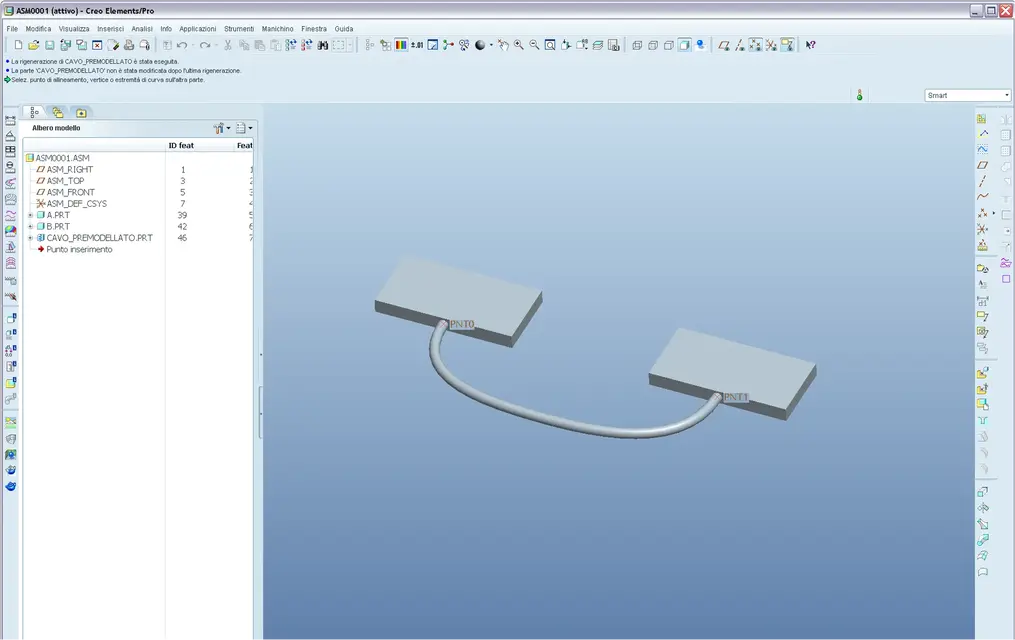
the result is as from attached file, only the cable that goes from a green connector to another green connector (for clarity I put 2 points one on the starting point of the spline and one on the arrival point)
If I design the cable in the together no problem, but to do this I must then solidify the whole by taking the trajectory from a surface and this not all my technicians know how to do it.
I would also like to import the cable already made and then in the whole tell him that this component 3d "cable" begins as the first point of the spline on pt0 and the final point of the spline is on pt0 of the other connector.
I didn't find a way to do that. I looked at relationships, could anyone suggest a solution?

Thank you.
bookmarks
 

Attachments

  • prova_cablaggio_minidmx.webp
    prova_cablaggio_minidmx.webp
    174.8 KB · Views: 38
Good morning to all, I looked in the various forums but I did not find an answer to this function that I think it is possible to do with proe wf3 .
I'm pressing that my reasoning is electronic, so it could be an obvious thing.
I have the need to realize some conenssion drawings of electronic control units for the control of led we produce and I would like everything to be done by the 3d having of these the complete model.
I assume to manage the import from the ecad for which in the electronic cad drawing the model 2d of the details then I carry it in idf and then load the relative assemblies 3d from proe.
the result is as from attached file, only the cable that goes from a green connector to another green connector (for clarity I put 2 points one on the starting point of the spline and one on the arrival point)
If I design the cable in the together no problem, but to do this I must then solidify the whole by taking the trajectory from a surface and this not all my technicians know how to do it.
I would also like to import the cable already made and then in the whole tell him that this component 3d "cable" begins as the first point of the spline on pt0 and the final point of the spline is on pt0 of the other connector.
I didn't find a way to do that. I looked at relationships, could anyone suggest a solution?

Thank you.
bookmarks
Hello, fabrizio,
I throw it... have you ever thought of investing in pro/cabling?
 
no, we never thought we'd use it because the wiring we only need to indicate the connection mode of the objects, not to realize the piece of wire, so we don't need drawings of the same etc.
Moreover I would like to solve the tit with the idf (ecad) and not work on the set of proes, if not to move the starting and arrival points of the cablings (and perhaps the intermediates to give pleasant curvatures).

I believe that our problem is trivial to solve, it definitely needs some tricks that mechanical designers know better than us.

The result we've come to is already highly fulfilling for me, only this little detail is missing to solve to make it almost perfect.

Thank you.
 
If that's all, it's just a trivial thing and you don't need the cabling, I threw it there just to figure out what you were, now it's clearer.

But to do something well you should clarify a few things:

you say that you would like to import the cable to give it the start and end points to the connectors, ok but then it is assumed that you have a pass the term "magazzino" of cables already prepared in length x?
do you also have special intermediate points?
There are various ways to manage it, just understand how many variations we are talking about.

greetings
 
thanks ozzy for the interest.
since then I don't have to produce cables (I just need to represent them to clarify the various connections in the data sheet of the power stations)
I don't have a cabling library, or at least I could have it and then place the component in the electronic cad and via ecad as it happens for the various details to find it in the set.
and here I arrive, the problem is then that I would like the length of the cable to adapt or alternatively I would also well be able to adjust it I move only the starting constraints (pt0,) and arrival (pt1) and moving the points of any folds letting it automatically calculate the total length.

If I make a predetermined cable however random and put it in the proe assembly allows me to bind the start of the cable (I tell him that the pt0 points of the connector and pt0 of the cable are coincident), but then it does not allow me to make the final point of the pt1 cable to the pt0 point of the second connector.

if obviously the design from scratch in the set I can set this bond initially.

Thank you.
bookmarks
 
if I make a predetermined length cable however random and put it in the proe assembly allows me to bind the beginning of the cable
Hi.
probably the error is this, you don't have to bind the cable in the together with the connector using the start of the cable, but enter it by default or use only and exclusively the plans, then take as reference in the sketch of the construction of the cable the points of the connectors.
I hope I've been clear
 
Hi.
probably the error is this, you don't have to bind the cable in the together with the connector using the start of the cable, but enter it by default or use only and exclusively the plans, then take as reference in the sketch of the construction of the cable the points of the connectors.
I hope I've been clear
exact this is a road, that is to draw the cable by taking the final points of the connectors, or you can use the flexibility having already preshaped it, this scheme with the clearly simplified components.

1-draw the spline of your cable as a separate part and ties the 2 extremes on the previously created pnt0 and pnt1 points.
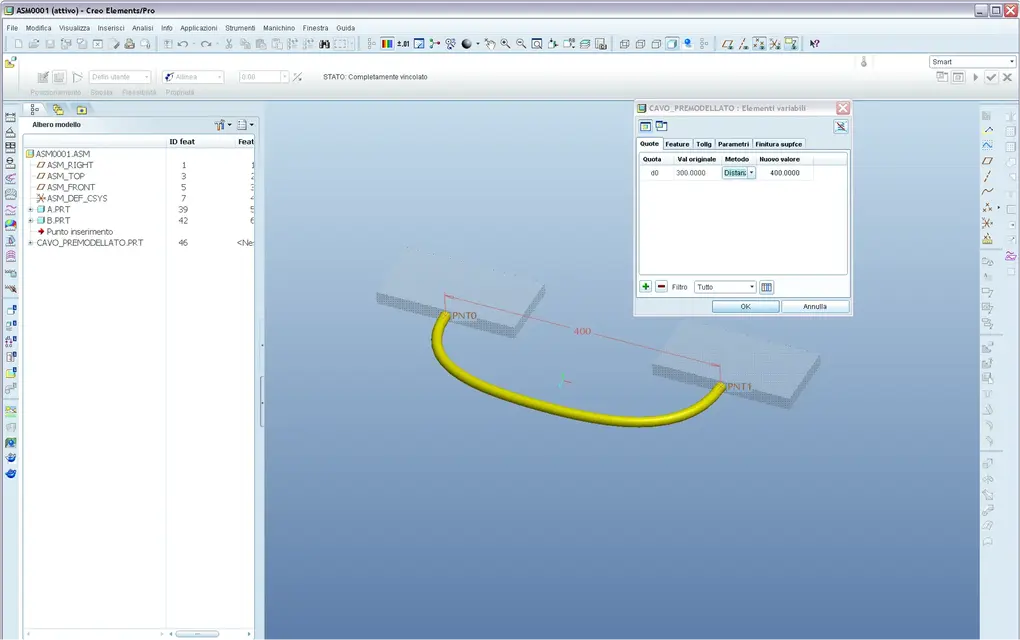
cavo premodellato.webp2-assemble the cable using the 2-points on the 2-points in the connectors, using the automatic function, will put the point-to-point bond on both.2.webp3-rend flexible in combination mode (set dx tree model - make flexible) your pre-modeled cable, taking as a method the distance, and do a distance analysis between the 2 points in scope together, so by letting the distance of the two connectors to your cable, resulting in extension-coupling of the cable, from you can extrapolate all the values you want, like the length of the cable and you can clearly create a family of cables.3.webpI hope to have explained well I have little time excuse.

greetings
 
thanks to both, but with regard to point 2 of ozzy I have a problem.
I also thought originally to do qusto, but when I go to assemble the already made cable (I put the part in the set) I can't put both the constraints on pt0 and pt1, i.e. I can hook the pt0 of the first connector, but when I declare the second bond saying to make the pt1 of the cable coincide with the pt0 of the second connector ptc possible.
this perhaps because being the distance between the pt0 of the connectors different from the distance between pt0 and pt1 of the cable cannot solve the constraints.

In fact, you should have the flexible part, but this can only be done after placing it.

Tomorrow I try to make an ecad that contains all the parts and post it so importing you can see what happens.

Thank you.
bookmarks
 
In fact, you should have the flexible part, but this can only be done after placing it.
no, quiet, if you set the flexibility on the part, at the time of inserting into the proe axieme asks you whether to insert it as a rigid or flexible component. ....


choose "yes" and define how you define your flexibility. . .

:wink:
 

Attachments

  • Flessibilità.webp
    Flessibilità.webp
    74.1 KB · Views: 15

Forum statistics

Threads
44,997
Messages
339,767
Members
4
Latest member
ibt

Members online

No members online now.
Back
Top