• This forum is the machine-generated translation of www.cad3d.it/forum1 - the Italian design community. Several terms are not translated correctly.

development factory coating

  • Thread starter Thread starter Fabietto
  • Start date Start date

Fabietto

Guest
Hello, everyone.
as from title I have to obtain the development of an aesthetic coating in fabric.
the fabric covers a particular thermoplastic material of a car interior component.
I need to get the development and then be able to cut laser, or die, the coating

here the photo and in attachment the .prt (creo9) and also the step.1693380912710.webpnow, turning off with the surfaces, and with the command "unpolished surface union", applied to the main surfaces, something I got, but working.. and certainly not accurate.. .

how would you face the situation?
I use I create, and so I posted here,
but I would also be curious to understand other software as they address the thing, (ragion for which I attached the step),
and therefore whoever wants to try with other systems and/or say his is welcome.

hello and thanks for the collaboration.
 

Attachments

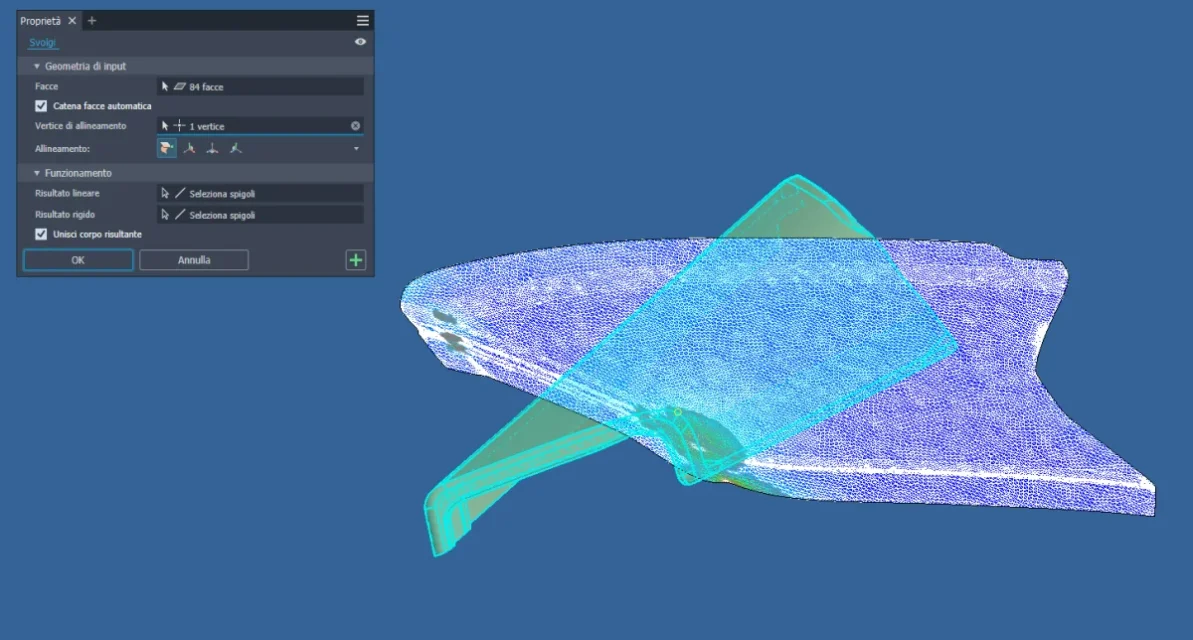
Normally in software cad there is the possibility to develop a surface considering various factors.
I did it with solid edge, for example.Immagine 2023-08-30 103346.webp
 
Thank you. News. a question. .
but what you posted is the development of one surface? (I assume the main external)
maybe I wasn't very clear, but the file I posted is just the fabric,
and I have to develop it all, including twists under piece.
in some corners of the revolution development will not be solved, and I have to settle them creating ad hoc cuts, but I was interested in understanding how to approach development. .

I also with creo, with few simple surfaces, come to develop them, but when they begin to have raggett rays and counterrages on style surfaces, start the bouquets and rockets...
 
asked intercession of ptc,
below the article, with the proposed command flatten quilt, to approach development
ciao
 
Thank you. News. a question. .
but what you posted is the development of one surface? (I assume the main external)
maybe I wasn't very clear, but the file I posted is just the fabric,
and I have to develop it all, including twists under piece.
in some corners of the revolution development will not be solved, and I have to settle them creating ad hoc cuts, but I was interested in understanding how to approach development. .

I also with creo, with few simple surfaces, come to develop them, but when they begin to have raggett rays and counterrages on style surfaces, start the bouquets and rockets...
regarding development was considered the whole piece, as if it were printed. cuts are done manually.
 
Hello fabietto,
I use inventor, the command equivalent to that used by biz is called turns and creates a surface... in practical use so far I have never used it even if a couple of times I would have been comfortable for indicative developments of unspoilt plates, but it goes back to before its implementation.
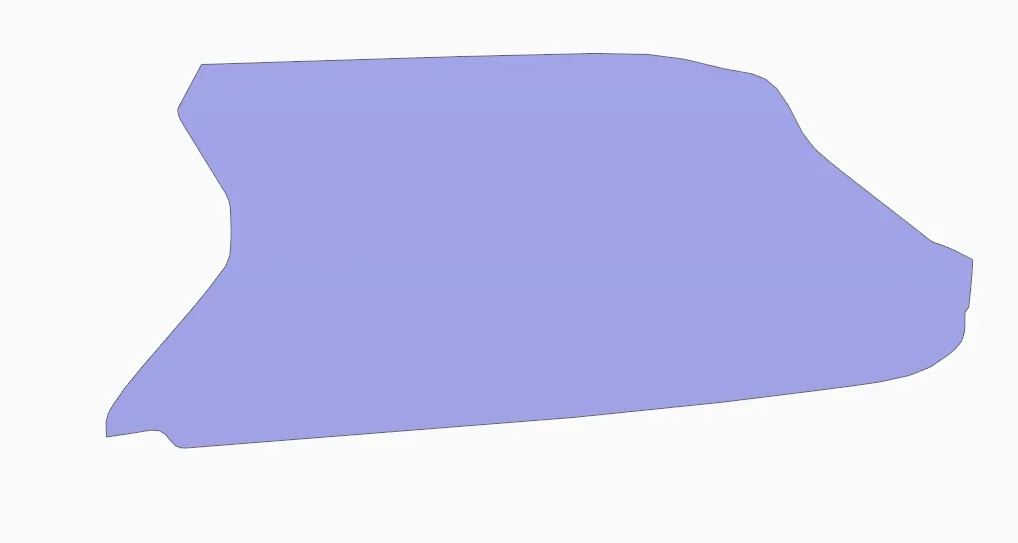
However at this point I am curious and ask biz if please can compare the results (I attach the dxf of my result) to see if there are significant differences between the two engines.
1695360935174.webp1695360986972.webp
 

Attachments

asked intercession of ptc,
below the article, with the proposed command flatten quilt, to approach development
ciao
I wanted to suggest the use of the "flatten quilt" but as you said that you can arrange with the surfaces then I no longer answered..creo is always unable to create cross-bends in sheet metal (bidirectional fold) and is that geometric shape of the cloth cladding.
 
Hello, I answer by order.News @catcher both solid edge and inventor seem to be performing with this operation. I with creo can't "splane/svolve" all external skin in a single operation, but I have to do more "splanades", depending on the fold, and then join them.
@freexf as mentioned in the first post, it is a combination of classical surface modeling and the "flatten quilt".
With regard to the difficulty of creo, I agree with you, with freeform surfaces with rays etc., I create goes in affanno.. .

I would be curious to understand how the various software reason, considering that the deformation/compression factor (which varies depending on the material) is not considered. .

Bye and good work, guys.
from Friday.
 
Hello, I answer by order.News @catcher both solid edge and inventor seem to be performing with this operation. I with creo can't "splane/svolve" all external skin in a single operation, but I have to do more "splanades", depending on the fold, and then join them.
@freexf as mentioned in the first post, it is a combination of classical surface modeling and the "flatten quilt".
With regard to the difficulty of creo, I agree with you, with freeform surfaces with rays etc., I create goes in affanno.. .

I would be curious to understand how the various software reason, considering that the deformation/compression factor (which varies depending on the material) is not considered. .

Bye and good work, guys.
from Friday.
in solid edge there is a similar parameter.
However at this point I am curious and ask biz if please can compare the results (I attach the dxf of my result) to see if there are significant differences between the two engines.
Unfortunately I do not use more solid edge because I fired from the company where I used this sw, so I have no way to compare your development with mine.
 
in solid edge there is a similar parameter.

Unfortunately I do not use more solid edge because I fired from the company where I used this sw, so I have no way to compare your development with mine.
Sorry, Biz, I didn't notice for your answer time, thank you anyway!
 

Forum statistics

Threads
44,997
Messages
339,767
Members
4
Latest member
ibt

Members online

No members online now.
Back
Top