• This forum is the machine-generated translation of www.cad3d.it/forum1 - the Italian design community. Several terms are not translated correctly.

development sheet metal box

  • Thread starter Thread starter mariom
  • Start date Start date

mariom

Guest
inventor 2014
hello to all

I made a box, and now I have to get a development, how do I??? below I put the sequence I used, you could give me indications at least to start, as of developments (ahimè) I have to make several, but I wanted to start from a simple example.
- created solid parallelepiped in .ipt format
- empty command to create the box and give desired thickness to the walls.
- from the same file I passed in sheet mode.
I used the command to make the box I created flat, but nothing happened.
Can you tell me where I'm wrong or how I can build a box and then develop it?? ? ? ?
Do I have to start from a .ipt lamira??
 
to be able to use the development it is necessary that the thickness set in the rules of sheet metal is correct and that the rays of the folds are "realizable", but above all the component does not pio' have the edges "closed" like those that you find to make a parrallelepiped emptied
 
wrong because you create the object with the wrong commands. You don't have to reason like in autocad.
you have to make a sheet and fold it with the appropriate commands.
 
Keep in mind that the "empty" command should be forgotten. Once you've made your solid, you'll have to reconnect the edges in accordance with the bending rules, being careful to give the right rays between inside and outside, then you'll have to use the eliminated face command to create a model of only surfaces and finally use the "experience" command.
At the moment, however, I seem to understand that you have no experience with the sheet module, so do as giannim says, start practicing with simple sheet metal parts, so you understand how the sheet module works.
Then, you can try to create more complex sheet metal parts, starting from solids like you did.
 
hello to all and thanks to the prompt answers, unfortunately the module sheet of inventor I have never used it, I will try to deepen.
but how do I build my box if I don't know the development, because the real problem is that, I have the size of the box and I have to do the development.
Okay, I know I can figure it out, but I wanted him to be an inventor.
 
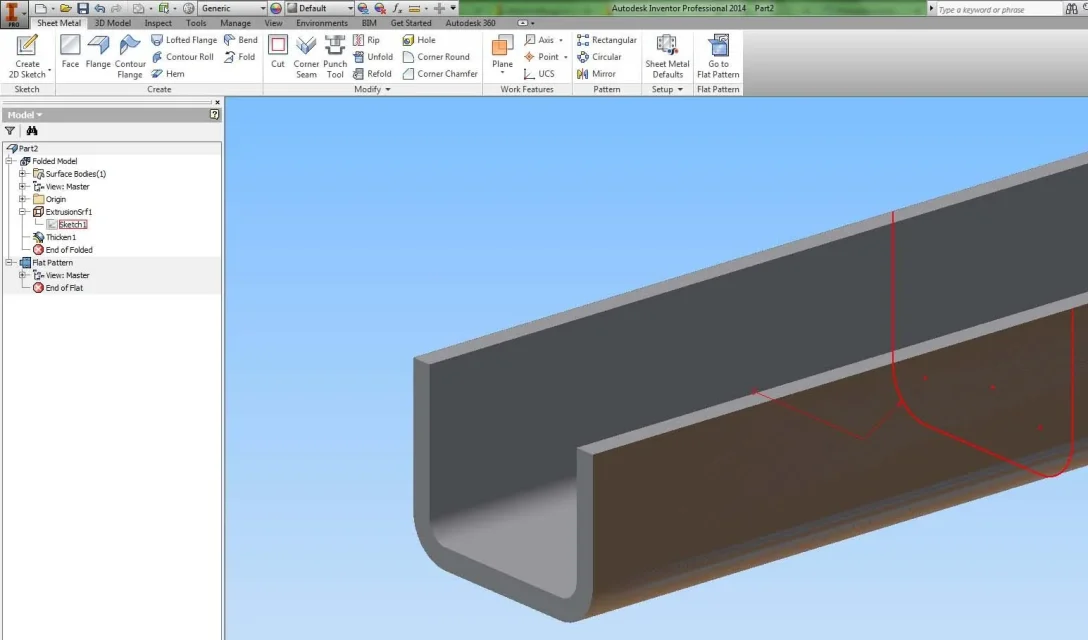
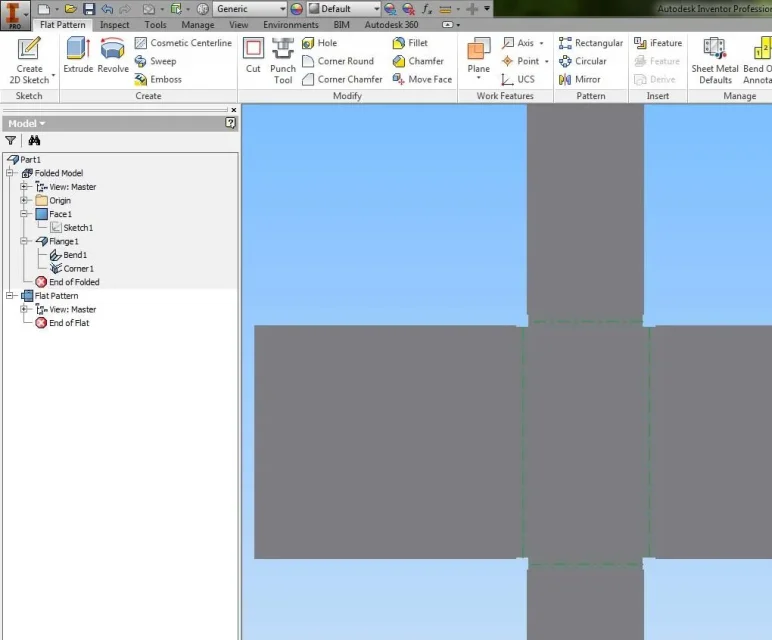
two stupid examples
the first done starting from sheet metal (scratch, create face, flange, sheet thickness and fold rules etc)

the second starting from a "normal" side sketch of the profile (with correct bending rays for sheet thickness), superextrusion of the sketch, thickness of the superextrusion, conversion in sheet, change rules thickness)1.webp
2.webp(although to be honest I make the precise quotas of the development make it to those who cut and fold the pieces, and the development I use it only when it makes me comfortable for some quotations of the work......... most times I quote the folded model......)
 
hello to all and thanks to the prompt answers, unfortunately the module sheet of inventor I have never used it, I will try to deepen.
but how do I build my box if I don't know the development, because the real problem is that, I have the size of the box and I have to do the development.
Okay, I know I can figure it out, but I wanted him to be an inventor.
as it would be "how do I build my box if I don't know the development."
you have to shape your box, the development thinks inventor, you don't have to do otherwise, that is to draw your development and then bend it!
sheet metal environment.
a sketch of a rectangle.
set the sheet thickness you want.
face command and create a face with your sketch.
Flange command, choose the edges of the face you created and see what happens.
finally "flat model"

<cit.amanda "non="" ...="" che="" ci="" in="" piangere":="" provare="" provare,="" resta="" sandrelli=""></cit.amanda>
 
as it would be "how do I build my box if I don't know the development."
you have to shape your box, the development thinks inventor, you don't have to do otherwise, that is to draw your development and then bend it!
sheet metal environment.
a sketch of a rectangle.
set the sheet thickness you want.
face command and create a face with your sketch.
Flange command, choose the edges of the face you created and see what happens.
finally "flat model"

<cit.amanda "non="" ...="" che="" ci="" in="" piangere":="" provare="" provare,="" resta="" sandrelli=""></cit.amanda>
sometimes comes the design of the box (not so simple ) and from here you have to send the drawings in department for construction.
However I started doing something with the sheet module and some results were seen.
 
I finally managed to develop a particular sheet metal starting from a design of a solid.
thanks to all for the advice that allowed me to take four first step.:finger:
p.s. I have seen that in another discussion of the forum was faced a similar problem, as soon as I can read it well and I will try to use it as an example.
 
I would like to ask a question!
after realizing the box, and developing, how can I make it a laser cut design?
I should remove the thickness.. .
 
hi rofin....

I to cut plasma on the flat part click button dx.... export face by name and save it as dxf I then read to the plasma cutting program

I don't know if it's the right technique but it works to me!
 
hi rofin....

I to cut plasma on the flat part click button dx.... export face by name and save it as dxf I then read to the plasma cutting program

I don't know if it's the right technique but it works to me!
It's practice if you have a machine inside your company and you take care of the drawings to be given to the cutter.
otherwise I prefer to always export by name, but save in dwg, put the templates on the table with the only bulk quotas, and send the dwg to the cutter, so it already has an idea of what you are asking.
 

Forum statistics

Threads
44,997
Messages
339,767
Members
4
Latest member
ibt

Members online

No members online now.
Back
Top